Low-power temperature sensor and collector
This section describes the implemented profiles and services, user interactions, and testing methods for the temperature sensor application.
Implemented profiles and services
The Temperature Sensor application implements a GATT server, a custom profile and the following services.
Temperature Service (UUID: 01ff0200-ba5e-f4ee-5ca1-eb1e5e4b1ce0)
Battery Service v1.0
Device Information Service v1.1
The application behaves as a GAP peripheral node. It enters GAP General Discoverable Mode and waits for a GAP central node to connect and configure notifications for the temperature value.
The Temperature service is a custom service that implements the Temperature characteristic (UUID: 0x2A6E) with a Characteristic Presentation Format descriptor (UUID: 0x2904), both defined by the Bluetooth SIG.
The Temperature Collector application implements a GATT client or server for the following profile and services.
Temperature Service (UUID: 01ff0200-ba5e-f4ee-5ca1-eb1e5e4b1ce0)
Battery Service v1.0
Device Information Service v1.1
The application behaves as a GAP central node. It enters GAP Limited Discovery Procedure and searches for sensor devices to pair with. After pairing with the peripheral, it configures notifications and displays temperature values on a terminal connected to the UART port.
Both application uses pairing with bonding by default. When connected with the Low-Power Temperature Sensor application, the collector sends the 999999 passcode to the host stack by default.
Parent topic:Low-power temperature sensor and collector
Supported platforms
The Temperature Sensor and Collector applications are supported by the following platforms:
KW45B41Z-EVK
FRDM-MCXW71
MCX-W71-EVK
KW47-EVK
FRDM-MCXW72
MCX-W72-EVK
Parent topic:Low-power temperature sensor and collector
User interface
After flashing the board, both nodes enter Low-power mode. In case the sensor is put in deep sleep, press WAKESW or RESET. To flash the board in case the sensor is put in deep sleep, press either WAKESW or RESET button. By default, the application is configured to be in low power mode, which disables LED support.
The user can manually change this configuration and enable LED support, else all subsequent LED behavior references are ignored and all LEDs are off. The devices disconnect and enter Deep-sleep only if low power is enabled. When the node is awake and communicating, CONNLED is on. To wake up the node, press the WAKESW button.
Parent topic:Low-power temperature sensor and collector
Usage
The setup requires two supported platforms, one for the temperature sensor and one for the temperature collector.
Open a serial port terminal and connect it to the temperature collector board, in the same manner as described in Testing devices. The start screen is displayed after the board is reset. At first the LEDs are off on both devices.
To start advertising on the sensor, press the WAKESW button and CONNLED lights up. The sensor enters into the Deep-sleep mode, which means that the MCU wakes up on any packet from the Link layer, in this case the connect request. If no connection is established in an interval of 30 seconds, the sensor stops advertising and enters into the Deep-sleep mode again. CONNLED turns off.
To start scanning on the collector, press the WAKESW button and CONNLED lights up. The device wakes up, enters into the Deep-sleep mode, scans, and connects to a compatible sensor device. If no connection is established within 30 seconds, the collector stops scanning and enters Deep-sleep mode again. CONNLED turns off.
If the collector connects to a sensor node, it bonds (if no bond was previously made), does service discovery (only the first time it connects with the sensor), and configures notification and waits for notifications from the sensor for 5 seconds. If no data is sent, the node disconnects and re-enters Deep-sleep mode. The sensor exits low power and sends a notification with the value of the temperature read through an ADC from the thermistor, if present, or random generated if not.
Once the connection is established, the PHY is automatically updated to 2M, if both the sensor and the collector support this feature as shown in the figure below. The PHY update is configurable from the application.
Output Console on Temperature Collector
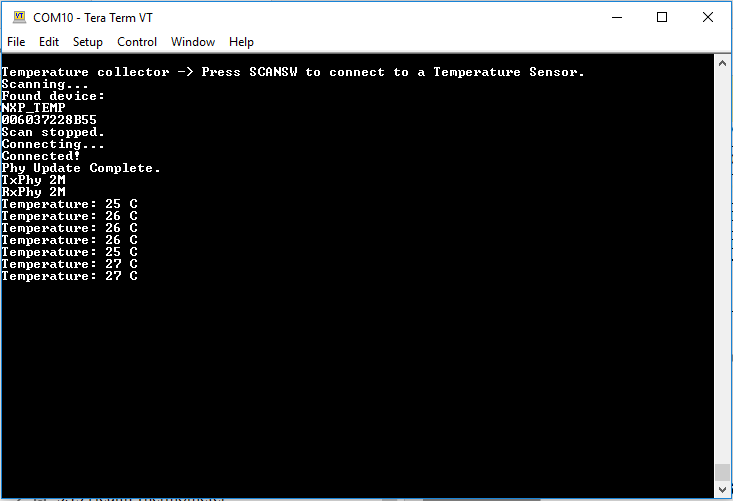
Subsequent key pressing triggers other notifications for the collector. If no key is pressed in an interval of 5 seconds, the sensor node disconnects and re-enters Deep-sleep mode.
Parent topic:Low-power temperature sensor and collector
Parent topic:Bluetooth LE stack and demo applications