Simple Metering Cluster
This chapter outlines the Simple Metering cluster, which is used to handle information relating to the measured consumption of some resource, which may be electricity, gas, heat or water.
The Simple Metering cluster has a Cluster ID of 0x0702.
Overview
The Simple Metering cluster is required in ZigBee devices as indicated in the table below.
Server-side |
Client-side |
|
|---|---|---|
Mandatory in… |
Metering Device |
|
Optional in… |
ESP |
ESP |
IPD
PCT
|
Thus, a Metering Device or ESP can use this cluster to store attributes and respond to commands relating to these attributes. An IPD or PCT may use this cluster to issue commands to interact with remote attributes held on a Metering Device or ESP.
The Simple Metering cluster is enabled by defining CLD_SIMPLE_METERING in the zcl_options.h file. Further compile-time options for the Simple Metering cluster are detailed in Section 42.12.
The information that can potentially be stored in this cluster is organized into the following attribute sets:
Reading Information Set (resource measurement information)
TOU Information Set (Time-Of-Use information)
Meter Status
Formatting (data formatting/interpretation guidance)
Historical Consumption
Load Profile Configuration
Supply Limit
Block Information (for future use - not certifiable in SE 1.1.1 or earlier)
Alarms (for future use - not certifiable in SE 1.1.1 or earlier)
This information is stored in both mandatory and optional attributes - see Section 42.3.
Note: Many of the Simple Metering cluster attributes are not certifiable in SE 1.1.1 (07-5356-17) or earlier and are reserved for future use (as indicated in Section 42.2).
Parent topic:Simple Metering Cluster
Simple Metering Cluster structure and attributes
The Simple Metering cluster is contained in the following tsSE_SimpleMetering structure:
typedef struct
{
    /* Reading information attribute set attribute ID's (D.3.2.2.1) */
    zuint48            u48CurrentSummationDelivered;        /
* Mandatory */
#ifdef CLD_SM_ATTR_CURRENT_SUMMATION_RECEIVED
    zuint48            u48CurrentSummationReceived;
#endif
#ifdef CLD_SM_ATTR_CURRENT_MAX_DEMAND_DELIVERED
    zuint48            u48CurrentMaxDemandDelivered;
#endif
#ifdef CLD_SM_ATTR_CURRENT_MAX_DEMAND_RECEIVED
    zuint48            u48CurrentMaxDemandReceived;
#endif
#ifdef CLD_SM_ATTR_DFT_SUMMATION
    zuint48            u48DFTSummation;
#endif
#ifdef CLD_SM_ATTR_DAILY_FREEZE_TIME
    zuint16            u16DailyFreezeTime;
#endif
#ifdef CLD_SM_ATTR_POWER_FACTOR
    zint8              i8PowerFactor;
#endif
#ifdef CLD_SM_ATTR_READING_SNAPSHOT_TIME
    zutctime           utctReadingSnapshotTime;
#endif
#ifdef CLD_SM_ATTR_CURRENT_MAX_DEMAND_DELIVERED_TIME
    zutctime           utctCurrentMaxDemandDeliveredTime;
#endif
#ifdef CLD_SM_ATTR_CURRENT_MAX_DEMAND_RECEIVED_TIME
    zutctime           utctCurrentMaxDemandReceivedTime;
#endif
#ifdef CLD_SM_ATTR_DEFAULT_UPDATE_PERIOD
    uint8              u8DefaultUpdatePeriod;
#endif
#ifdef CLD_SM_ATTR_FAST_POLL_UPDATE_PERIOD
    uint8              u8FastPollUpdatePeriod;
#endif
#ifdef CLD_SM_ATTR_CURRENT_BLOCK_PERIOD_CONSUMPTION_DELIVERED
    zuint48            u48CurrentBlockPeriodConsumptionDelivered;
#endif
#ifdef CLD_SM_ATTR_DAILY_CONSUMPTION_TARGET
    zuint24            u24DailyConsumptionTarget;
#endif
#ifdef CLD_SM_ATTR_CURRENT_BLOCK
    zenum8             e8CurrentBlock;
#endif
#ifdef CLD_SM_SUPPORT_GET_PROFILE
#ifdef CLD_SM_ATTR_PROFILE_INTERVAL_PERIOD
    zenum8             eProfileIntervalPeriod;
#endif
#ifdef CLD_SM_ATTR_INTERVAL_READ_REPORTING_PERIOD
    uint16             u16IntervalReadReportingPeriod;
#endif
#endif  // CLD_SM_SUPPORT_GET_PROFILE
#ifdef CLD_SM_ATTR_PREVIOUS_BLOCK_PERIOD_CONSUMPTION_DELIVERED
    zuint48            u48PreviousBlockPeriodConsumptionDelivered;
#endif
#ifdef CLD_SM_ATTR_PRESET_READING_TIME
    uint16             u16PresetReadingTime;
#endif
#ifdef CLD_SM_ATTR_VOLUME_PER_REPORT
    uint16             u16VolumePerReport;
#endif
#ifdef CLD_SM_ATTR_FLOW_RESTRICTION
    uint8              u8FlowRestriction;
#endif
#ifdef CLD_SM_ATTR_SUPPLY_STATUS
    zbmap8             u8SupplyStatus;
#endif
#ifdef CLD_SM_ATTR_CURRENT_INLET_ENERGY_CARRIER_SUMMATION
    zuint48            u48CurrentInletEnergyCarrierSummation;
#endif
#ifdef CLD_SM_ATTR_CURRENT_OUTLET_ENERGY_CARRIER_SUMMATION
    zuint48            u48CurrentOutletEnergyCarrierSummation;
#endif
#ifdef CLD_SM_ATTR_INLET_TEMPERATURE
    int16              i16InletTemperature;
#endif
#ifdef CLD_SM_ATTR_OUTLET_TEMPERATURE
    int16              i16OutletTemperature;
#endif
#ifdef CLD_SM_ATTR_CONTROL_TEMPERATURE
    int16              i16ControlTemperature;
#endif
#ifdef CLD_SM_ATTR_CURRENT_INLET_ENERGY_CARRIER_DEMAND
    zint24             i24CurrentInletEnergyCarrierDemand;
#endif
#ifdef CLD_SM_ATTR_CURRENT_OUTLET_ENERGY_CARRIER_DEMAND
    zint24             i24CurrentOutletEnergyCarrierDemand;
#endif
    /* Time Of Use Information attribute attribute ID's set (D.3.2.2.2) */
#ifdef CLD_SM_ATTR_CURRENT_TIER_1_SUMMATION_DELIVERED
    zuint48            u48CurrentTier1SummationDelivered;
#endif
#ifdef CLD_SM_ATTR_CURRENT_TIER_1_SUMMATION_RECEIVED
    zuint48            u48CurrentTier1SummationReceived;
#endif
#ifdef CLD_SM_ATTR_CURRENT_TIER_2_SUMMATION_DELIVERED
    zuint48            u48CurrentTier2SummationDelivered;
#endif
#ifdef CLD_SM_ATTR_CURRENT_TIER_2_SUMMATION_RECEIVED
    zuint48            u48CurrentTier2SummationReceived;
#endif
#ifdef CLD_SM_ATTR_CURRENT_TIER_3_SUMMATION_DELIVERED
    zuint48            u48CurrentTier3SummationDelivered;
#endif
#ifdef CLD_SM_ATTR_CURRENT_TIER_3_SUMMATION_RECEIVED
    zuint48            u48CurrentTier3SummationReceived;
#endif
#ifdef CLD_SM_ATTR_CURRENT_TIER_4_SUMMATION_DELIVERED
    zuint48            u48CurrentTier4SummationDelivered;
#endif
#ifdef CLD_SM_ATTR_CURRENT_TIER_4_SUMMATION_RECEIVED
    zuint48            u48CurrentTier4SummationReceived;
#endif
#ifdef CLD_SM_ATTR_CURRENT_TIER_5_SUMMATION_DELIVERED
    zuint48            u48CurrentTier5SummationDelivered;
#endif
#ifdef CLD_SM_ATTR_CURRENT_TIER_5_SUMMATION_RECEIVED
    zuint48            u48CurrentTier5SummationReceived;
#endif
#ifdef CLD_SM_ATTR_CURRENT_TIER_6_SUMMATION_DELIVERED
    zuint48            u48CurrentTier6SummationDelivered;
#endif
#ifdef CLD_SM_ATTR_CURRENT_TIER_6_SUMMATION_RECEIVED
    zuint48            u48CurrentTier6SummationReceived;
#endif
#ifdef CLD_SM_ATTR_CURRENT_TIER_7_SUMMATION_DELIVERED
    zuint48            u48CurrentTier7SummationDelivered;
#endif
#ifdef CLD_SM_ATTR_CURRENT_TIER_7_SUMMATION_RECEIVED
    zuint48            u48CurrentTier7SummationReceived;
#endif
#ifdef CLD_SM_ATTR_CURRENT_TIER_8_SUMMATION_DELIVERED
    zuint48            u48CurrentTier8SummationDelivered;
#endif
#ifdef CLD_SM_ATTR_CURRENT_TIER_8_SUMMATION_RECEIVED
    zuint48            u48CurrentTier8SummationReceived;
#endif
#ifdef CLD_SM_ATTR_CURRENT_TIER_9_SUMMATION_DELIVERED
    zuint48            u48CurrentTier9SummationDelivered;
#endif
#ifdef CLD_SM_ATTR_CURRENT_TIER_9_SUMMATION_RECEIVED
    zuint48            u48CurrentTier9SummationReceived;
#endif
#ifdef CLD_SM_ATTR_CURRENT_TIER_10_SUMMATION_DELIVERED
    zuint48            u48CurrentTier10SummationDelivered;
#endif
#ifdef CLD_SM_ATTR_CURRENT_TIER_10_SUMMATION_RECEIVED
    zuint48            u48CurrentTier10SummationReceived;
#endif
#ifdef CLD_SM_ATTR_CURRENT_TIER_11_SUMMATION_DELIVERED
    zuint48            u48CurrentTier11SummationDelivered;
#endif
#ifdef CLD_SM_ATTR_CURRENT_TIER_11_SUMMATION_RECEIVED
    zuint48            u48CurrentTier11SummationReceived;
#endif
#ifdef CLD_SM_ATTR_CURRENT_TIER_12_SUMMATION_DELIVERED
    zuint48            u48CurrentTier12SummationDelivered;
#endif
#ifdef CLD_SM_ATTR_CURRENT_TIER_12_SUMMATION_RECEIVED
    zuint48            u48CurrentTier12SummationReceived;
#endif
#ifdef CLD_SM_ATTR_CURRENT_TIER_13_SUMMATION_DELIVERED
    zuint48            u48CurrentTier13SummationDelivered;
#endif
#ifdef CLD_SM_ATTR_CURRENT_TIER_13_SUMMATION_RECEIVED
    zuint48            u48CurrentTier13SummationReceived;
#endif
#ifdef CLD_SM_ATTR_CURRENT_TIER_14_SUMMATION_DELIVERED
    zuint48            u48CurrentTier14SummationDelivered;
#endif
#ifdef CLD_SM_ATTR_CURRENT_TIER_14_SUMMATION_RECEIVED
    zuint48            u48CurrentTier14SummationReceived;
#endif
#ifdef CLD_SM_ATTR_CURRENT_TIER_15_SUMMATION_DELIVERED
    zuint48            u48CurrentTier15SummationDelivered;
#endif
#ifdef CLD_SM_ATTR_CURRENT_TIER_15_SUMMATION_RECEIVED
    zuint48            u48CurrentTier15SummationReceived;
#endif
    /* Meter status attribute set attribute ID's (D.3.2.2.3) */
    zbmap8             u8MeterStatus;                        /* Mandatory */
#ifdef CLD_SM_ATTR_REMAINING_BATTERY_LIFE
    uint8              u8RemainingBatteryLife;
#endif
#ifdef CLD_SM_ATTR_HOURS_IN_OPERATION
    zuint24            u24HoursInOperation;
#endif
#ifdef CLD_SM_ATTR_HOURS_IN_FAULT
    zuint24            u24HoursInFault;
#endif
    /* Formatting attribute set attribute ID's (D.3.2.2.4) */
    zenum8             eUnitOfMeasure;                        /* Mandatory */
#ifdef CLD_SM_ATTR_MULTIPLIER
    zuint24            u24Multiplier;
#endif
#ifdef CLD_SM_ATTR_DIVISOR
    zuint24            u24Divisor;
#endif
    zbmap8             u8SummationFormatting;                /* Mandatory */
#ifdef CLD_SM_ATTR_DEMAND_FORMATING
    zbmap8             u8DemandFormatting;
#endif
#ifdef CLD_SM_ATTR_HISTORICAL_CONSUMPTION_FORMATTING
    zbmap8             u8HistoricalConsumptionFormatting;
#endif
    zbmap8             eMeteringDeviceType;                /* Mandatory */
#ifdef CLD_SM_ATTR_SITE_ID
    tsZCL_OctetString  sSiteId;
    uint8              au8SiteId[SE_SM_SITE_ID_MAX_STRING_LENGTH];
#endif
#ifdef CLD_SM_ATTR_METER_SERIAL_NUMBER
   tsZCL_OctetString  sMeterSerialNumber;
 uint8   au8MeterSerialNumber[SE_SM_METER_SERIAL_NUMBER_MAX_STRING_LENGTH];
#endif
#ifdef CLD_SM_ATTR_ENERGY_CARRIER_UNIT_OF_MEASURE
    zenum8         e8EnergyCarrierUnitOfMeasure;
#endif
#ifdef CLD_SM_ATTR_ENERGY_CARRIER_SUMMATION_FORMATTING
    zbmap8         u8EnergyCarrierSummationFormatting;
#endif
#ifdef CLD_SM_ATTR_ENERGY_CARRIER_DEMAND_FORMATTING
    zbmap8         u8EnergyCarrierDemandFormatting;
#endif
#ifdef CLD_SM_ATTR_TEMPERATURE_UNIT_OF_MEASURE
    zenum8         e8TemperatureUnitOfMeasure;
#endif
#ifdef CLD_SM_ATTR_TEMPERATURE_FORMATTING
    zbmap8          u8TemperatureFormatting;
#endif
    /* ESP Historical Consumption set attribute ID's (D.3.2.2.5) */
#ifdef CLD_SM_ATTR_INSTANTANEOUS_DEMAND
    zint24         i24InstantaneousDemand;
#endif
#ifdef CLD_SM_ATTR_CURRENT_DAY_CONSUMPTION_DELIVERED
    zuint24         u24CurrentDayConsumptionDelivered;
#endif
#ifdef CLD_SM_ATTR_CURRENT_DAY_CONSUMPTION_RECEIVED
    zuint24         u24CurrentDayConsumptionReceived;
#endif
#ifdef CLD_SM_ATTR_PREVIOUS_DAY_CONSUMPTION_DELIVERED
    zuint24         u24PreviousDayConsumptionDelivered;
#endif
#ifdef CLD_SM_ATTR_PREVIOUS_DAY_CONSUMPTION_RECEIVED
    zuint24         u24PreviousDayConsumptionReceived;
#endif
#ifdef CLD_SM_ATTR_CURRENT_PARTIAL_PROFILE_INTERVAL_START_TIME_DELIVERED
 zutctime     utctCurrentPartialProfileIntervalStartTimeDelivered;
#endif
#ifdef CLD_SM_ATTR_CURRENT_PARTIAL_PROFILE_INTERVAL_START_TIME_RECEIVED
 zutctime      utctCurrentPartialProfileIntervalStartTimeReceived;
#endif
#ifdef CLD_SM_ATTR_CURRENT_PARTIAL_PROFILE_INTERVAL_VALUE_DELIVERED
 zuint24  u24CurrentPartialProfileIntervalValueDelivered;
#endif
#ifdef CLD_SM_ATTR_CURRENT_PARTIAL_PROFILE_INTERVAL_VALUE_RECEIVED
 zuint24   u24CurrentPartialProfileIntervalValueReceived;
#endif
#ifdef CLD_SM_ATTR_CURRENT_DAY_MAXIMUM_PRESSURE
 zuint48  u48CurrentDayMaxPressure;
#endif
#ifdef CLD_SM_ATTR_CURRENT_DAY_MINIMUM_PRESSURE
 zuint48    u48CurrentDayMinPressure;
#endif
#ifdef CLD_SM_ATTR_PREVIOUS_DAY_MAXIMUM_PRESSURE
  zuint48  u48PreviousDayMaxPressure;
#endif
#ifdef CLD_SM_ATTR_PREVIOUS_DAY_MINIMUM_PRESSURE
   zuint48     u48PreviousDayMinPressure;
#endif
#ifdef CLD_SM_ATTR_CURRENT_DAY_MAXIMUM_DEMAND
  zint24   i24CurrentDayMaxDemand;
#endif
#ifdef CLD_SM_ATTR_PREVIOUS_DAY_MAXIMUM_DEMAND
  zint24      i24PreviousDayMaxDemand;
#endif
#ifdef CLD_SM_ATTR_CURRENT_MONTH_MAXIMUM_DEMAND
  zint24      i24CurrentMonthMaxDemand;
#endif
#ifdef CLD_SM_ATTR_CURRENT_YEAR_MAXIMUM_DEMAND
    zint24     i24CurrentYearMaxDemand;
#endif
#ifdef CLD_SM_ATTR_CURRENT_DAY_MAXIMUM_ENERGY_CARRIER_DEMAND
  zint24         i24CurrentDayMaxEnergyCarrierDemand;
#endif
#ifdef CLD_SM_ATTR_PREVIOUS_DAY_MAXIMUM_ENERGY_CARRIER_DEMAND
  zint24         i24PreviousDayMaxEnergyCarrierDemand;
#endif
#ifdef CLD_SM_ATTR_CURRENT_MONTH_MAXIMUM_ENERGY_CARRIER_DEMAND
  zint24         i24CurrentMonthMaxEnergyCarrierDemand;
#endif
#ifdef CLD_SM_ATTR_CURRENT_MONTH_MINIMUM_ENERGY_CARRIER_DEMAND
  zint24         i24CurrentMonthMinEnergyCarrierDemand;
#endif
#ifdef CLD_SM_ATTR_CURRENT_YEAR_MAXIMUM_ENERGY_CARRIER_DEMAND
  zint24         i24CurrentYearMaxEnergyCarrierDemand;
#endif
#ifdef CLD_SM_ATTR_CURRENT_YEAR_MINIMUM_ENERGY_CARRIER_DEMAND
  zint24         i24CurrentYearMinEnergyCarrierDemand;
#endif
/* Load Profile attribute set attribute ID's (D.3.2.2.6) */
#ifdef CLD_SM_ATTR_MAX_NUMBER_OF_PERIODS_DELIVERED
  zuint8   u8MaxNumberOfPeriodsDelivered;
#endif
/* Supply Limit attribute set attribute ID's (D.3.2.2.7) */
#ifdef CLD_SM_ATTR_CURRENT_DEMAND_DELIVERED
 zuint24      u24CurrentDemandDelivered;
#endif
#ifdef CLD_SM_ATTR_DEMAND_LIMIT
    zuint24    u24DemandLimit;
#endif
#ifdef CLD_SM_ATTR_DEMAND_INTEGRATION_PERIOD
    zuint8      u8DemandIntegrationPeriod;
#endif
#ifdef CLD_SM_ATTR_NUMBER_OF_DEMAND_SUBINTERVALS
    zuint8      u8NumberOfDemandSubintervals;
#endif
/* Block Information attribute set attribute ID's (D.3.2.2.8) */
/* No Tier Block */
#if (CLD_SM_ATTR_NO_TIER_BLOCK_CURRENT_SUMMATION_DELIVERED_MAX_COUNT != 0)
 zuint48  au48CurrentNoTierBlockSummationDelivered
[CLD_SM_ATTR_NO_TIER_BLOCK_CURRENT_SUMMATION_DELIVERED_MAX_COUNT];
#endif
    /* Tier 1 Block Set */
#if ((CLD_SM_ATTR_NUM_OF_TIERS_CURRENT_SUMMATION_DELIVERED > 0)&&
 (CLD_SM_ATTR_NUM_OF_BLOCKS_IN_EACH_TIER_CURRENT_SUMMATION_DELIVERED != 0))
 zuint48  au48CurrentTier1BlockSummationDelivered
   [CLD_SM_ATTR_NUM_OF_BLOCKS_IN_EACH_TIER_CURRENT_SUMMATION_DELIVERED];
#endif
    /* Tier 2 Block Set */
#if ((CLD_SM_ATTR_NUM_OF_TIERS_CURRENT_SUMMATION_DELIVERED > 1)&&
     (CLD_SM_ATTR_NUM_OF_BLOCKS_IN_EACH_TIER_CURRENT_SUMMATION_DELIVERED != 0))
zuint48  au48CurrentTier2BlockSummationDelivered
   [CLD_SM_ATTR_NUM_OF_BLOCKS_IN_EACH_TIER_CURRENT_SUMMATION_DELIVERED];
#endif
/* Tier 3 Block Set */
#if ((CLD_SM_ATTR_NUM_OF_TIERS_CURRENT_SUMMATION_DELIVERED > 2)&&
     (CLD_SM_ATTR_NUM_OF_BLOCKS_IN_EACH_TIER_CURRENT_SUMMATION_DELIVERED != 0))
  zuint48    au48CurrentTier3BlockSummationDelivered
    [CLD_SM_ATTR_NUM_OF_BLOCKS_IN_EACH_TIER_CURRENT_SUMMATION_DELIVERED];
#endif
    /* Tier 4 Block Set */
#if ((CLD_SM_ATTR_NUM_OF_TIERS_CURRENT_SUMMATION_DELIVERED > 3)&&
     (CLD_SM_ATTR_NUM_OF_BLOCKS_IN_EACH_TIER_CURRENT_SUMMATION_DELIVERED != 0))
    zuint48   au48CurrentTier4BlockSummationDelivered
    [CLD_SM_ATTR_NUM_OF_BLOCKS_IN_EACH_TIER_CURRENT_SUMMATION_DELIVERED];
#endif
    /* Tier 5 Block Set */
#if ((CLD_SM_ATTR_NUM_OF_TIERS_CURRENT_SUMMATION_DELIVERED > 4)&&
     (CLD_SM_ATTR_NUM_OF_BLOCKS_IN_EACH_TIER_CURRENT_SUMMATION_DELIVERED != 0))
    zuint48   au48CurrentTier5BlockSummationDelivered
    [CLD_SM_ATTR_NUM_OF_BLOCKS_IN_EACH_TIER_CURRENT_SUMMATION_DELIVERED];
#endif
    /* Tier 6 Block Set */
#if ((CLD_SM_ATTR_NUM_OF_TIERS_CURRENT_SUMMATION_DELIVERED > 5)&&
     (CLD_SM_ATTR_NUM_OF_BLOCKS_IN_EACH_TIER_CURRENT_SUMMATION_DELIVERED != 0))
    zuint48      au48CurrentTier6BlockSummationDelivered
      [CLD_SM_ATTR_NUM_OF_BLOCKS_IN_EACH_TIER_CURRENT_SUMMATION_DELIVERED];
#endif
    /* Tier 7 Block Set */
#if ((CLD_SM_ATTR_NUM_OF_TIERS_CURRENT_SUMMATION_DELIVERED > 6)&&
     (CLD_SM_ATTR_NUM_OF_BLOCKS_IN_EACH_TIER_CURRENT_SUMMATION_DELIVERED != 0))
    zuint48     au48CurrentTier7BlockSummationDelivered
      [CLD_SM_ATTR_NUM_OF_BLOCKS_IN_EACH_TIER_CURRENT_SUMMATION_DELIVERED];
#endif
    /* Tier 8 Block Set */
#if ((CLD_SM_ATTR_NUM_OF_TIERS_CURRENT_SUMMATION_DELIVERED > 7)&&
     (CLD_SM_ATTR_NUM_OF_BLOCKS_IN_EACH_TIER_CURRENT_SUMMATION_DELIVERED != 0))
    zuint48      au48CurrentTier8BlockSummationDelivered
      [CLD_SM_ATTR_NUM_OF_BLOCKS_IN_EACH_TIER_CURRENT_SUMMATION_DELIVERED];
#endif
    /* Tier 9 Block Set */
#if ((CLD_SM_ATTR_NUM_OF_TIERS_CURRENT_SUMMATION_DELIVERED > 8)&&
     (CLD_SM_ATTR_NUM_OF_BLOCKS_IN_EACH_TIER_CURRENT_SUMMATION_DELIVERED != 0))
    zuint48      au48CurrentTier9BlockSummationDelivered
       [CLD_SM_ATTR_NUM_OF_BLOCKS_IN_EACH_TIER_CURRENT_SUMMATION_DELIVERED];
#endif
    /* Tier 10 Block Set */
#if ((CLD_SM_ATTR_NUM_OF_TIERS_CURRENT_SUMMATION_DELIVERED > 9)&&
     (CLD_SM_ATTR_NUM_OF_BLOCKS_IN_EACH_TIER_CURRENT_SUMMATION_DELIVERED != 0))
    zuint48     au48CurrentTier10BlockSummationDelivered
      [CLD_SM_ATTR_NUM_OF_BLOCKS_IN_EACH_TIER_CURRENT_SUMMATION_DELIVERED];
#endif
    /* Tier 11 Block Set */
#if ((CLD_SM_ATTR_NUM_OF_TIERS_CURRENT_SUMMATION_DELIVERED > 10)&&
     (CLD_SM_ATTR_NUM_OF_BLOCKS_IN_EACH_TIER_CURRENT_SUMMATION_DELIVERED != 0))
    zuint48  au48CurrentTier11BlockSummationDelivered
       [CLD_SM_ATTR_NUM_OF_BLOCKS_IN_EACH_TIER_CURRENT_SUMMATION_DELIVERED];
#endif
    /* Tier 12 Block Set */
#if ((CLD_SM_ATTR_NUM_OF_TIERS_CURRENT_SUMMATION_DELIVERED > 11)&&
     (CLD_SM_ATTR_NUM_OF_BLOCKS_IN_EACH_TIER_CURRENT_SUMMATION_DELIVERED != 0))
    zuint48   au48CurrentTier12BlockSummationDelivered
       [CLD_SM_ATTR_NUM_OF_BLOCKS_IN_EACH_TIER_CURRENT_SUMMATION_DELIVERED];
#endif
    /* Tier 13 Block Set */
#if ((CLD_SM_ATTR_NUM_OF_TIERS_CURRENT_SUMMATION_DELIVERED > 12)&&
     (CLD_SM_ATTR_NUM_OF_BLOCKS_IN_EACH_TIER_CURRENT_SUMMATION_DELIVERED != 0))
    zuint48   au48CurrentTier13BlockSummationDelivered
      [CLD_SM_ATTR_NUM_OF_BLOCKS_IN_EACH_TIER_CURRENT_SUMMATION_DELIVERED];
#endif
    /* Tier 14 Block Set */
#if ((CLD_SM_ATTR_NUM_OF_TIERS_CURRENT_SUMMATION_DELIVERED > 13)&&
  CLD_SM_ATTR_NUM_OF_BLOCKS_IN_EACH_TIER_CURRENT_SUMMATION_DELIVERED != 0))
  zuint48     au48CurrentTier14BlockSummationDelivered
   [CLD_SM_ATTR_NUM_OF_BLOCKS_IN_EACH_TIER_CURRENT_SUMMATION_DELIVERED];
#endif
    /* Tier 15 Block Set */
#if ((CLD_SM_ATTR_NUM_OF_TIERS_CURRENT_SUMMATION_DELIVERED > 14)&&
   (CLD_SM_ATTR_NUM_OF_BLOCKS_IN_EACH_TIER_CURRENT_SUMMATION_DELIVERED != 0))
    zuint48  au48CurrentTier15BlockSummationDelivered
     [CLD_SM_ATTR_NUM_OF_BLOCKS_IN_EACH_TIER_CURRENT_SUMMATION_DELIVERED];
#endif
    /* Alarm attribute set attribute ID's (D.3.2.2.9) */
#ifdef CLD_SM_ATTR_GENERIC_ALARM_MASK
    zbmap16     u16GenericAlarmMask;
#endif
#ifdef CLD_SM_ATTR_ELECTRICITY_ALARM_MASK
    zbmap32     u32ElectricityAlarmMask;
#endif
#ifdef CLD_SM_ATTR_PRESSURE_ALARM_MASK
    zbmap16      u16PressureAlarmMask;
#endif
#ifdef CLD_SM_ATTR_WATER_SPECIFIC_ALARM_MASK
    zbmap16      u16WaterSpecificAlarmMask;
#endif
#ifdef CLD_SM_ATTR_HEAT_AND_COOLING_ALARM_MASK
    zbmap16      u16HeatAndCoolingSpecificAlarmMask;
#endif
#ifdef CLD_SM_ATTR_GAS_ALARM_MASK
    zbmap16      u16GasAlarmMask;
#endif
} tsCLD_SimpleMetering;
where:
‘Reading Information’ Attribute Set
u48CurrentSummationDeliveredis the total amount of the measured resource (e.g. electrical energy) delivered to the premises so far, expressed in the units specified ineUnitOfMeasureand in the format specified inu8SummationFormattingThe following are optional attributes and are fully described in the ZigBee Smart Energy Profile Specification:
u48CurrentSummationReceived
u48CurrentMaxDemandDelivered
u48CurrentMaxDemandReceived
u48DFTSummation
u16DailyFreezeTime
i8PowerFactor
utctReadingSnapshotTime
utctCurrentMaxDemandDeliveredTime
utctCurrentMaxDemandReceivedTime
The following are optional attributes that relate to Fast Polling mode (both attributes are not certifiable in SE 1.1.1 or earlier and are for future use):
u32DefaultUpdatePeriodis the default poll-period, in seconds, that is used in updating metering data outside of fast polling episodesu8FastPollUpdatePeriodis the minimum poll-period, in seconds, that can be used in updating metering data during fast polling episodes (should not be set to less than 2 seconds)
The following are optional attributes and are fully described in the ZigBee Smart Energy Profile Specification(these attributes are not certifiable in SE 1.1.1 or earlier and are for future use):
u48CurrentBlockPeriodConsumptionDelivered
u24DailyConsumptionTarget
e8CurrentBlock
The following are optional attributes that relate to the ‘Get Profile’ feature:
eProfileIntervalPeriodis the time-interval over which one set of consumption data will be collectedu32IntervalReadReportingPeriodis the time-interval, in minutes, after which a sleepy End Device should wake up to provide metering data
The following are optional attributes are fully described in the ZigBee Smart Energy Profile Specification (all these attributes except
u8SupplyStatusare not certifiable in SE 1.1.1 or earlier and are for future use):
u16PresetReadingTime
u16VolumePerReport
u8FlowRestriction
u8SupplyStatus
u48CurrentInletEnergyCarrierSummation
u48CurrentOutletEnergyCarrierSummation
i16InletTemperature
i16OutletTemperature
i16ControlTemperature
i24CurrentInletEnergyCarrierDemand
i24CurrentOutletEnergyCarrierDemand
‘Time-Of-Use (TOU) Information’ Attribute Set
The following are optional attributes and are fully described in the ZigBee Smart Energy Profile Specification(the attributes for tiers 7 to 15 are not certifiable in SE 1.1.1 or earlier and are for future use):
u48CurrentTier1SummationDelivered
u48CurrentTier1SummationReceived
u48CurrentTier2SummationDelivered
u48CurrentTier2SummationReceived
...
...
...
...
u48CurrentTier15SummationDelivered
u48CurrentTier15SummationReceived
‘Meter Status’ Attribute Set
u``8MeterStatusis an 8-bit bitmap representing the status of the meter. Enumerated masks are provided that correspond to the possible settings - see Section 42.10.2(this attribute is only certifiable for electricity meters in SE 1.1.1)The following are optional attributes and are fully described in the ZigBee Smart Energy Profile Specification(all the attributes are not certifiable in SE 1.1.1 or earlier and are for future use):
u8RemainingBatteryLife
u24HoursInOperation
u24HoursInFault
‘Formatting’ Attribute Set
eUnitOfMeasureindicates the unit of measure for the resource quantity contained above inu48CurrentSummationDeliveredand below ini24InstantaneousDemand. Enumerations for the possible units are provided - see Section 42.10.3The following are optional attributes and are fully described in the ZigBee Smart Energy Profile Specification:
u24Multiplier
u24Divisor
u8SummationFormattingindicates the formatting for the resource quantity contained above inu48CurrentSummationDelivered. Enumerations for the possible formats are provided - see Section 42.10.4The following are optional attributes and are fully described in the ZigBee Smart Energy Profile Specification:
u8DemandFormatting
u8HistoricalConsumptionFormatting
eMeteringDeviceTypeindicates the type of Metering Device in terms of the resource type which it measures. Enumerations for the possible device types are provided - see Section 42.10.6The following pair of elements represents an optional attribute which identifies the location of a Metering Device (this attribute is not certifiable in SE 1.1.1 or earlier and is for future use):
sSiteIdis atsZCL_OctetStringstructure containing information on the site identifier. This element is paired withau8SiteId(below)au8SiteIdis an array containing the site identifier. This element is paired withsSiteId(above)
Note: This identifier is known in the UK as the M-PAN for electricity and MPRN for gas, and in South Africa as as the ‘Stand Point’. The field is large enough to accommodate the number of characters typically used in the UK and Europe (16 digits).
The following pair of elements represents an optional attribute, which indicates the serial number of a Metering Device (this attribute is not certifiable in SE 1.1.1 or earlier and is for future use):
sMeterSerialNumberis atsZCL_OctetStringstructure containing information on the serial number of a Metering Device. This element is paired withau8SiteId(below)au8MeterSerialNumberis an array containing the serial number of a Metering Device. This element is paired withsMeterSerialNumber(above)
The following are optional attributes and are fully described in the ZigBee Smart Energy Profile Specification(these attributes are not certifiable in SE 1.1.1 or earlier and are for future use):
e8EnergyCarrierUnitOfMeasure
u8EnergyCarrierSummationFormatting
u8EnergyCarrierDemandFormatting
e8TemperatureUnitOfMeasure
u8TemperatureFormatting
‘Historical Consumption’ Attribute Set
i24InstantaneousDemandis an optional attribute containing the current rate of consumption of the metered resource with respect to time. The unit of measure for the relevant resource is as specified ineUnitOfMeasureIf this attribute is used, the metering application should update its value on a regular basis, between once every second and once every five seconds. The attribute value can be negative, meaning that the relevant resource is currently being supplied from the premises to the utility company - for example, the case of locally generated electricity from roof-mounted solar panels being supplied to the national grid.
The following are optional attributes and are fully described in the ZigBee Smart Energy Profile Specification:
u24CurrentDayConsumptionDelivered
u24CurrentDayConsumptionReceived
u24PreviousDayConsumptionDelivered
u24PreviousDayConsumptionReceived
utctCurrentPartialProfileIntervalStartTimeDelivered
utctCurrentPartialProfileIntervalStartTimeReceived
u24CurrentPartialProfileIntervalValueDelivered
u24CurrentPartialProfileIntervalValueReceived
The following are optional attributes and are fully described in the ZigBee Smart Energy Profile Specification(these attributes are not certifiable in SE 1.1.1 or earlier and are for future use):
u48CurrentDayMaxPressure
u48CurrentDayMinPressure
u48PreviousDayMaxPressure
u48PreviousDayMinPressure
i24CurrentDayMaxDemand
i24PreviousDayMaxDemand
i24CurrentMonthMaxDemand
i24CurrentYearMaxDemand
i24CurrentDayMaxEnergyCarrierDemand
i24PreviousDayMaxEnergyCarrierDemand
i24CurrentMonthMaxEnergyCarrierDemand
i24CurrentMonthMinEnergyCarrierDemand
i24CurrentYearMaxEnergyCarrierDemand
i24CurrentYearMinEnergyCarrierDemand
‘Load Profile Configuration’ Attribute Set
u8MaxNumberOfPeriodsDeliveredis an optional attribute from the Simple Metering ‘Load Profile Configuration’ attribute set and is fully described in the ZigBee Smart Energy Profile Specification.
‘Supply Limit’ Attribute Set
The following are optional attributes and are fully described in the ZigBee Smart Energy Profile Specification:
u24CurrentDemandDelivered
u24DemandLimit
u8DemandIntegrationPeriod
u8NumberOfDemandSubintervals
‘Block Information’ Attribute Set
The following are optional attributes and are fully described in the ZigBee Smart Energy Profile Specification(these attributes are not certifiable in SE 1.1.1 or earlier and are for future use):
au48CurrentNoTierBlockSummationDelivered[CLD_SM_ATTR_NO_TIER_BLOCK_CU RRENT_SUMMATION_DELIVERED_MAX_COUNT] au48CurrentTier1BlockSummationDelivered[CLD_SM_ATTR_NUM_OF _BLOCKS_IN_EACH_TIER_CURRENT_SUMMATION_DELIVERED] au48CurrentTier2BlockSummationDelivered[CLD_SM_ATTR_NUM_ OF_BLOCKS_IN_EACH_TIER_CURRENT_SUMMATION_DELIVERED] au48CurrentTier3BlockSummationDelivered[CLD_SM_ATTR_NUM_ OF_BLOCKS_IN_EACH_TIER_CURRENT_SUMMATION_DELIVERED] au48CurrentTier4BlockSummationDelivered[CLD_SM_ATTR_NUM_ OF_BLOCKS_IN_EACH_TIER_CURRENT_SUMMATION_DELIVERED] au48CurrentTier5BlockSummationDelivered[CLD_SM_ATTR_NUM_ OF_BLOCKS_IN_EACH_TIER_CURRENT_SUMMATION_DELIVERED] au48CurrentTier6BlockSummationDelivered[CLD_SM_ATTR_NUM_ OF_BLOCKS_IN_EACH_TIER_CURRENT_SUMMATION_DELIVERED] au48CurrentTier7BlockSummationDelivered[CLD_SM_ATTR_NUM_ OF_BLOCKS_IN_EACH_TIER_CURRENT_SUMMATION_DELIVERED] au48CurrentTier8BlockSummationDelivered[CLD_SM_ATTR_NUM_ OF_BLOCKS_IN_EACH_TIER_CURRENT_SUMMATION_DELIVERED] au48CurrentTier9BlockSummationDelivered[CLD_SM_ATTR_NUM_ OF_BLOCKS_IN_EACH_TIER_CURRENT_SUMMATION_DELIVERED] au48CurrentTier10BlockSummationDelivered[CLD_SM_ATTR_NUM_ OF_BLOCKS_IN_EACH_TIER_CURRENT_SUMMATION_DELIVERED] au48CurrentTier11BlockSummationDelivered[CLD_SM_ATTR_NUM_ OF_BLOCKS_IN_EACH_TIER_CURRENT_SUMMATION_DELIVERED] au48CurrentTier12BlockSummationDelivered[CLD_SM_ATTR_NUM_ OF_BLOCKS_IN_EACH_TIER_CURRENT_SUMMATION_DELIVERED] au48CurrentTier13BlockSummationDelivered[CLD_SM_ATTR_NUM_ OF_BLOCKS_IN_EACH_TIER_CURRENT_SUMMATION_DELIVERED] au48CurrentTier14BlockSummationDelivered[CLD_SM_ATTR_NUM_ OF_BLOCKS_IN_EACH_TIER_CURRENT_SUMMATION_DELIVERED] au48CurrentTier15BlockSummationDelivered[CLD_SM_ATTR_NUM_ OF_BLOCKS_IN_EACH_TIER_CURRENT_SUMMATION_DELIVERED]
Parent topic:Simple Metering Cluster
Attribute Settings
The Simple Metering cluster contains both mandatory and optional attributes (see Section 42.2). The cluster structure is shown below with only the mandatory attributes (which are enabled by default):
typedef struct PACK
{
  zuint48                   u48CurrentSummationDelivered;
  zbmap8                    u8MeterStatus;
  teSE_UnitOfMeasure        eUnitOfMeasure;
  zbmap8                    u8SummationFormatting;
  teSE_MeteringDeviceType   eMeteringDeviceType;
} tsSE_SimpleMetering;
The mandatory attribute settings are outlined below.
eMeteringDeviceType
The element eMeteringDeviceType of the structure tsSE_SimpleMetering indicates the type of Metering Device in terms of the resource type which it measures: electricity, gas, water, heat, cooling or pressure. This attribute belongs to the cluster’s Formatting attribute set.
Enumerated values are provided for the full range of possible metering devices - for example, E_CLD_SM_MDT_GAS for a gas meter. Enumerated values are also provided for devices that mirror a Metering Device - for example, E_CLD_SM_MDT_GAS_MIRRORED for the mirroring device of a gas meter. All of these enumerations are defined in the structure teCLD_SM_MeteringDeviceType, detailed in Section 42.10.6.
u8MeterStatus
The element u8MeterStatus of the structure tsSE_SimpleMetering indicates the current status of the device by means of an 8-bit value. This attribute has its own attribute set, Meter Status.
The status value is a bitmap with the bit representations indicated in the table below:
Bit 7 |
Bit 6 |
Bit 5 |
Bit 4 |
Bit 3 |
Bit 2 |
Bit 1 |
Bit 0 |
|---|---|---|---|---|---|---|---|
Reserved |
Service |
Disconnect
Open *
|Leak Detect|Power Quality|Power
Failure
|Tamper Detect|Battery Low|Check Meter|
* Set to ‘1’ when service to this site has been disconnected
A bit is set (to ‘1’) to indicate the corresponding error or warning.
A number of macros are defined to reflect the above bit settings - for example, E_CLD_SM_METER_STATUS_POWER_FAILURE_BIT contains the state of the Power Failure bit (Bit 3). There are also macros for masking off the appropriate bit - these macros are detailed in Section 42.10.2.
eUnitOfMeasure
The element eUnitOfMeasure of the structure tsSE_SimpleMetering indicates the unit of measure in which the relevant resource is metered, e.g. kiloWatt-hour for electricity. This attribute belongs to the cluster’s Formatting attribute set.
Enumerated values are provided for the possible units of measure - for example, E_CLD_SM_UOM_CUBIC_METER for cubic metre (of gas or water). This example will also configure measurements to be expressed in binary/hex. However, enumerated values are also provided to configure measurements to be expressed in binary coded decimal - for example, E_CLD_SM_UOM_CUBIC_METER_BCD configures measurements in cubic metres and expressed in binary coded decimal. All of these enumerations are defined in the structure teCLD_SM_UnitOfMeasure, detailed in Section 42.10.3.
u8SummationFormatting
The element u8SummationFormatting of the structure tsSE_SimpleMetering is an 8-bit value indicating the position of the decimal point in the metered value (see u48CurrentSummationDelivered). This attribute belongs to the cluster’s Formatting attribute set.
This value contains bit fields, as follows:
Bits 2-0: 3-bit value indicating number of digits to right of point
Bits 6-3: 3-bit value indicating number of digits to left of point
Bit 7: Setting this bit (to ‘1’) suppresses leading zeros
A number of macros are defined to accommodate the above format information - these macros are detailed in Section 42.10.4.
u48CurrentSummationDelivered
The element u48CurrentSummationDelivered of the structure tsSE_SimpleMetering is a 48-bit value representing the total quantity consumed, so far, of the metered resource (e.g. electrical energy). This attribute belongs to the Reading Information attribute set.
The attribute value is interpreted with the aid of the elements eUnitOfMeasure and u8SummationFormatting, which indicate the unit of measure and the position of the decimal point respectively.
Parent topic:Simple Metering Cluster
Remotely Reading Simple Metering Attributes
Dedicated functions are provided for remotely reading the Simple Metering attributes:
The application must first call eSE_ReadMeterAttributes() to submit a ‘read attributes’ request to the relevant remote endpoint. The resulting read process is as described for eZCL_SendReadAttributesRequest() in Section 2.3.2.
On receiving the ‘read attributes’ response, the event E_ZCL_CBET_READ_ATTRIBUTES_RESPONSE is generated, which causes the callback function for the local endpoint to be invoked. This callback function should include a call to eSE_HandleReadAttributesResponse() which checks whether all the Simple Metering attributes are included in the response. If the response is not complete, the function re-sends ‘read attributes’ requests until all attribute values are obtained.
Note that read access to cluster attributes must be explicitly enabled at compile-time as described in Section 1.3.
Parent topic:Simple Metering Cluster
Mirroring Metering Data
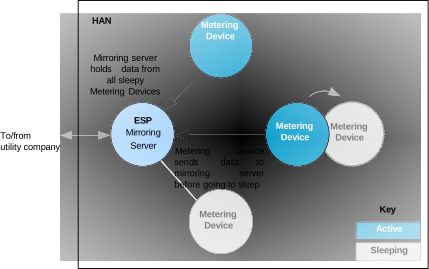
‘Mirroring’ is a facility that stores and provides access to metering data which originates from Metering Devices that sleep. A Metering Device cannot be accessed during periods of sleep and therefore its data cannot normally be read at these times. Mirroring involves holding the data from sleepy Metering Devices centrally on a server, allowing access to the data at all times.
Normally, the ESP (Co-ordinator) acts as the mirroring server. One or more sleepy Metering Devices (End Devices) can mirror their data on this server. A Metering Device must send its latest data to the mirroring server immediately before entering sleep mode. This is illustrated in the figure below.
Mirroring of Metering Data
Every mirror (one for each Metering Device) on the mirroring server has its own endpoint. The maximum number of mirror endpoints is defined at compile-time (see Section 42.12). Note that these endpoints are in addition to the main endpoint for the ESP (registered using eSE_RegisterEspMeterEndPoint() or eSE_RegisterEspEndPoint()).
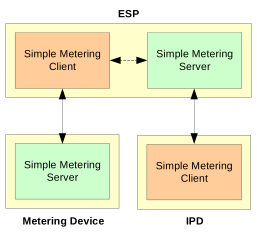
Mirroring versions of the Simple Metering cluster server and/or client are implemented on the mirror endpoints. This is illustrated in the figure below, where the ESP, as the mirroring server, incorporates both the Simple Metering cluster server and client, the Metering device incorporates a cluster server and the IPD incorporates a cluster client.
Simple Metering Cluster in Mirroring
The ESP device structure tsSE_EspMeterDevice contains a section on mirroring support which includes an array of tsSE_Mirror structures (see Section 42.11.2). This array contains one element/structure per mirror endpoint, with the first mirror endpoint occupying array element 0 and the array size corresponding to the maximum number of mirror endpoints allowed on the mirroring server. The information stored in an array element includes the IEEE address of the Metering Device to which the mirror endpoint has been allocated.
Configuring Mirroring on ESP
The ESP normally acts as the mirroring server, containing a unique mirror endpoint for each (mirrored) Metering Device. Configuration of the mirroring server is carried out both within the application that runs on the device and as compile-time options - refer to Section 42.12 for the relevant compile-time options.
On the ESP, mirroring can be enabled in the application code when the device is registered using the function eSE_RegisterEspMeterEndPoint() or eSE_RegisterEspEndPoint(). These functions require specification of the first endpoint that is to be used for mirroring. Starting at this endpoint, consecutive endpoints to be used for mirrors are reserved, up to the maximum number of mirrors defined by the compile-time option CLD_SM_NUMBER_OF_MIRRORS. For example, if 5 is specified as the first mirror endpoint and up to 4 mirrors can be used then endpoints 5, 6, 7 and 8 are reserved for mirrors. Note that mirroring is disabled by setting the start endpoint to 0.
Note: The endpoints reserved for mirroring must also be included in the configuration diagram in the ZPS Configuration Editor. However, they must not be enabled since they are enabled when mirrors are created on them.
The tsSE_Mirror structures in the ESP device structure tsSE_EspMeterDevice contain the IEEE addresses of the Metering Devices being mirrored on the ESP (these IEEE addresses are automatically initialised to zero). The ESP application must save an array of these IEEE addresses to non-volatile memory using the NVM module - this will allow the mirrored Metering Devices to be identified by the mirroring server following a reset of the ESP.
The ESP must allocate mirror endpoints to Metering Devices in response to requests from the Metering Devices (refer to Section 42.5.2 for details of requesting a mirror), as described below:
On receiving a mirror request on the ESP, the ZCL automatically allocates the next available mirror endpoint to the Metering Device (the IEEE address of the Metering Device is automatically written to the
tsSE_Mirrorstructure which corresponds to the allocated mirror endpoint).The event E_CLD_SM_CLIENT_RECEIVED_COMMAND containing the command E_CLD_SM_REQUEST_MIRROR is then generated on the ESP, causing the callback function on the ESP to be invoked.
The callback function must check whether all mirror endpoints have now been exhausted, in order to update the relevant status on the ESP. To do this, the function eSM_GetFreeMirrorEndPoint() must be called to obtain the number of the next free mirror endpoint. If the value 0xFFFF is returned, this means that no more mirror endpoints are available (for subsequent requests) and the attribute
u8PhysicalEnvironmentof the Basic cluster must be set to zero (to indicate to other Metering Devices that no more mirrors are available on the ESP). This step is illustrated in the code fragment below.
eSM_GetFreeMirrorEndPoint (&u16FoundEP);
if (u16FoundEP == 0xFFFF)
{
           psSE_EspMeterDevice->sBasicCluster.u8PhysicalEnvironment = 0x00;
}
else
{
           psSE_EspMeterDevice->sBasicCluster.u8PhysicalEnvironment = 0x01;
}
The callback function must copy the IEEE addresses from the
tsSE_Mirrorstructures (which are automatically kept up-to-date) to the application’s array of IEEE addresses for mirrored devices, and this array should be re-saved in non-volatile memory using the NVM module. This step is illustrated below in the code fragment under “Writing and Preserving Array of IEEE Addresses”.A response is automatically sent to the requesting Metering Device, where this response contains the number of the assigned endpoint.
The ESP is then ready to receive metering data from the remote Metering Device, as described in Section 42.5.3.
Writing and Preserving Array of IEEE Addresses
The ESP application must maintain an array of the IEEE addresses of the mirrored Metering Devices and keep a copy of this array in NVM. The array can be updated from the tsSE_Mirror structures for the mirror endpoints and saved to NVM as illustrated in the code fragment below:
case E_UPDATE_EVENT_REQUEST_MIRROR:
case E_UPDATE_EVENT_REMOVE_MIRROR:
{
  uint8 u8LoopCntr;
  for (u8LoopCntr =0; u8LoopCntr < CLD_SM_NUMBER_OF_MIRRORS; u8LoopCntr++)
      {
        sMirrorState.u64ExtAddr[u8LoopCntr] =
                     sMeter.sSE_Mirrors[u8LoopCntr].u64SourceAddress;
      }
      sMirrorState.bNetworkUp = TRUE;
     NvSaveOnIdle(&sMirrorState, TRUE);
}
break;
Recreating Mirrors Following an ESP Reset
If the ESP is reset, the mirrors that have been created on the device are lost. However, if the IEEE addresses (of the mirrored Metering Devices) associated with the mirror endpoints have been preserved in NVM, this data can be read by the ESP application following the reset and the mirrors recreated. Given the relevant endpoint number and IEEE address, a mirror can be recreated using the function eSM_CreateMirror().
Note: A matching function **eSM_RemoveMirror()**also exists to allow the application to remove a mirror.
Parent topic:Mirroring Metering Data
Configuring Mirroring on Metering Devices
Configuration of a Metering Device for mirroring is carried out both within the application that runs on the device and as a compile-time option - refer to Section42.12 for the relevant compile-time options.
It is the responsibility of the Metering Device to request a mirror on the ESP, but first it must establish whether the ESP is accepting mirror requests. To do this, the application should use the function eZCL_SendReadAttributesRequest() to obtain the value of the u8PhysicalEnvironment attribute of the Basic cluster on the ESP - if this value is non-zero then the ESP is open to receiving mirror requests.
Provided that the ESP is accepting mirror requests, a Metering Device application can request a mirror using the function eSM_ServerRequestMirrorCommand(). This function sends a mirror request to the ESP with the aim of being allocated a mirror endpoint. The handling of this request on the ESP is described in Section 42.5.1.
The Metering Device application must then wait for a response from the ESP. This response is indicated by the event E_CLD_SM_SERVER_RECEIVED_COMMAND containing the command E_CLD_SM_REQUEST_MIRROR_RESPONSE, causing the callback function for the receiving endpoint to be invoked.
If the request has resulted in the successful allocation of a mirror endpoint on the ESP, the tsSM_RequestMirrorResponseCommand structure (see Section 42.11.6) in this event will contain the allocated endpoint number. In this case:
The callback function should write the allocated endpoint number and mirroring server (ESP) IEEE address to non-volatile memory for persistent data storage using the NVM module.
The Metering Device application can now send metering data for storage on the ESP whenever required, as described in Section 42.5.3.
Note: If the Metering Device subsequently requests another mirror on the same ESP, the same mirror endpoint number will be returned - a Metering Device cannot have more than one mirror on the same ESP.
If the request did not result in an allocated mirror endpoint on the ESP, the endpoint number returned in the above structure will be 0xFFFF and no action needs to be taken by the callback function.
Parent topic:Mirroring Metering Data
Mirroring Data
Once a mirror for a Metering Device has been set up, as described in Section 42.5.1 and Section 42.5.2, the mirror can be populated and refreshed with data in two ways:
The ESP application can submit a ‘read attributes’ request to the Metering Device (when it is not asleep), as described in Section 2.3.2.
The Metering Device can send metering data as unsolicited attribute reports to the mirror at any time (for example, before entering sleep mode). This method is described further below.
The Metering Device application sends unsolicited attribute reports for the Simple Metering cluster to the mirror using the function eZCL_ReportAllAttributes(), described in Section 5.2.
On receiving this data, the event E_ZCL_CBET_ATTRIBUTE_REPORT_MIRROR is generated on the ESP, causing the callback function on the ESP to be invoked. The callback function must then check that the data has come from a valid source (a Metering Device which has a mirror on the ESP) by calling the function eSM_IsMirrorSourceAddressValid(). According to the outcome of this check, the function updates the event status:
sZCL_CallBackEvent.uMessage.sReportAttributeMirror.eStatus
If
eStatusis set to E_ZCL_ATTR_REPORT_OK, the reported attribute values (metering data) are automatically stored on the relevant mirror endpoint and an E_ZCL_CBET_REPORT_INDIVIDUAL_ATTRIBUTE event is generated for each attribute reported.If
eStatusis set to anything else, a ZCL default response is automatically sent back to the reporting device to indicate that mirroring is not authorised for this device (E_ZCL_CMDS_NOT_AUTHORIZED).
Maintaining the Mirrored eMeteringDeviceType Attribute
When a mirror is created on the ESP, the Simple Metering cluster attribute eMeteringDeviceType in the mirror will be set to the appropriate value for the Metering Device to be mirrored (e.g. E_CLD_SM_MDT_GAS). However, in order to distinguish the mirror cluster on the ESP from the original cluster on the Metering Device, the ESP application must replace this value in the mirror with the equivalent ‘_MIRRORED’ value (e.g. E_CLD_SM_MDT_GAS_MIRRORED). In fact, this replacement must be performed every time the ESP receives a new set of attribute values from the Metering Device (by either of the two methods described above), since this attribute value in the mirror will be over-written each time and must subsequently be corrected.
Parent topic:Mirroring Metering Data
Reading Mirrored Data
A ZigBee device such as an IPD may need to obtain data from a mirror on the ESP, particularly when the mirrored Metering Device is sleeping. The data is requested by means of the standard ‘read attributes’ method, described in Section 2.3.2 - that is, by calling the ZCL function eZCL_SendReadAttributesRequest() on the requesting device.
If an attempt is made to read an attribute that currently has no value in the mirror, the resulting E_ZCL_CBET_READ_INDIVIDUAL_ATTRIBUTE_RESPONSE event will contain the attribute status E_ZCL_CMDS_UNSUPPORTED_ATTRIBUTE.
Parent topic:Mirroring Metering Data
Removing a Mirror
The removal of a mirror on the ESP is initiated by the application on the corresponding Metering Device using the function eSM_ServerRemoveMirrorCommand(). This function sends a ‘remove mirror’ request to the relevant mirror endpoint on the ESP.
Note: A mirror can be removed from an endpoint on the ESP but the endpoint will remain reserved for mirroring - it may later be re-assigned to another mirror.
On receiving this request, the ESP processes the request as follows:
The ZCL first verifies the source address of the request to ensure that it has come from the Metering Device which corresponds to the mirror to be removed. If the source address is not valid then a ZCL default response is automatically sent to the requesting Metering Device to indicate that the request was not authorised (E_ZCL_CMDS_NOT_AUTHORIZED) - otherwise, the ESP continues to process the request as described in the steps below.
The ZCL then removes the mirror from the specified endpoint, thus freeing the endpoint for future use by another mirror.
The event E_CLD_SM_CLIENT_RECEIVED_COMMAND containing the command E_CLD_SM_REMOVE_MIRROR is generated on the ESP, causing the callback function on the ESP to be invoked.
The callback function must set the
u8PhysicalEnvironmentattribute of the Basic cluster to 0x01 in order to indicate that the ESP has the capacity to accept mirror requests (since the removal of the mirror leaves at least one mirror endpoint free).The callback function must copy the IEEE addresses from the
tsSE_Mirrorstructures (which are automatically kept up-to-date) to the application’s array of IEEE addresses for mirrored devices, and this array should be re-saved in non-volatile memory using the NVM module. This step is illustrated in the code fragment under “Writing and Preserving Array of IEEE Addresses” on page 1011.A response is automatically sent to the requesting Metering Device to confirm the mirror removal.
The response (reporting successful mirror removal) results in the generation of the event E_CLD_SM_SERVER_RECEIVED_COMMAND containing the command E_CLD_SM_MIRROR_REMOVED on the Metering Device.
Note: The function eSM_RemoveMirror() is also provided, which allows the ESP application to directly remove a mirror.
Parent topic:Mirroring Metering Data
Parent topic:Simple Metering Cluster
Consumption Data Archive (‘Get Profile’)
Devices that support the Simple Metering cluster can maintain and exchange historical consumption (profiling) data using the ‘Get Profile’ feature. A consumption data archive, which is distinct from the data of the Simple Metering cluster attributes, is maintained in a circular buffer on the cluster server. A cluster client can make a ‘Get Profile’ request to the server to obtain data from this archive. Normally, the cluster server is implemented on a Metering Device and the cluster client is implemented on an IPD. Typically, the IPD requests a consumption history from the Metering Device in order to display this information to the consumer.
The consumption data in the archive corresponds to a series of consecutive time intervals with their corresponding consumption values. Thus, the archive consists of the last few consumption measurements - it is the responsibility of the application running on the server device to update the archive (see Section 42.6.1).
If the ‘Get Profile’ feature is required, it must be enabled in the compile-time options as described in Section 42.12. These options include the maximum number of consumption intervals that can be archived on the server (and therefore requested).
Updating Consumption Data on Server
The consumption archive is held on the Smart Metering cluster server in a circular buffer operating on a FIFO basis. This buffer provides storage space for a sequence of entries containing consumption data for consecutive time intervals, where each buffer entry is a structure of the type tsSEGetProfile consisting of:
End-time of consumption interval (as UTC time)
Units delivered to the customer
Units received from the customer (when customer sells units to utility company)
The maximum number of entries that can be stored in the buffer is determined at compile-time (see Section 42.12). When a new entry is added to a full buffer, this entry replaces the oldest entry currently in the buffer.
The application must keep the buffer up-to-date by adding a new entry using the function eSM_ServerUpdateConsumption(). Before this function is called, the relevant consumption data must be updated in one or both of the following Simple Metering cluster attributes:
u24CurrentPartialProfileIntervalValueDelivered
Contains the number of units delivered to the customer over the last interval
u24CurrentPartialProfileIntervalValueReceived
Contains the number of units received from the customer over the last interval
An attribute only needs to be updated if the corresponding consumption has been implemented (for example, the utility company often only delivers units to the customer and does not receive any from the customer).
eSM_ServerUpdateConsumption() takes the current time as an input and then adds an entry containing the consumption data (in the above attributes) to the buffer, where the supplied current time becomes the end-time in the entry (thus, the duration of the consumption intervals is dictated by the frequency at which this function is called - see below).
Note: The current time can be obtained by the application using the function u32ZCL_GetUTCTime(), described in Section 18.7.
eSM_ServerUpdateConsumption() must be called periodically by the application. The period must match the value to which the Simple Metering eProfileIntervalPeriod attribute has been set (see Section 42.2). Standard periods, ranging from 2.5 minutes to one day, are provided as a set of enumerations (see Section 42.10.10).
Parent topic:Consumption Data Archive (‘Get Profile’)
Sending and Handling a ‘Get Profile’ Request
The application on a device which supports the Simple Metering cluster as a client, such as an IPD, can send a ‘Get Profile’ request to the cluster server by calling the function eSM_ClientGetProfileCommand(). This function allows consumption data to be requested from the archive for one or more intervals.
The inputs for this function include:
A value indicating whether the units delivered or units received (by the utility company) are being requested (see Section 42.6.1)
An end-time (as a UTC time) - the most recent consumption data will be reported which has an end-time equal to or earlier than this end-time (a specified end-time of zero will result in the most recent consumption data)
The number of consumption intervals to report (this number will be reported only if data for sufficient intervals is available) - the end-time rule, specified above, will be applied to all the reported intervals
On receiving the request, the event E_CLD_SM_SERVER_RECEIVED_COMMAND containing the command E_CLD_SM_GET_PROFILE is generated on the server, causing the callback function on the device to be invoked (for a Metering Device, this is the callback function registered through eSE_RegisterEspMeterEndPoint() or eSE_RegisterMeterEndPoint()). The callback function only needs to be concerned with this event if the archive data needs to be modified before the ZCL automatically sends the requested data in a ‘Get Profile’ response. The response indicates the number of consumption intervals reported and contains the consumption data for these intervals, as well as the end-time of the most recent interval reported.
On receiving the response, the event E_CLD_SM_CLIENT_RECEIVED_COMMAND containing the command E_CLD_SM_GET_PROFILE_RESPONSE is generated on the requesting client, causing the callback function on the device to be invoked (for an IPD, this is the callback function registered through eSE_RegisterIPDEndPoint()). The callback function should extract the requested data from the event using the function u32SM_GetReceivedProfileData() in order to process or store the data. This function should be called for each consumption interval reported in the event - the code fragment below illustrates repeated calls to the function until all the reported data has been obtained:
for (i =0 ;i < sGetProfileResponseCommand.u8NumberOfPeriodsDelivered; i
++)
{
    //Read data from event
X(i)= u32SM_GetReceivedProfileData(tsSM_GetProfileResponseCommand *psSMGetProfileResponseCommand)
}
Alternatively, the function can be called repeatedly until it returns 0xFFFFFFFF, which indicates that there is no more data to be extracted from the event.
Parent topic:Consumption Data Archive (‘Get Profile’)
Parent topic:Simple Metering Cluster
Simple Metering Events
The Simple Metering cluster has its own events that are handled through the callback mechanism described in Chapter 3. If a device uses the Simple Metering cluster then Simple Metering event handling must be included in the callback function for the associated endpoint, where this callback function is registered through the relevant endpoint registration function (for example, through eSE_RegisterMeterEndPoint() for a standalone Metering Device). The relevant callback function will then be invoked when a Simple Metering event occurs.
For a Simple Metering event, the eEventType field of the tsZCL_CallBackEvent structure is set to E_ZCL_CBET_CLUSTER_CUSTOM. This event structure also contains an element sClusterCustomMessage, which is itself a structure containing a field pvCustomData. This field is a pointer to a tsSM_CallBackMessage structure which contains the Simple Metering parameters:
typedef struct
{
  teSM_CallBackEventType eEventType;
  uint8 u8CommandId;
    union
    {
       tsSM_GetProfileResponseCommand     sGetProfileResponseCommand;
       tsSM_RequestFastPollResponseCommand    sRequestFastPollResponseCommand;
       tsSM_GetProfileRequestCommand     sGetProfileCommand;
       tsSM_RequestMirrorResponseCommand    sRequestMirrorResponseCommand;
       tsSM_MirrorRemovedResponseCommand    sMirrorRemovedResponseCommand;
       tsSM_RequestFastPollCommand      sRequestFastPollCommand;
       tsSM_Error            sError;
    }uMessage;
}tsSM_CallBackMessage;
Information on the elements of the above structure is provided below.
Event Types
The eEventType field of the tsSM_CallBackMessage structure specifies the type of Simple Metering event that has been generated. These event types are enumerated in the teSM_CallBackEventType structure (see Section 42.10.7) and are listed in the table below.
Event Type Enumeration |
Description |
|---|---|
E_CLD_SM_CLIENT_RECEIVED_COMMAND |
Generated when a command has been received on a cluster client |
E_CLD_SM_SERVER_RECEIVED_COMMAND |
Generated when a command has been received on the cluster server |
E_CLD_SM_FAST_POLLING_TIMER_EXPIRED |
Generated on the cluster server at the end of a fast polling episode (for future use) |
The possible command types for the above event types are listed in Section 42.7.2.
Parent topic:Simple Metering Events
Command Types
For each event type listed in Section 42.7.1, one of a number of command types could have been received. The relevant command type is specified through the u8CommandId field of the tsSM_CallBackMessage structure. The possible command types for each event type are detailed below.
E_CLD_SM_CLIENT_RECEIVED_COMMAND
The E_CLD_SM_CLIENT_RECEIVED_COMMAND event is generated when a command has been received on a cluster client. The possible command types for this event type are listed in the table below, which gives the enumerations and the associated uMessage union elements in the tsSM_CallBackMessage structure:
u8CommandId Enumeration |
uMessage Union Element |
|---|---|
E_CLD_SM_GET_PROFILE_RESPONSE |
sGetProfileResponseCommand |
E_CLD_SM_REQUEST_MIRROR |
sRequestMirrorAdd |
E_CLD_SM_REMOVE_MIRROR |
sRequestMirrorRemove |
E_CLD_SM_REQUEST_FAST_POLL_MODE_ |
RESPONSE
|sRequestFastPollResponseCommand
(for future use)
| |E_CLD_SM_CLIENT_ERROR|sError|
The above command enumerations are fully described in Section 42.10.8.
E_CLD_SM_SERVER_RECEIVED_COMMAND
The E_CLD_SM_SERVER_RECEIVED_COMMAND event is generated when a command has been received on the cluster server. The possible command types for this event type are listed in the table below, which gives the enumerations and the associated uMessage union elements in the tsSM_CallBackMessage structure:
u8CommandId Enumeration |
uMessage Union Element |
|---|---|
E_CLD_SM_GET_PROFILE |
sGetProfileCommand |
E_CLD_SM_REQUEST_MIRROR_RESPONSE |
sRequestMirrorResponseCommand |
E_CLD_SM_MIRROR_REMOVED |
sMirrorRemovedResponseCommand |
E_CLD_SM_REQUEST_FAST_POLL_MODE |
sRequestFastPollCommand (for future use) |
E_CLD_SM_SERVER_ERROR |
sError |
The above command enumerations are fully described in Section 42.10.9.
E_CLD_SM_FAST_POLLING_TIMER_EXPIRED
The E_CLD_SM_FAST_POLLING_TIMER_EXPIRED event is generated on the cluster server at the end of a fast polling episode. It has no associated data structure. Fast polling is not certifiable in SE 1.1.1 or earlier and this event is reserved for future use.
Parent topic:Simple Metering Events
Parent topic:Simple Metering Cluster
Functions
The following Simple Metering cluster functions are provided:
eSE_SMCreate
teZCL_Status eSE_SMCreate(
    uint8 u8Endpoint,
    bool_t bIsServer,
    uint8 *pu8AttributeControlBits,
    tsZCL_ClusterInstance *psClusterInstance,
    tsZCL_ClusterDefinition *psClusterDefinition,
    tsSM_CustomStruct *psCustomDataStruct,
    void *pvEndPointSharedStructPtr);
Description
This function creates an instance of the Simple Metering cluster on an endpoint. The cluster instance is created on the endpoint which is associated with the supplied tsZCL_ClusterInstance structure and can act as a server or a client, as specified.
The function should only be called when setting up a custom endpoint containing one or more selected clusters (rather than the whole set of clusters supported by a standard ZigBee device). This function will create a Simple Metering cluster instance on the endpoint, but instances of other clusters may also be created on the same endpoint by calling their corresponding creation functions. For more details of creating cluster instances on custom endpoints, refer to Appendix D.
Note: This function must not be called for an endpoint on which a standard ZigBee device (for example, an IPD) is used. In this case, the device and its supported clusters must be registered on the endpoint using the relevant device registration function from those described in the ZigBee Devices User Guide (JNUG3131).
When used, this function must be the first Simple Metering cluster function called in the application, and must be called after the stack has been started and after the ZCL has been initialized.
The function requires an array to be declared for internal use, which contains one element (of type uint8) for each attribute of the cluster. The array length should therefore equate be the total number of attributes supported by the Simple Metering cluster, which can be obtained by using the macro SM_NUM_OF_ATTRIBUTES.
The array declaration should be as follows:
uint8 au8AppSMClusterAttributeControlBits[SM_NUM_OF_ATTRIBUTES];
The function initializes the array elements to zero.
Parameters
u8Endpoint: Number of local endpoint on which the cluster instance is to be created, in the range 1 to 240.
bIsServer : Type of cluster instance (server or client) to be created:
: TRUE - server
: FALSE - client
pu8AttributeControlBits: Pointer to an array of uint8 values, with one element for each attribute in the cluster (see above).
psClusterInstance: Pointer to structure containing information about the cluster instance to be created (see Section 6.1.16). This structure is updated by the function by initialising individual structure fields.
psClusterDefinition: Pointer to structure indicating the type of cluster to be created (see Section 6.1.2). In this case, this structure must contain the details of the Simple Metering cluster. This parameter can refer to a pre-filled structure called
sCLD_SimpleMeteringwhich is provided in the SimpleMetering.h file.psCustomDataStructure: Pointer to structure which contains custom data for the Simple Metering cluster. This structure is used for internal data storage and also contains data relating to a received command/message. No knowledge of the fields of this structure is required.
pvEndPointSharedStructPtr: Pointer to the shared structure used for attribute storage. This parameter should be the address of the structure of type
tsCLD_SimpleMeteringwhich defines the attributes of Simple Metering cluster. The function will initialize the attributes with default values.
Returns
E_ZCL_SUCCESS
E_ZCL_FAIL
E_ZCL_ERR_PARAMETER_NULL
E_ZCL_ERR_INVALID_VALUE
Parent topic:Functions
eSE_ReadMeterAttributes
teZCL_Status eSE_ReadMeterAttributes(
    uint8 u8SourceEndPointId,
    uint8 u8DestinationEndPointId,
    tsZCL_Address *psDestinationAddress,
    uint8 *pu8TransactionSequenceNumber);
Description
This function can be used to send a ‘read attributes’ request to the Simple Metering cluster on a remote endpoint. The function requests all Simple Metering attributes to be read - alternatively, the function eZCL_SendReadAttributesRequest() can be used if only specific attributes are required. Note that read access to cluster attributes on the remote node (server) and local node (client) must be enabled at compile-time, as described in Section 1.3.
You must specify the endpoint on the local node from which the request is to be sent. This is also used to identify the instance of the local shared device structure which holds the relevant attributes. The obtained attribute values are written to this shared structure by the function.
You must also specify the address of the destination node and the destination endpoint number. It is possible to use this function to send a request to bound endpoints or to a group of endpoints on remote nodes - in the latter case, a group address must be specified. Note that when sending requests to multiple endpoints through a single call to this function, multiple responses will subsequently be received from the remote endpoints.
You are also required to provide a pointer to a location to receive a Transaction Sequence Number (TSN) for the request. The TSN in the response is set to match the TSN in the request, allowing an incoming response to be paired with a request. This is useful when sending more than one request to the same destination endpoint.
Following the first response to this function call, your application should call the function eSE_HandleReadAttributesResponse() to ensure that all the Simple Metering attributes are received from the remote endpoint.
Parameters
u8SourceEndPointId: Number of the local endpoint through which the request is sent
u8DestinationEndPointId: Number of the remote endpoint to which the request is sent. Note that this parameter is ignored when sending to address types E_ZCL_AM_BOUND and E_ZCL_AM_GROUP
psDestinationAddress: Pointer to a structure containing the address of the remote node to which the request is sent
pu8TransactionSequenceNumber: Pointer to a location to store the Transaction Sequence Number (TSN) of the request
Returns
E_ZCL_SUCCESS
E_ZCL_ERR_CLUSTER_NOT_FOUND
E_ZCL_ERR_CLUSTER_ID_RANGE
E_ZCL_ERR_EP_UNKNOWN
E_ZCL_ERR_EP_RANGE
E_ZCL_ERR_ATTRIBUTE_WO
E_ZCL_ERR_ATTRIBUTES_ACCESS
E_ZCL_ERR_ATTRIBUTE_NOT_FOUND
E_ZCL_ERR_PARAMETER_NULL
E_ZCL_ERR_PARAMETER_RANGE
Parent topic:Functions
eSE_HandleReadMeterAttributesResponse
teSE_Status eSE_HandleReadAttributesResponse(
    tsZCL_CallBackEvent *psEvent,
    uint8 *puTransactionSequenceNumber);
Description
This function should be called after eSE_ReadMeterAttributes(). The function examines the response to a ‘read attributes’ request for the Simple Metering cluster and determines whether the response is complete - that is, whether it contains all the Simple Metering attributes (the response may be incomplete if the returned data is too large to fit into a single APDU). If the response is not complete, the function will re-send ‘read attributes’ requests until all attribute values have been obtained. Any further attribute values obtained are written to the local shared device structure containing the attributes.
This function call should normally be included in the user-defined callback function that is invoked when the event E_ZCL_CBET_READ_ATTRIBUTES_RESPONSE is generated. This is the callback function which is specified when the (requesting) endpoint is registered using the appropriate endpoint registration function. The callback function must pass the generated event into eSE_HandleReadAttributesResponse().
You are also required to provide a pointer to a location to receive a Transaction Sequence Number (TSN) for the request/response.
Parameters
psEvent: Pointer to the generated event E_ZCL_CBET_READ_ATTRIBUTES_RESPONSE
pu8TransactionSequenceNumber: Pointer to a location to store the Transaction Sequence Number (TSN) of the request/response
Returns
E_ZCL_SUCCESS
E_ZCL_ERR_CLUSTER_NOT_FOUND
E_ZCL_ERR_CLUSTER_ID_RANGE
E_ZCL_ERR_EP_UNKNOWN
E_ZCL_ERR_EP_RANGE
E_ZCL_ERR_ATTRIBUTE_WO
E_ZCL_ERR_ATTRIBUTES_ACCESS
E_ZCL_ERR_ATTRIBUTE_NOT_FOUND
E_ZCL_ERR_PARAMETER_NULL
E_ZCL_ERR_PARAMETER_RANGE
Parent topic:Functions
eSM_ServerRequestMirrorCommand
teZCL_Status eSM_ServerRequestMirrorCommand(
    uint8 u8SourceEndpoint,
    uint8 u8DestinationEndpoint,
    tsZCL_Address *psDestinationAddress);
Description
This function can be used by a Metering Device to request a mirror on the ESP, for the central storage of its metering data. A mirror is useful for a Metering Device which sleeps, in order to allow access to its metering data while the device is sleeping.
The function sends an ‘Add Mirror’ request to the ESP. The address of the ESP device must be specified as well as the endpoint that will receive and process the request - this is the main endpoint on which the ESP is registered on the Co-ordinator. If successful, the request will result in the allocation of a mirror endpoint (on the ESP) to the Metering Device.
Note: Before using this function to send an ‘Add Mirror’ request, the Metering Device application should check whether the ESP is currently accepting these requests by calling the function eZCL_SendReadAttributesRequest() to obtain the value of the u8PhysicalEnvironment attribute of the Basic cluster on the ESP. This attribute value will be non-zero if ‘Add Mirror’ requests are being accepted.
eSM_ServerRequestMirrorCommand() is a non-blocking function and so returns immediately after the request has been sent. The application must then wait for a response, indicated by the event E_CLD_SM_SERVER_RECEIVED_COMMAND containing the command E_CLD_SM_REQUEST_MIRROR_RESPONSE. If a mirror was successfully created, the number of the allocated mirror endpoint on the ESP is included in the event.
Mirroring and mirror set-up are fully described in Section 42.5.
Parameters
u8SourceEndpoint: Number of local endpoint through which request is sent
u8DestinationEndpoint: Number of ESP endpoint to which request is sent (main endpoint of ESP)
psDestinationAddress: Pointer to a structure containing the address of the ESP device (to which the request is sent)
Returns
E_ZCL_SUCCESS
E_ZCL_ERR_ZTRANSMIT_FAIL
E_ZCL_ERR_CLUSTER_NOT_FOUND
E_ZCL_ERR_CLUSTER_ID_RANGE
E_ZCL_ERR_EP_UNKNOWN
E_ZCL_ERR_EP_RANGE
Parent topic:Functions
eSM_ServerRemoveMirrorCommand
teZCL_Status eSM_ServerRemoveMirrorCommand(
    uint8 u8SourceEndpoint,
    uint8 u8DestinationEndpoint,
    tsZCL_Address *psDestinationAddress);
Description
This function can be used on a Metering Device to request the removal of the corresponding mirror on the ESP. The function should only be used to remove a mirror that has been previously set up by the Metering Device application using the function eSM_ServerRequestMirrorCommand().
The function sends a ‘Remove Mirror’ request to the ESP. The address of the ESP must be specified as well as the endpoint number of the mirror to be removed.
This is a non-blocking function and so returns immediately after the request has been sent. The application must then wait for a response.
If the request was successful, a response will be received from the ESP resulting in the generation of the event E_CLD_SM_SERVER_RECEIVED_COMMAND containing the command E_CLD_SM_MIRROR_REMOVED
If the request was unsuccessful, a ZCL default response will be received from the ESP to indicate that the request was not authorised (E_ZCL_CMDS_NOT_AUTHORIZED)
Mirror removal is fully described in Section 42.5.5.
Parameters
u8SourceEndpoint: Number of local endpoint through which request is sent
u8DestinationEndpoint: Number of ESP endpoint which contains the mirror to be removed
psDestinationAddress: Pointer to a structure containing the address of the ESP device (to which the request is sent)
Returns
E_ZCL_SUCCESS
E_ZCL_ERR_ZTRANSMIT_FAIL
E_ZCL_ERR_CLUSTER_NOT_FOUND
E_ZCL_ERR_CLUSTER_ID_RANGE
E_ZCL_ERR_EP_UNKNOWN
E_ZCL_ERR_EP_RANGE
Parent topic:Functions
eSM_CreateMirror
teSM_Status eSM_CreateMirror(
    uint8 u8MirrorEndpoint,
    uint64 u64RemoteIeeeAddress);
Description
This function can be used on the mirroring server (ESP) to create a mirror with the specified endpoint number for the Metering Device with the specified IEEE address. The endpoint number must be within the valid range for mirror endpoints on the ESP.
An error will be returned if there is no free mirror endpoint on which to create a mirror.
The function is normally used by an ESP application following a device reset, in order to recreate mirrors that were lost during the reset. This recovery assumes that the relevant IEEE addresses (for Metering Devices) associated with the mirror endpoints can be retrieved from non-volatile memory, where they were saved before the reset.
Parameters
u8MirrorEndpoint: Number of endpoint on which mirror will be created (must be within valid range for mirror endpoints)
u64RemoteIeeeAddress: IEEE address of Metering Device to be mirrored
Returns
E_ZCL_SUCCESS
E_ZCL_ERR_PARAMETER_RANGE
E_CLD_SM_STATUS_EP_NOT_AVAILABLE
Parent topic:Functions
eSM_RemoveMirror
teSM_Status eSM_RemoveMirror(
    uint8 u8MirrorEndpoint,
    uint64 u64RemoteIeeeAddress);
Description
This function can be used on the mirroring server (ESP) to remove the mirror with the specified endpoint number for the Metering Device with the specified IEEE address. The endpoint will then become free to be re-allocated for another mirror.
An error will be returned if the specified mirror endpoint cannot be found.
Parameters
u8MirrorEndpoint: Number of endpoint which hosts mirror to be removed (must be within valid range for mirror endpoints)
u64RemoteIeeeAddress: : IEEE address of mirrored Metering Device
Returns
E_ZCL_SUCCESS
E_ZCL_ERR_PARAMETER_RANGE
E_CLD_SM_STATUS_EP_NOT_AVAILABLE
E_ZCL_FAIL
Parent topic:Functions
eSM_GetFreeMirrorEndPoint
teZCL_Status eSM_GetFreeMirrorEndPoint(
    uint16 *pu16FreeEP);
Description
This function can be used on the mirroring server (ESP) to obtain the number of the next available mirror endpoint. If there are no free mirror endpoints, the function sets the returned endpoint number to 0xFFFF.
The function is normally used in the ESP callback function to check the availability of mirror endpoints before updating the u8PhysicalEnvironment attribute of the Basic cluster (this attribute is set to zero if no more mirror endpoints are available).
Use of this function is described in Section 42.5.1.
Parameters
pu16FreeEP: Pointer to location to receive next free endpoint number
Returns
E_ZCL_SUCCESS
Parent topic:Functions
eSM_IsMirrorSourceAddressValid
eSM_IsMirrorSourceAddressValid(
tsZCL_ReportAttributeMirror *psZCL_ReportAttributeMirror);
Description
This function can be used on the ESP to handle mirroring data reported from a Metering Device. If mirroring is enabled, the function should be included in the callback function on the ESP.
When the ESP receives mirroring data from a Metering Device, the event E_ZCL_CBET_ATTRIBUTE_REPORT_MIRROR is generated, causing the callback function to be invoked. The callback function should call this function to deal with the event.
The function first checks that the data comes from a Metering Device which has a mirror on the ESP (the source IEEE address of the data is used for this check) and then updates the event status accordingly:
sZCL_CallBackEvent.uMessage.sReportAttributeMirror.eStatus
If the source device is valid then this status is set to E_ZCL_ATTR_REPORT_OK and the metering data is automatically stored on the relevant mirror endpoint. Otherwise, a ZCL default response is returned to the Metering Device to indicate that mirroring is not authorised for this device (E_ZCL_CMDS_NOT_AUTHORIZED).
The mirroring of metering data is fully described in Section 42.5.3.
Parameters
psZCL_ReportAttributeMirror: Pointer to
sReportAttributeMirrorelement of the event
Returns
E_ZCL_SUCCESS
Parent topic:Functions
eSM_ServerUpdateConsumption
teZCL_Status eSM_ServerUpdateConsumption(
    uint8 u8SourceEndPointId,
    uint32 u32UtcTime);
Description
This function can be used on a Simple Metering cluster server (with the ‘Get Profile’ feature enabled) to add a new entry to the circular buffer used to store historical consumption data. The buffer stores a sequence of entries containing consumption data for consecutive time intervals, identified by their end-times.
Before this function is called, the application must update one or both of the following Simple Metering cluster attributes with the relevant consumption(s) over the last time interval (since the last readings were made):
u24CurrentPartialProfileIntervalValueDelivered
u24CurrentPartialProfileIntervalValueReceived
An attribute only needs to be updated if the corresponding consumption has been implemented.
The function takes the current time (UTC time) as an input and adds a buffer entry containing the consumption measurements together with the supplied UTC time, which is saved as the end-time of the interval
The entry is stored as a tsSEGetProfile structure, described in Section 42.11.5.
The buffer can contain a limited number of entries, determined at compile-time (see Section 42.12), and operates on a FIFO basis so that a new entry added to a full buffer will over-write the oldest entry.
The function should be called periodically by the application. The period must match the value to which the Simple Metering eProfileIntervalPeriod attribute has been set (see Section 42.2). Standard periods, ranging from 2.5 minutes to one day, are provided as a set of enumerations (see Section 42.10.10).
Parameters
u8SourceEndPointId: Number of local endpoint on which the Simple Metering cluster server operates
u32UtcTime: Current time (as UTC time which can be obtained using u32ZCL_GetUTCTime())
Returns
E_ZCL_SUCCESS
Parent topic:Functions
eSM_ClientGetProfileCommand
teZCL_Status eSM_ClientGetProfileCommand(
    uint8 u8SourceEndpoint,
    uint8 u8DestinationEndpoint,
    tsZCL_Address *psDestinationAddress,
    uint8 u8IntervalChannel,
    uint32 u32EndTime,
    uint8 u8NumberOfPeriods);
Description
This function can be used on a Simple Metering cluster client (with the ‘Get Profile’ feature enabled) to send a ‘Get Profile’ request to the Simple Metering cluster server in order to retrieve historical consumption data.
The server contains a circular buffer which stores a sequence of data entries containing consumption data for consecutive time intervals, identified by their end-times. This function can request a number of entries from the buffer, containing the consumption data over multiple intervals.
The function parameters include:
The number of buffer entries (corresponding to consumption intervals) requested
The most recent end-time for which a buffer entry will be reported - the most recent consumption data will be reported which has an end-time equal to or earlier than this end-time (a specified end-time of zero will result in the most recent consumption data)
A value indicating whether the units delivered or units received are being requested
This is a non-blocking function and so returns immediately after the request has been sent. The application must then wait for a response, which is accessed using the function u32SM_GetReceivedProfileData().
Parameters
u8SourceEndpoint: Number of local endpoint through which request is sent
u8DestinationEndpoint: Number of endpoint to which request is sent on the destination device
psDestinationAddress: : Pointer to a structure containing the address of the destination device
u8IntervalChannel: Required consumption data - received or delivered:
E_CLD_SM_CONSUMPTION_RECEIVED
E_CLD_SM_CONSUMPTION_DELIVERED
u32EndTime: A UTC time representing the most recent interval end-time for which data will be reported (a zero value means report data for the most recent interval)
u8NumberOfPeriods: Number of consumption intervals to be reported
Returns
E_ZCL_SUCCESS
E_ZCL_ERR_ZTRANSMIT_FAIL
E_ZCL_ERR_CLUSTER_NOT_FOUND
E_ZCL_ERR_CLUSTER_ID_RANGE
E_ZCL_ERR_EP_UNKNOWN
E_ZCL_ERR_EP_RANGE
Parent topic:Functions
u32SM_GetReceivedProfileData
uint32 u32SM_GetReceivedProfileData(
    tsSM_GetProfileResponseCommand
    *psSMGetProfileResponseCommand);
Description
This function is used on a Simple Metering cluster client to obtain the consumption data received in a ‘Get Profile’ response. The response is obtained from the Simple Metering cluster server (and previously requested by the client through a call to eSM_ClientGetProfileCommand()).
When a ‘Get Profile’ response from the server arrives, the event E_CLD_SM_CLIENT_RECEIVED_COMMAND containing the command E_CLD_SM_GET_PROFILE_RESPONSE is generated on the client. This response causes the callback function on the device to be invoked (for an IPD, this is the callback function registered through eSE_RegisterIPDEndPoint()). The callback function should deal with the response.
This function can be called within the callback function to extract consumption data from the event. It is necessary to provide the function with a pointer to the response within the event. The function returns the data corresponding to one consumption interval on each call. Therefore, if the response contains data for multiple intervals, the function must be called multiple times to extract all of this data. The number of intervals contained in the response is also included in the response:
sSMCallBackMessage.uMessage.sGetProfileResponseCommand.u8NumberOfPeriodsDelivered
When there is no more data to be extracted from the event, the function returns 0xFFFFFFFF.
Parameters
psSMGetProfileResponseCommand: Pointer to
sGetProfileResponseCommandelement of the event
Returns
32-bit value corresponding to consumption data for one interval
0xFFFFFFFF indicates that there is no more data to be read from the event.
Parent topic:Functions
Parent topic:Simple Metering Cluster
Return codes
The Simple Metering cluster functions use the ZCL return codes, listed in Section 7.2.
Parent topic:Simple Metering Cluster
Enumerations
‘Attribute ID’ Enumerations
The following structure contains the enumerations used to identify the attributes of the Simple Metering cluster.
Note: Some of the following enumerations correspond to attributes that are not certifiable in SE 1.1.1 (07-5356-17) or earlier and are for future use (as indicated in the attribute descriptions in Section 42.2).
typedef enum PACK
{
    /* Reading information attribute set attribute IDs*/
    E_CLD_SM_ATTR_ID_CURRENT_SUMMATION_DELIVERED     =    0x0000,
    E_CLD_SM_ATTR_ID_CURRENT_SUMMATION_RECEIVED,
    E_CLD_SM_ATTR_ID_CURRENT_MAX_DEMAND_DELIVERED,
    E_CLD_SM_ATTR_ID_CURRENT_MAX_DEMAND_RECEIVED,
    E_CLD_SM_ATTR_ID_DFT_SUMMATION,
    E_CLD_SM_ATTR_ID_DAILY_FREEZE_TIME,
    E_CLD_SM_ATTR_ID_POWER_FACTOR,
    E_CLD_SM_ATTR_ID_READING_SNAPSHOT_TIME,
    E_CLD_SM_ATTR_ID_CURRENT_MAX_DEMAND_DELIVERED_TIME,
    E_CLD_SM_ATTR_ID_CURRENT_MAX_DEMAND_RECEIVED_TIME,
    E_CLD_SM_ATTR_ID_DEFAULT_UPDATE_PERIOD,
    E_CLD_SM_ATTR_ID_FAST_POLL_UPDATE_PERIOD,
    E_CLD_SM_ATTR_ID_CURRENT_BLOCK_PERIOD_CONSUMPTION_DELIVERED,
    E_CLD_SM_ATTR_ID_DAILY_CONSUMPTION_TARGET,
    E_CLD_SM_ATTR_ID_CURRENT_BLOCK,
    E_CLD_SM_ATTR_ID_PROFILE_INTERVAL_PERIOD,
    E_CLD_SM_ATTR_ID_INTERVAL_READ_REPORTING_PERIOD,
    E_CLD_SM_ATTR_ID_PRESET_READING_TIME,
    E_CLD_SM_ATTR_ID_VOLUME_PER_REPORT,
    E_CLD_SM_ATTR_ID_FLOW_RESTRICTION,
    E_CLD_SM_ATTR_ID_SUPPLY_STATUS,
    E_CLD_SM_ATTR_ID_CURRENT_INLET_ENERGY_CARRIER_SUMMATION,
    E_CLD_SM_ATTR_ID_CURRENT_OUTLET_ENERGY_CARRIER_SUMMATION,
    E_CLD_SM_ATTR_ID_INLET_TEMPERATURE,
    E_CLD_SM_ATTR_ID_OUTLET_TEMPERATURE,
    E_CLD_SM_ATTR_ID_CONTROL_TEMPERATURE,
    E_CLD_SM_ATTR_ID_CURRENT_INLET_ENERGY_CARRIER_DEMAND,
    E_CLD_SM_ATTR_ID_CURRENT_OUTLET_ENERGY_CARRIER_DEMAND,
    /* Time Of Use Information attribute set attribute IDs */
    E_CLD_SM_ATTR_ID_CURRENT_TIER_1_SUMMATION_DELIVERED  =   0x0100,
    E_CLD_SM_ATTR_ID_CURRENT_TIER_1_SUMMATION_RECEIVED,
    E_CLD_SM_ATTR_ID_CURRENT_TIER_2_SUMMATION_DELIVERED,
    E_CLD_SM_ATTR_ID_CURRENT_TIER_2_SUMMATION_RECEIVED,
 :
    E_CLD_SM_ATTR_ID_CURRENT_TIER_15_SUMMATION_DELIVERED,
    E_CLD_SM_ATTR_ID_CURRENT_TIER_15_SUMMATION_RECEIVED,
    /* Meter status attribute set attribute IDs */
    E_CLD_SM_ATTR_ID_STATUS            =    0x0200,
    E_CLD_SM_ATTR_ID_REMAINING_BATTERY_LIFE,
    E_CLD_SM_ATTR_ID_HOURS_IN_OPERATION,
    E_CLD_SM_ATTR_ID_HOURS_IN_FAULT,
    /* Formatting attribute set attribute IDs */
    E_CLD_SM_ATTR_ID_UNIT_OF_MEASURE            =    0x0300,
    E_CLD_SM_ATTR_ID_MULTIPLIER,
    E_CLD_SM_ATTR_ID_DIVISOR,
    E_CLD_SM_ATTR_ID_SUMMATION_FORMATING,
    E_CLD_SM_ATTR_ID_DEMAND_FORMATING,
    E_CLD_SM_ATTR_ID_HISTORICAL_CONSUMPTION_FORMATTING,
    E_CLD_SM_ATTR_ID_METERING_DEVICE_TYPE,
    E_CLD_SM_ATTR_ID_SITE_ID,
    E_CLD_SM_ATTR_ID_METER_SERIAL_NUMBER,
    E_CLD_SM_ATTR_ID_ENERGY_CARRIER_UNIT_OF_MEASURE,
    E_CLD_SM_ATTR_ID_ENERGY_CARRIER_SUMMATION_FORMATTING,
    E_CLD_SM_ATTR_ID_ENERGY_CARRIER_DEMAND_FORMATTING,
    E_CLD_SM_ATTR_ID_TEMPERATURE_UNIT_OF_MEASURE,
    E_CLD_SM_ATTR_ID_TEMPERATURE_FORMATTING,
    /* ESP Historical Consumption set attribute IDs */
    E_CLD_SM_ATTR_ID_INSTANTANEOUS_DEMAND         =    0x0400,
    E_CLD_SM_ATTR_ID_CURRENT_DAY_CONSUMPTION_DELIVERED,
    E_CLD_SM_ATTR_ID_CURRENT_DAY_CONSUMPTION_RECEIVED,
    E_CLD_SM_ATTR_ID_PREVIOUS_DAY_CONSUMPTION_DELIVERED,
    E_CLD_SM_ATTR_ID_PREVIOUS_DAY_CONSUMPTION_RECEIVED,
    E_CLD_SM_ATTR_ID_CURRENT_PARTIAL_PROFILE_INTERVAL_START_TIME_DELIVERED,
    E_CLD_SM_ATTR_ID_CURRENT_PARTIAL_PROFILE_INTERVAL_START_TIME_RECEIVED,
    E_CLD_SM_ATTR_ID_CURRENT_PARTIAL_PROFILE_INTERVAL_VALUE_DELIVERED,
    E_CLD_SM_ATTR_ID_CURRENT_PARTIAL_PROFILE_INTERVAL_VALUE_RECEIVED,
    E_CLD_SM_ATTR_ID_CURRENT_DAY_MAXIMUM_PRESSURE,
    E_CLD_SM_ATTR_ID_CURRENT_DAY_MINIMUM_PRESSURE,
    E_CLD_SM_ATTR_ID_PREVIOUS_DAY_MAXIMUM_PRESSURE,
    E_CLD_SM_ATTR_ID_PREVIOUS_DAY_MINIMUM_PRESSURE,
    E_CLD_SM_ATTR_ID_CURRENT_DAY_MAXIMUM_DEMAND,
    E_CLD_SM_ATTR_ID_PREVIOUS_DAY_MAXIMUM_DEMAND,
    E_CLD_SM_ATTR_ID_CURRENT_MONTH_MAXIMUM_DEMAND,
    E_CLD_SM_ATTR_ID_CURRENT_YEAR_MAXIMUM_DEMAND,
    E_CLD_SM_ATTR_ID_CURRENT_DAY_MAXIMUM_ENERGY_CARRIER_DEMAND,
    E_CLD_SM_ATTR_ID_PREVIOUS_DAY_MAXIMUM_ENERGY_CARRIER_DEMAND,
    E_CLD_SM_ATTR_ID_CURRENT_MONTH_MAXIMUM_ENERGY_CARRIER_DEMAND,
    E_CLD_SM_ATTR_ID_CURRENT_MONTH_MINIMUM_ENERGY_CARRIER_DEMAND,
    E_CLD_SM_ATTR_ID_CURRENT_YEAR_MAXIMUM_ENERGY_CARRIER_DEMAND,
    E_CLD_SM_ATTR_ID_CURRENT_YEAR_MINIMUM_ENERGY_CARRIER_DEMAND,
    /* Load Profile attribute set attribute IDs */
    E_CLD_SM_ATTR_ID_MAX_NUMBER_OF_PERIODS_DELIVERED     =    0x0500,
    /* Supply Limit attribute set attribute IDs */
    E_CLD_SM_ATTR_ID_CURRENT_DEMAND_DELIVERED      =    0x0600,
    E_CLD_SM_ATTR_ID_DEMAND_LIMIT,
    E_CLD_SM_ATTR_ID_DEMAND_INTEGRATION_PERIOD,
    E_CLD_SM_ATTR_ID_NUMBER_OF_DEMAND_SUBINTERVALS,
    /* Block Information Attribute set attribute IDs */
    /* Block Information Attribute set: No Tier Block Set */
    E_CLD_SM_ATTR_ID_CURRENT_NOTIER_BLOCK1_SUMMATION_DELIVERED  =   0x0700,
    E_CLD_SM_ATTR_ID_CURRENT_NOTIER_BLOCK2_SUMMATION_DELIVERED,
 :
    E_CLD_SM_ATTR_ID_CURRENT_NOTIER_BLOCK16_SUMMATION_DELIVERED,
    /* Block Information Attribute set: Tier1 Block Set */
    E_CLD_SM_ATTR_ID_CURRENT_TIER1_BLOCK1_SUMMATION_DELIVERED,
    E_CLD_SM_ATTR_ID_CURRENT_TIER1_BLOCK2_SUMMATION_DELIVERED,
 :
    E_CLD_SM_ATTR_ID_CURRENT_TIER1_BLOCK16_SUMMATION_DELIVERED,
    /* Block Information Attribute set: Tier2 Block Set */
    E_CLD_SM_ATTR_ID_CURRENT_TIER2_BLOCK1_SUMMATION_DELIVERED,
    E_CLD_SM_ATTR_ID_CURRENT_TIER2_BLOCK2_SUMMATION_DELIVERED,
 :
    E_CLD_SM_ATTR_ID_CURRENT_TIER2_BLOCK16_SUMMATION_DELIVERED,
    /* Block Information Attribute set: Tier5 Block Set */
    E_CLD_SM_ATTR_ID_CURRENT_TIER3_BLOCK1_SUMMATION_DELIVERED,
    E_CLD_SM_ATTR_ID_CURRENT_TIER3_BLOCK2_SUMMATION_DELIVERED,
 :
    E_CLD_SM_ATTR_ID_CURRENT_TIER3_BLOCK16_SUMMATION_DELIVERED,
    /* Block Information Attribute set: Tier4 Block Set */
    E_CLD_SM_ATTR_ID_CURRENT_TIER4_BLOCK1_SUMMATION_DELIVERED,
    E_CLD_SM_ATTR_ID_CURRENT_TIER4_BLOCK2_SUMMATION_DELIVERED,
 :
    E_CLD_SM_ATTR_ID_CURRENT_TIER4_BLOCK16_SUMMATION_DELIVERED,
    /* Block Information Attribute set: Tier5 Block Set */
    E_CLD_SM_ATTR_ID_CURRENT_TIER5_BLOCK1_SUMMATION_DELIVERED,
    E_CLD_SM_ATTR_ID_CURRENT_TIER5_BLOCK2_SUMMATION_DELIVERED,
 :
    E_CLD_SM_ATTR_ID_CURRENT_TIER5_BLOCK16_SUMMATION_DELIVERED,
    /* Block Information Attribute set: Tier6 Block Set */
    E_CLD_SM_ATTR_ID_CURRENT_TIER6_BLOCK1_SUMMATION_DELIVERED,
    E_CLD_SM_ATTR_ID_CURRENT_TIER6_BLOCK2_SUMMATION_DELIVERED,
 :
    E_CLD_SM_ATTR_ID_CURRENT_TIER6_BLOCK16_SUMMATION_DELIVERED,
    /* Block Information Attribute set: Tier8 Block Set */
    E_CLD_SM_ATTR_ID_CURRENT_TIER7_BLOCK1_SUMMATION_DELIVERED,
    E_CLD_SM_ATTR_ID_CURRENT_TIER7_BLOCK2_SUMMATION_DELIVERED,
 :
    E_CLD_SM_ATTR_ID_CURRENT_TIER7_BLOCK16_SUMMATION_DELIVERED,
    /* Block Information Attribute set: Tier8 Block Set */
    E_CLD_SM_ATTR_ID_CURRENT_TIER8_BLOCK1_SUMMATION_DELIVERED,
    E_CLD_SM_ATTR_ID_CURRENT_TIER8_BLOCK2_SUMMATION_DELIVERED,
 :
    E_CLD_SM_ATTR_ID_CURRENT_TIER8_BLOCK16_SUMMATION_DELIVERED,
    /* Block Information Attribute set: Tier9 Block Set */
    E_CLD_SM_ATTR_ID_CURRENT_TIER9_BLOCK1_SUMMATION_DELIVERED,
    E_CLD_SM_ATTR_ID_CURRENT_TIER9_BLOCK2_SUMMATION_DELIVERED,
    :
    E_CLD_SM_ATTR_ID_CURRENT_TIER9_BLOCK16_SUMMATION_DELIVERED,
    /* Block Information Attribute set: Tier10 Block Set */
    E_CLD_SM_ATTR_ID_CURRENT_TIER10_BLOCK1_SUMMATION_DELIVERED,
    E_CLD_SM_ATTR_ID_CURRENT_TIER10_BLOCK2_SUMMATION_DELIVERED,
 :
    E_CLD_SM_ATTR_ID_CURRENT_TIER10_BLOCK16_SUMMATION_DELIVERED,
    /* Block Information Attribute set: Tier11 Block Set */
    E_CLD_SM_ATTR_ID_CURRENT_TIER11_BLOCK1_SUMMATION_DELIVERED,
    E_CLD_SM_ATTR_ID_CURRENT_TIER11_BLOCK2_SUMMATION_DELIVERED,
 :
    E_CLD_SM_ATTR_ID_CURRENT_TIER11_BLOCK16_SUMMATION_DELIVERED,
    /* Block Information Attribute set: Tier12 Block Set */
    E_CLD_SM_ATTR_ID_CURRENT_TIER12_BLOCK1_SUMMATION_DELIVERED,
    E_CLD_SM_ATTR_ID_CURRENT_TIER12_BLOCK2_SUMMATION_DELIVERED,
 :
    E_CLD_SM_ATTR_ID_CURRENT_TIER12_BLOCK16_SUMMATION_DELIVERED,
    /* Block Information Attribute set: Tier13 Block Set */
    E_CLD_SM_ATTR_ID_CURRENT_TIER13_BLOCK1_SUMMATION_DELIVERED,
    E_CLD_SM_ATTR_ID_CURRENT_TIER13_BLOCK2_SUMMATION_DELIVERED,
 :
    E_CLD_SM_ATTR_ID_CURRENT_TIER13_BLOCK16_SUMMATION_DELIVERED,
    /* Block Information Attribute set: Tier14 Block Set */
    E_CLD_SM_ATTR_ID_CURRENT_TIER14_BLOCK1_SUMMATION_DELIVERED,
    E_CLD_SM_ATTR_ID_CURRENT_TIER14_BLOCK2_SUMMATION_DELIVERED,
 :
    E_CLD_SM_ATTR_ID_CURRENT_TIER14_BLOCK16_SUMMATION_DELIVERED,
    /* Block Information Attribute set: Tier15 Block Set */
    E_CLD_SM_ATTR_ID_CURRENT_TIER15_BLOCK1_SUMMATION_DELIVERED,
    E_CLD_SM_ATTR_ID_CURRENT_TIER15_BLOCK2_SUMMATION_DELIVERED,
 :
    E_CLD_SM_ATTR_ID_CURRENT_TIER15_BLOCK16_SUMMATION_DELIVERED,
    /* Alarm Attribute set attribute IDs */
    E_CLD_SM_ATTR_ID_GENERIC_ALARM_MASK = 0x0800,
    E_CLD_SM_ATTR_ID_ELECTRICITY_ALARM_MASK,
    E_CLD_SM_ATTR_ID_PRESSURE_ALARM_MASK,
    E_CLD_SM_ATTR_ID_WATER_SPECIFIC_ALARM_MASK,
    E_CLD_SM_ATTR_ID_HEAT_AND_COOLING_SPECIFIC_ALARM_MASK,
    E_CLD_SM_ATTR_ID_GAS_ALARM_MASK,
} teCLD_SM_SimpleMeteringAttributeID;
Parent topic:Enumerations
‘Meter Status’ Enumerations
Enumerations for the u8MeterStatus element in the Simple Metering cluster structure tsSE_SimpleMetering are provided as #defines.
The following enumerated masks can be used to set the meter status:
Enumeration |
Description |
|---|---|
E_CLD_SM_METER_STATUS_CHECK_METER_MASK |
Non-fatal problem detected on meter |
E_CLD_SM_METER_STATUS_LOW_BATTERY_MASK |
Battery level is low |
E_CLD_SM_METER_STATUS_TAMPER_DETECT_MASK |
Detected tampering with device |
E_CLD_SM_METER_STATUS_POWER_FAILURE_MASK |
Indicates power failure on device |
E_CLD_SM_METER_STATUS_POWER_QUALITY_MASK |
Power anomaly detected |
E_CLD_SM_METER_STATUS_LEAK_DETECT_MASK |
Detected leak (e.g. of gas or water) |
E_CLD_SM_METER_STATUS_SERVICE_DISCONNECT_OPEN_MASK |
Service to premises disconnected |
Parent topic:Enumerations
‘Unit of Measure’ Enumerations
The following enumerations are used to set the teSE_UnitOfMeasure element in the Simple Metering cluster structure tsSE_SimpleMetering. Separate sets of enumerations are provided for binary and BCD (Binary Coded Decimal) representations.
typedef enum PACK
{
    /* Binary values */
    E_CLD_SM_UOM_KILO_WATTS                = 0x00,
    E_CLD_SM_UOM_CUBIC_METER,
    E_CLD_SM_UOM_CUBIC_FEET,
    E_CLD_SM_UOM_100_CUBIC_FEET,           /* ccf & ccf/h */
    E_CLD_SM_UOM_US_GALLON,                /* USG & USG/h */
    E_CLD_SM_UOM_IMPERIAL_GALLON,          /* IMPG & IMPG/h */
    E_CLD_SM_UOM_BTU,                      /* BTU & BTU/h */
    E_CLD_SM_UOM_LITERS,                   /* Liters & Liters/h */
    E_CLD_SM_UOM_KPA_GAUGE,
    E_CLD_SM_UOM_KPA_ABSOLUTE,
    /* BCD values */
    E_CLD_SM_UOM_KILO_WATTS_BCD            = 0x80,
    E_CLD_SM_UOM_CUBIC_METER_BCD,
    E_CLD_SM_UOM_CUBIC_FEET_BCD,
    E_CLD_SM_UOM_100_CUBIC_FEET_BCD,       /* ccf & ccf/h */
    E_CLD_SM_UOM_US_GALLON_BCD,            /* USG & USG/h */
    E_CLD_SM_UOM_IMPERIAL_GALLON_BCD,      /* IMPG & IMPG/h */
    E_CLD_SM_UOM_BTU_BCD,                  /* BTU & BTU/h */
    E_CLD_SM_UOM_LITERS_BCD,               /* Liters & Liters/h */
    E_CLD_SM_UOM_KPA_GAUGE_BCD,
    E_CLD_SM_UOM_KPA_ABSOLUTE_BCD
} teCLD_SM_UnitOfMeasure;
The above enumerations are detailed in the table below.
Enumeration |
Description |
|---|---|
Instantaneous |
|
Binary Values |
|
E_CLD_SM_UOM_KILO_WATTS |
kW (kiloWatts) |
E_CLD_SM_UOM_CUBIC_METER |
m3/h (cubic metres per hour) |
E_CLD_SM_UOM_CUBIC_FEET |
ft3/h (cubic feet per hour) |
E_CLD_SM_UOM_100_CUBIC_FEET |
ccf/h (100 cubic feet per hour) |
E_CLD_SM_UOM_US_GALLON |
US gl/h (US Gallons per hour) |
E_CLD_SM_UOM_IMPERIAL_GALLON |
Imperial gl/h (Imperial Gallons per hour) |
E_CLD_SM_UOM_BTU |
BTU/h (British Thermal Units per hour) |
E_CLD_SM_UOM_LITERS |
l/h (litres per hour) |
E_CLD_SM_UOM_KPA_GAUGE |
kPA (kiloPascal) gauge |
E_CLD_SM_UOM_KPA_ABSOLUTE |
kPA (kiloPascal) absolute |
BCD Values |
|
E_CLD_SM_UOM_KILO_WATTS_BCD |
kW (kiloWatts) |
E_CLD_SM_UOM_CUBIC_METER_BCD |
m3/h (cubic metres per hour) |
E_CLD_SM_UOM_CUBIC_FEET_BCD |
ft3/h (cubic feet per hour) |
E_CLD_SM_UOM_100_CUBIC_FEET_BCD |
ccf/h (100 cubic feet per hour) |
E_CLD_SM_UOM_US_GALLON_BCD |
US gl/h (US Gallons per hour) |
E_CLD_SM_UOM_IMPERIAL_GALLON_BCD |
Imperial gl/h (Imperial Gallons per hour) |
E_CLD_SM_UOM_BTU_BCD |
BTU/h (British Thermal Units per hour) |
E_CLD_SM_UOM_LITERS_BCD |
l/h (litres per hour) |
E_CLD_SM_UOM_KPA_GAUGE_BCD |
kPA (kiloPascal) gauge |
E_CLD_SM_UOM_KPA_ABSOLUTE_BCD |
kPA (kiloPascal) absolute |
Parent topic:Enumerations
‘Summation Formatting’ Enumerations
Enumerations for use with the u8SummationFormatting element in the Simple Metering cluster structure u8SummationFormatting are provided as #defines. The enumerations allow the following formatting information to be extracted from the u8SummationFormatting bitmap:
Enumeration |
Description |
|---|---|
E_CLD_SM_FORMATTING_DIGITS_TO_RIGHT_OF_DP_LS_BIT |
Position of least significant bit of bit-field indicating number of digits to right of decimal point |
E_CLD_SM_FORMATTING_DIGITS_TO_RIGHT_OF_DP_NUMBER_OF_BITS |
Number of bits in bit-field indicating number of digits to right of decimal point |
E_CLD_SM_FORMATTING_DIGITS_TO_RIGHT_OF_DP_MASK |
Bit-mask used to extract number of digits to right of decimal point |
E_CLD_SM_FORMATTING_DIGITS_TO_LEFT_OF_DP_LS_BIT |
Position of least significant bit of bit-field indicating number of digits to left of decimal point |
E_CLD_SM_FORMATTING_DIGITS_TO_LEFT_OF_DP_NUMBER_OF_BITS |
Number of bits in bit-field indicating number of digits to left of decimal point |
E_CLD_SM_FORMATTING_DIGITS_TO_LEFT_OF_DP_MASK |
Bit-mask used to extract number of digits to left of decimal point |
E_CLD_SM_FORMATTING_SUPPRESS_LEADING_ZEROS_BIT |
Bit-mask used to extract bit indicating whether lead-ing zeros will be suppressed |
The following are examples of the use of the above enumerations.
Extracting the number of digits to the right of the decimal point:
u8BitsToRight = (u8SummationFormatting & E_CLD_SM_FORMATTING_DIGITS_TO_RIGHT_OF_DP_MASK)
>> E_CLD_SM_FORMATTING_DIGITS_TO_RIGHT_OF_DP_LS_BIT
Extracting the number of digits to the left of the decimal point:
u8BitsToLeft = (u8SummationFormatting & E_CLD_SM_FORMATTING_DIGITS_TO_LEFT_OF_DP_MASK)
>> E_CLD_SM_FORMATTING_DIGITS_TO_LEFT_OF_DP_LS_BIT
Determining whether leading zeros will be suppressed:
bSuppressZeros = !((u8SummationFormatting & E_CLD_SM_FORMATTING_SUPPRESS_LEADING_ZEROS_BIT) == 0)
Parent topic:Enumerations
‘Supply Direction’ Enumerations
The following enumerations are used to indicate the direction of supply.
typedef enum PACK
{
    E_CLD_SM_CONSUMPTION_DELIVERED,
    E_CLD_SM_CONSUMPTION_RECEIVED
}teSM_IntervalChannel;
The above enumerations are detailed in the table below.
Enumeration |
Description |
|---|---|
E_CLD_SM_CONSUMPTION_DELIVERED |
Specifies that the supply is from the customer to the utility company (in cases where the customer generates their own supply) |
E_CLD_SM_CONSUMPTION_RECEIVED |
Specifies that the supply is from the utility company to the customer |
Parent topic:Enumerations
‘Metering Device Type’ Enumerations
The following enumerations are used to set the eMeteringDeviceType element in the Simple Metering cluster structure tsSE_SimpleMetering.
typedef enum PACK
{
    E_CLD_SM_MDT_ELECTRIC                = 0x00,
    E_CLD_SM_MDT_GAS,
    E_CLD_SM_MDT_WATER,
    E_CLD_SM_MDT_THERMAL,                /* Deprecated */
    E_CLD_SM_MDT_PRESSURE,
    E_CLD_SM_MDT_HEAT,
    E_CLD_SM_MDT_COOLING,
    E_CLD_SM_MDT_GAS_MIRRORED            = 0x80,
    E_CLD_SM_MDT_WATER_MIRRORED,
    E_CLD_SM_MDT_THERMAL_MIRRORED,
    E_CLD_SM_MDT_PRESSURE_MIRRORED,
    E_CLD_SM_MDT_HEAT_MIRRORED,
    E_CLD_SM_MDT_COOLING_MIRRORED,
} teCLD_SM_MeteringDeviceType;
The above enumerations are detailed in the table below.
Enumeration |
Description |
|---|---|
E_CLD_SM_MDT_ELECTRIC |
Electric Meter |
E_CLD_SM_MDT_GAS |
Gas Meter |
E_CLD_SM_MDT_WATER |
Water Meter |
E_CLD_SM_MDT_THERMAL |
Thermal Meter (deprecated) |
E_CLD_SM_MDT_PRESSURE |
Pressure Meter |
E_CLD_SM_MDT_HEAT |
Heat Meter |
E_CLD_SM_MDT_COOLING |
Cooling Meter |
E_CLD_SM_MDT_GAS_MIRRORED |
Mirrored Gas Meter |
E_CLD_SM_MDT_WATER_MIRRORED |
Mirrored Water Meter |
E_CLD_SM_MDT_THERMAL_MIRRORED |
Mirrored Thermal Meter (deprecated) |
E_CLD_SM_MDT_PRESSURE_MIRRORED |
Mirrored Pressure Meter |
E_CLD_SM_MDT_HEAT_MIRRORED |
Mirrored Heat Meter |
E_CLD_SM_MDT_COOLING_MIRRORED |
Mirrored Cooling Meter |
Parent topic:Enumerations
‘Simple Metering Event’ Enumerations
The event types generated by the Simple Metering cluster are enumerated in the teSM_CallBackEventType structure below:
typedef enum PACK
{
           E_CLD_SM_CLIENT_RECEIVED_COMMAND,
           E_CLD_SM_SERVER_RECEIVED_COMMAND,
           E_CLD_SM_FAST_POLLING_TIMER_EXPIRED
}teSM_CallBackEventType;
The above event types are described in the table below.
Event Type Enumeration |
Description |
|---|---|
E_CLD_SM_CLIENT_RECEIVED_COMMAND |
Generated on a cluster client when a command is received from the server |
E_CLD_SM_SERVER_RECEIVED_COMMAND |
Generated on the cluster server when a command is received from a client |
E_CLD_SM_FAST_POLLING_TIMER_EXPIRED |
Generated on the cluster server when the end-time of a fast polling episode is reached (for future use) |
Parent topic:Enumerations
‘Server Command’ Enumerations
The comands issued by a Simple Metering cluster server and received by a client are enumerated in the teSM_ClusterServerCommands structure below:
typedef enum PACK
{
    E_CLD_SM_GET_PROFILE_RESPONSE,
    E_CLD_SM_REQUEST_MIRROR,
    E_CLD_SM_REMOVE_MIRROR,
    E_CLD_SM_REQUEST_FAST_POLL_MODE_RESPONSE,
    E_CLD_SM_CLIENT_ERROR
}teSM_ClusterServerCommands;
Command Enumeration |
Description |
|---|---|
E_CLD_SM_GET_PROFILE_RESPONSE |
Response to ‘Get Profile’ request - content of response is contained in the structure |
E_CLD_SM_REQUEST_MIRROR |
An ‘Add Mirror’ request |
E_CLD_SM_REMOVE_MIRROR |
A ‘Remove Mirror’ request |
E_CLD_SM_REQUEST_FAST_POLL_MODE_-RESPONSE |
Response to ‘Fast Polling’ request (for future use) |
E_CLD_SM_CLIENT_ERROR |
Error condition - content of error is contained in the structure |
Parent topic:Enumerations
‘Client Command’ Enumerations
The comands issued by a Simple Metering cluster client and received by the server are enumerated in the teSM_ClusterClientCommands structure below:
typedef enum PACK
{
    E_CLD_SM_GET_PROFILE,
    E_CLD_SM_REQUEST_MIRROR_RESPONSE,
    E_CLD_SM_MIRROR_REMOVED,
    E_CLD_SM_REQUEST_FAST_POLL_MODE,
    E_CLD_SM_SERVER_ERROR
}teSM_ClusterClientCommands;
Command Enumeration |
Description |
|---|---|
E_CLD_SM_GET_PROFILE |
A ‘Get Profile’ request - content of request is contained in the structure |
E_CLD_SM_REQUEST_MIRROR_RESPONSE |
Response to ‘Add Mirror’ request - content of response is contained in the structure |
E_CLD_SM_MIRROR_REMOVED |
Response to ‘Remove Mirror’ request - content of response is contained in the structure |
E_CLD_SM_REQUEST_FAST_POLL_MODE |
A ‘Fast Polling’ request (for future use) |
E_CLD_SM_SERVER_ERROR |
Error condition - content of error is contained in the structure |
Parent topic:Enumerations
‘Consumption Interval’ Enumerations
The following enumerations define the possible time-intervals for the consumption data captured in the ‘Get Profile’ feature.
typedef enum PACK
{
    E_CLD_SM_TIME_FRAME_DAILY,
    E_CLD_SM_TIME_FRAME_60MINS,
    E_CLD_SM_TIME_FRAME_30MINS,
    E_CLD_SM_TIME_FRAME_15MINS,
    E_CLD_SM_TIME_FRAME_10MINS,
    E_CLD_SM_TIME_FRAME_7_5MINS,
    E_CLD_SM_TIME_FRAME_5MINS,
    E_CLD_SM_TIME_FRAME_2_5MINS
}teSM_TimeFrame;
Time Frame Enumeration |
Time Interval |
|---|---|
E_CLD_SM_TIME_FRAME_DAILY |
One day |
E_CLD_SM_TIME_FRAME_60MINS |
60 minutes |
E_CLD_SM_TIME_FRAME_30MINS |
30 minutes |
E_CLD_SM_TIME_FRAME_15MINS |
15 minutes |
E_CLD_SM_TIME_FRAME_10MINS |
10 minutes |
E_CLD_SM_TIME_FRAME_7_5MINS |
7.5 minutes |
E_CLD_SM_TIME_FRAME_5MINS |
5 minutes |
E_CLD_SM_TIME_FRAME_2_5MINS |
2.5 minutes |
Parent topic:Enumerations
‘Simple Metering Status’ Enumerations
The following enumerations are used to report status in the Simple Metering cluster.
typedef enum PACK
{
    E_CLD_SM_STATUS_SUCCESS,
    E_CLD_SM_STATUS_UNDEFINED_INTERVAL_CHANNEL,
    E_CLD_SM_STATUS_INTERVAL_NOT_SUPPORTED,
    E_CLD_SM_STATUS_INVALID_END_TIME,
    E_CLD_SM_STATUS_MORE_PERIODS_REQUESTED_THAN_SUPPORTED,
    E_CLD_SM_STATUS_NO_INTERVALS_AVAILABLE_FOR_REQUESTED_TIME,
    E_CLD_SM_STATUS_EP_NOT_AVAILABLE
}teSM_Status;
Status Enumeration |
Description |
|---|---|
E_CLD_SM_STATUS_SUCCESS |
Success |
E_CLD_SM_STATUS_UNDEFINED_INTERVAL_CHANNEL |
Undefined |
E_CLD_SM_STATUS_INTERVAL_NOT_SUPPORTED |
Unsupported consumption data specifed through |
E_CLD_SM_STATUS_INVALID_END_TIME |
Invalid end-time specified in ‘Get Profile’ request (Section 42.11.8) |
E_CLD_SM_STATUS_MORE_PERIODS_REQUESTED_THAN_SUPPORTED |
More periods specified in ‘Get Profile’ request than can be returned |
E_CLD_SM_STATUS_NO_INTERVALS_AVAILABLE_FOR_REQUESTED_TIME |
No intervals available for the end-time specified in ‘Get Profile’ request |
E_CLD_SM_STATUS_EP_NOT_AVAILABLE |
Specified endpoint not available |
Parent topic:Enumerations
Parent topic:Simple Metering Cluster
Structures
tsSM_CallBackMessage
For a Simple Metering event, the eEventType field of the tsZCL_CallBackEvent structure is set to E_ZCL_CBET_CLUSTER_CUSTOM. This event structure also contains an element sClusterCustomMessage, which is itself a structure containing a field pvCustomData. This field is a pointer to the following tsSM_CallBackMessage structure which contains the Simple Metering parameters:
typedef struct
{
     teSM_CallBackEventType eEventType;
      uint8 u8CommandId;
  union
    {
     tsSM_GetProfileResponseCommand    sGetProfileResponseCommand;
     tsSM_RequestFastPollResponseCommand  sRequestFastPollResponseCommand;
     tsSM_GetProfileRequestCommand    sGetProfileCommand;
     tsSM_RequestMirrorResponseCommand   sRequestMirrorResponseCommand;
     tsSM_MirrorRemovedResponseCommand   sMirrorRemovedResponseCommand;
     tsSM_RequestFastPollCommand     sRequestFastPollCommand;
     tsSM_Error           sError;
 }uMessage;
}tsSM_CallBackMessage;
where:
eEventTypeis the Simple Metering event type from those listed in Section42.10.7u8CommandIdis the identifier of the type of Simple Metering command received. This field is only valid for the following Simple Metering event types:E_CLD_SM_CLIENT_RECEIVED_COMMAND - enumerated commands are provided, as described in Section 42.10.8
E_CLD_SM_SERVER_RECEIVED_COMMAND - enumerated commands are provided, as described in Section 42.10.9
uMessageis a union containing the command payload in one of the following forms (depending on the command specified in the fieldu8CommandId):s``GetProfileResponseCommandis a structure containing the payload of a ‘Get Profile’ response - see Section 42.11.9sRequestFastPollResponseCommandis a structure containing the payload of a ‘Fast Polling’ response (for future use)sGetProfileCommandis a structure containing the payload of a ‘Get Profile’ request - see Section 42.11.8sRequestMirrorResponseCommandis a structure containing the payload of an ‘Add Mirror’ response - see Section 42.11.6sMirrorRemovedResponseCommandis a structure containing the payload of an ‘Remove Mirror’ response - see Section 42.11.7sRequestFastPollCommandis a structure containing the payload of an ‘Fast Polling’ request (for future use)sErroris a structure containing the details of an error condition - see Section 42.11.10
Parent topic:Structures
tsSE_Mirror
Details of the mirror endpoints on the ESP are kept in an array of structures of the type tsSE_Mirror (one structure per endpoint) within the tsSE_EspMeterDevice structure. The tsSE_Mirror structure is shown and described below.
Note: This structure is only for use by the ZCL and should not be modified by the application.
typedef struct
{
            /*Mirrored EndPoint*/
    tsZCL_EndPointDefinition sEndPoint;
    /*Mirror Requester address*/
    uint64        u64SourceAddress;
    /*Mirror cluster instances*/
    tsSE_MirrorClusterInstances         sSEMirrorClusterInstances;
    /*Event Address, Custom callback event, Custom callback message*/
    tsSM_CustomStruct sSMMirrorCustomDataStruct;
}tsSE_Mirror;
where:
sEndPointis atsZCL_EndPointDefinitionstructure which contains details of the endpoint corresponding to the mirror (for details of this structure, refer to Section 6.1.1)u64SourceAddressis the 64-bit IEEE address of the Metering Device to which the mirror endpoint is assigned - a zero value indicates that the mirror endpoint is not currently assigned to a devicesSEMirrorClusterInstancesis atsSE_MirrorClusterInstancesstructure (see Section 42.11.3) which contains information on the Basic and Simple Metering cluster instances that are associated with the mirror endpointsSMMirrorCustomDataStructis atsSM_CustomStructstructure (see Section 42.11.4) which contains data relating to a received command/message for the mirror endpoint
Parent topic:Structures
tsSE_MirrorClusterInstances
This structure contains information on the Basic and Simple Metering cluster instances that are associated with a mirror endpoint.
Note: This structure is only for use by the ZCL and should not be modified by the application.
typedef struct
{
   /*Basic Cluster Instance*/
           tsZCL_ClusterInstance sBasicCluster;
           /* SM Cluster Instance */
           tsZCL_ClusterInstance sSM_Cluster;
}tsSE_MirrorClusterInstances;
where:
sBasicClusteris atsZCL_ClusterInstancestructure which contains information on the Basic cluster instance associated with a mirror endpoint (for details of this structure, refer to Section 6.1.16)sSM_Clusteris atsZCL_ClusterInstancestructure which contains information on the Simple Metering cluster instance associated with a mirror endpoint (for details of this structure, refer to Section 6.1.16)
Parent topic:Structures
tsSM_CustomStruct
This structure contains data relating to a command/message for a mirror endpoint.
Note: This structure is only for use by the ZCL software and should not be modified by the application.
typedef struct
{
    tsZCL_ReceiveEventAddress  sReceiveEventAddress;
    tsZCL_CallBackEvent        sSMCustomCallBackEvent;
    tsSM_CallBackMessage       sSMCallBackMessage;
} tsSM_CustomStruct;
where:
sReceiveEventAddressis atsZCL_ReceiveEventAddressstructure which contains addressing information relating to a received mirroring command/messagesSMCustomCallBackEventis atsZCL_CallBackEventstructure (see Section 3.1) which contains the event that has been generated as a result of the received command/messagesSMCallBackMessageis atsSM_CallBackMessagestructure (see Section42.11.1) which contains details of the event and the command/message that caused the event
Parent topic:Structures
tsSEGetProfile
This structure is used to store historical consumption data when the ‘Get Profile’ feature is enabled. The data within the structure corresponds to a single consumption interval.
typedef struct
{
           uint32 u32UtcTime;
           zuint24 u24ConsumptionReceived;
           zuint24 u24ConsumptionDelivered;
}tsSEGetProfile;
where:
u32UtcTimeis the end-time of the consumption interval (as a UTC time)u24ConsumptionReceivedis the number of units received from the customer during the interval (for customers who generate and sell their own units)u24ConsumptionDeliveredis the number of units delivered to the customer during the interval
Parent topic:Structures
tsSM_RequestMirrorResponseCommand
This structure contains the details of an ‘Add Mirror’ response (from a cluster client). It is included in the structure tsSM_CallBackMessage when an E_CLD_SM_SERVER_RECEIVED_COMMAND event containing the command E_CLD_SM_REQUEST_MIRROR_RESPONSE is generated on the cluster server.
typedef struct
{
    uint16 u16Endpoint;
}tsSM_RequestMirrorResponseCommand;
where u16Endpoint is the number of the endpoint on which the mirror was successfully added or takes the value 0xFFFF if the request failed because no free endpoint was available for the mirror.
Parent topic:Structures
tsSM_MirrorRemovedResponseCommand
This structure contains the details of a ‘Remove Mirror’ response (from a cluster client). It is included in the structure tsSM_CallBackMessage when an E_CLD_SM_SERVER_RECEIVED_COMMAND event containing the command E_CLD_SM_MIRROR_REMOVED is generated on the cluster server.
typedef struct
{
    uint16 u16Endpoint;
}tsSM_MirrorRemovedResponseCommand;
where u16Endpoint is the number of the endpoint from which the mirror was successfully removed, or takes the value 0xFFFF if the remove request failed.
Parent topic:Structures
tsSM_GetProfileRequestCommand
This stucture contains the details of a ‘Get Profile’ request (from a cluster client). It is included in the structure tsSM_CallBackMessage when an E_CLD_SM_SERVER_RECEIVED_COMMAND event containing the command E_CLD_SM_GET_PROFILE is generated on the cluster server.
typedef struct
{
    teSM_IntervalChannel eIntervalChannel;
    uint8 u8NumberOfPeriods;
    uint8 u8SourceEndPoint;
    uint8 u8DestinationEndPoint;
    uint32 u32EndTime;
    tsZCL_Address sSourceAddress;
}tsSM_GetProfileRequestCommand;
where:
eIntervalChannelis a value indicating the required consumption data:E_CLD_SM_CONSUMPTION_RECEIVED - units from customer
E_CLD_SM_CONSUMPTION_DELIVERED - units to customer
u8NumberOfPeriodsis the number of consumption intervals for which data is being requestedu8SourceEndPointis the number of the source endpoint of the request on the clientu8DestinationEndPointis the number of the destination endpoint of the request on the serveru32EndTimeis the end-time for which consumption data is being requested - the most recent consumption data will be reported which has an end-time equal to or earlier than this end-time (a zero value will result in the most recent consumption data)sSourceAddressis a structure containing the source address of the request - that is, the address of the requesting client (the structure is described in Section 6.1.4)
Parent topic:Structures
tsSM_GetProfileResponseCommand
This stucture contains the details of a ‘Get Profile’ response (from the cluster server). It is included in the structure tsSM_CallBackMessage when an E_CLD_SM_CLIENT_RECEIVED_COMMAND event containing the command E_CLD_SM_GET_PROFILE_RESPONSE is generated on the cluster server.
typedef struct
{
    uint32         u32Endtime;
    teSM_Status    eStatus;
    teSM_TimeFrame u8ProfileIntervalPeriod;
    uint8          u8NumberOfPeriodsDelivered;
    zuint24       *pau24Intervals;
}tsSM_GetProfileResponseCommand;
where:
u32Endtimeis the end-time of the consumption data that is being reported, as a UTC timeeStatusis the status of the response, represented by one of the enumerated values listed in Section 42.10.11u8ProfileIntervalPeriodis the time-interval (consumption interval) over which each set of consumption data is collected - one of the standard enumerated values listed in Section 42.10.10u8NumberOfPeriodsDeliveredis the number of consumption intervals being reportedpau24Intervalsis a pointer to the consumption data being reported
Parent topic:Structures
tsSM_Error
This stucture contains the details of an error response (from cluster server or client). It is included in the structure tsSM_CallBackMessage when an E_CLD_SM_SERVER_RECEIVED_COMMAND event is generated containing the command E_CLD_SM_SERVER_ERROR on a client or E_CLD_SM_CLIENT_ERROR on the server.
typedef struct
{
    uint8 u8Endpoint;
    uint8 u8Status;
}tsSM_Error;
where
u8Endpointis the number of the endpoint from which the error is reportedu8Statusis a value representing the nature of the error
Parent topic:Structures
Parent topic:Simple Metering Cluster
Compile-time options
This section describes the compile-time options that may be enabled in the zcl_options.h file of an application that uses the Simple Metering cluster.
The Simple Metering cluster is enabled by defining CLD_SIMPLE_METERING.
Optional Attributes
The optional attributes for the Simple Metering cluster are enabled/disabled by defining:
For optional attributes from ‘Reading Information’ attribute set:
CLD_SM_ATTR_CURRENT_SUMMATION_RECEIVED
CLD_SM_ATTR_CURRENT_MAX_DEMAND_DELIVERED
CLD_SM_ATTR_CURRENT_MAX_DEMAND_RECEIVED
CLD_SM_ATTR_DFT_SUMMATION
CLD_SM_ATTR_DAILY_FREEZE_TIME
CLD_SM_ATTR_POWER_FACTOR
CLD_SM_ATTR_READING_SNAPSHOT_TIME
CLD_SM_ATTR_CURRENT_MAX_DEMAND_DELIVERED_TIME
CLD_SM_ATTR_CURRENT_MAX_DEMAND_RECEIVED_TIME
For optional attributes from ‘Time-Of-Use (TOU) Information’ attribute set:
CLD_SM_ATTR_CURRENT_TIER_1_SUMMATION_DELIVERED
CLD_SM_ATTR_CURRENT_TIER_1_SUMMATION_RECEIVED
CLD_SM_ATTR_CURRENT_TIER_2_SUMMATION_DELIVERED
CLD_SM_ATTR_CURRENT_TIER_2_SUMMATION_RECEIVED
CLD_SM_ATTR_CURRENT_TIER_3_SUMMATION_DELIVERED
CLD_SM_ATTR_CURRENT_TIER_3_SUMMATION_RECEIVED
CLD_SM_ATTR_CURRENT_TIER_4_SUMMATION_DELIVERED
CLD_SM_ATTR_CURRENT_TIER_4_SUMMATION_RECEIVED
CLD_SM_ATTR_CURRENT_TIER_5_SUMMATION_DELIVERED
CLD_SM_ATTR_CURRENT_TIER_5_SUMMATION_RECEIVED
CLD_SM_ATTR_CURRENT_TIER_6_SUMMATION_DELIVERED
CLD_SM_ATTR_CURRENT_TIER_6_SUMMATION_RECEIVED
For optional attributes from ‘Block Information’ attribute set:
CLD_SM_ATTR_NO_TIER_BLOCK_CURRENT_SUMMATION_DELIVERED_MAX_COUNT (maximum value of 16)
CLD_SM_ATTR_NUM_OF_TIERS_CURRENT_SUMMATION_DELIVERED
(maximum value of 15)
CLD_SM_ATTR_NUM_OF_BLOCKS_IN_EACH_TIER_CURRENT_SUMMATION_DELIVERED
(maximum value of 16)
For optional attributes from ‘Formatting’ attribute set:
CLD_SM_ATTR_MULTIPLIER
CLD_SM_ATTR_DIVISOR
CLD_SM_ATTR_DEMAND_FORMATING
CLD_SM_ATTR_HISTORICAL_CONSUMPTION_FORMATTING
For optional attributes from ‘ESP Historical Consumption’ attribute set:
CLD_SM_ATTR_INSTANTANEOUS_DEMAND
CLD_SM_ATTR_CURRENT_DAY_CONSUMPTION_DELIVERED
CLD_SM_ATTR_CURRENT_DAY_CONSUMPTION_RECEIVED
CLD_SM_ATTR_PREVIOUS_DAY_CONSUMPTION_DELIVERED
CLD_SM_ATTR_PREVIOUS_DAY_CONSUMPTION_RECEIVED
CLD_SM_ATTR_CURRENT_PARTIAL_PROFILE_INTERVAL_START_TIME_DELIVERED
CLD_SM_ATTR_CURRENT_PARTIAL_PROFILE_INTERVAL_START_TIME_RECEIVED
CLD_SM_ATTR_CURRENT_PARTIAL_PROFILE_INTERVAL_VALUE_DELIVERED
CLD_SM_ATTR_CURRENT_PARTIAL_PROFILE_INTERVAL_VALUE_RECEIVED
For optional attribute from ‘Load Profile’ attribute set:
CLD_SM_ATTR_MAX_NUMBER_OF_PERIODS_DELIVERED
For optional attributes from ‘Supply Limit’ attribute set:
CLD_SM_ATTR_CURRENT_DEMAND_DELIVERED
CLD_SM_ATTR_DEMAND_LIMIT
CLD_SM_ATTR_DEMAND_INTEGRATION_PERIOD
CLD_SM_ATTR_NUMBER_OF_DEMAND_SUBINTERVALS
Mirroring
If the mirroring of metering data is to be enabled (see Section 42.5), the following options must be defined in the zcl_options.h file.
On the Simple Metering server on the Metering Device (which will request and report to a mirror on a mirroring server, such as the ESP), there is no need to define anything.
On the Simple Metering client on the mirroring server, such as the ESP, the mirroring option must be enabled by including:
#define CLD_SM_SUPPORT_MIRROR
In addition, the following defines must be added on the mirroring server (e.g. ESP):
#define CLD_BAS_ATTR_PHYSICAL_ENVIRONMENT
(flags support for mirroring via a non-zero value of the u8PhysicalEnvironment attribute of the Basic cluster)
#define CLD_SM_NUMBER_OF_MIRRORS <n>
(sets the maximum number of mirrors supported on the mirroring server to the value n)
#define ZCL_ATTRIBUTE_REPORTING_CLIENT_SUPPORTED
(enables support for attribute reporting clients)
The Simple Metering cluster attributes that are supported by mirroring must be defined on the mirroring server (the same set of attributes are mirrored on all endpoints):
CLD_SM_MIRROR_ATTR_CURRENT_SUMMATION_RECEIVED
CLD_SM_MIRROR_ATTR_CURRENT_MAX_DEMAND_DELIVERED
CLD_SM_MIRROR_ATTR_CURRENT_MAX_DEMAND_RECEIVED
CLD_SM_MIRROR_ATTR_DFT_SUMMATION
CLD_SM_MIRROR_ATTR_DAILY_FREEZE_TIME
CLD_SM_MIRROR_ATTR_POWER_FACTOR
CLD_SM_MIRROR_ATTR_READING_SNAPSHOT_TIME
CLD_SM_MIRROR_ATTR_CURRENT_MAX_DEMAND_DELIVERED_TIME
CLD_SM_MIRROR_ATTR_CURRENT_MAX_DEMAND_RECEIVED_TIME
CLD_SM_MIRROR_ATTR_CURRENT_TIER_1_SUMMATION_DELIVERED
CLD_SM_MIRROR_ATTR_CURRENT_TIER_1_SUMMATION_RECEIVED
CLD_SM_MIRROR_ATTR_CURRENT_TIER_2_SUMMATION_DELIVERED
CLD_SM_MIRROR_ATTR_CURRENT_TIER_2_SUMMATION_RECEIVED
CLD_SM_MIRROR_ATTR_CURRENT_TIER_3_SUMMATION_DELIVERED
CLD_SM_MIRROR_ATTR_CURRENT_TIER_3_SUMMATION_RECEIVED
CLD_SM_MIRROR_ATTR_CURRENT_TIER_4_SUMMATION_DELIVERED
CLD_SM_MIRROR_ATTR_CURRENT_TIER_4_SUMMATION_RECEIVED
CLD_SM_MIRROR_ATTR_CURRENT_TIER_5_SUMMATION_DELIVERED
CLD_SM_MIRROR_ATTR_CURRENT_TIER_5_SUMMATION_RECEIVED
CLD_SM_MIRROR_ATTR_CURRENT_TIER_6_SUMMATION_DELIVERED
CLD_SM_MIRROR_ATTR_CURRENT_TIER_6_SUMMATION_RECEIVED
CLD_SM_MIRROR_ATTR_MULTIPLIER
CLD_SM_MIRROR_ATTR_DIVISOR
CLD_SM_MIRROR_ATTR_DEMAND_FORMATING
CLD_SM_MIRROR_ATTR_HISTORICAL_CONSUMPTION_FORMATTING
CLD_SM_MIRROR_ATTR_INSTANTANEOUS_DEMAND
CLD_SM_MIRROR_ATTR_CURRENT_DAY_CONSUMPTION_DELIVERED
CLD_SM_MIRROR_ATTR_CURRENT_DAY_CONSUMPTION_RECEIVED
CLD_SM_MIRROR_ATTR_PREVIOUS_DAY_CONSUMPTION_DELIVERED
CLD_SM_MIRROR_ATTR_PREVIOUS_DAY_CONSUMPTION_RECEIVED
CLD_SM_MIRROR_ATTR_CURRENT_PARTIAL_PROFILE_INTERVAL_START_TIME_DELIVERED
CLD_SM_MIRROR_ATTR_CURRENT_PARTIAL_PROFILE_INTERVAL_START_TIME_RECEIVED
CLD_SM_MIRROR_ATTR_CURRENT_PARTIAL_PROFILE_INTERVAL_VALUE_DELIVERED
CLD_SM_MIRROR_ATTR_CURRENT_PARTIAL_PROFILE_INTERVAL_VALUE_RECEIVED
CLD_SM_MIRROR_ATTR_MAX_NUMBER_OF_PERIODS_DELIVERED
CLD_SM_MIRROR_ATTR_CURRENT_DEMAND_DELIVERED
CLD_SM_MIRROR_ATTR_DEMAND_LIMIT
CLD_SM_MIRROR_ATTR_DEMAND_INTEGRATION_PERIOD
CLD_SM_MIRROR_ATTR_NUMBER_OF_DEMAND_SUBINTERVALS
The Basic cluster attributes that are supported by mirroring must also be defined on the mirroring server (the same set of attributes are mirrored on all endpoints), from the following:
CLD_BAS_MIRROR_ATTR_APPLICATION_VERSION
CLD_BAS_MIRROR_ATTR_STACK_VERSION
CLD_BAS_MIRROR_ATTR_HARDWARE_VERSION
CLD_BAS_MIRROR_ATTR_MANUFACTURER_NAME
CLD_BAS_MIRROR_ATTR_MODEL_IDENTIFIER
CLD_BAS_MIRROR_ATTR_DATE_CODE
CLD_BAS_MIRROR_ATTR_LOCATION_DESCRIPTION
CLD_BAS_MIRROR_ATTR_PHYSICAL_ENVIRONMENT
CLD_BAS_MIRROR_ATTR_DEVICE_ENABLED
CLD_BAS_MIRROR_ATTR_ALARM_MASK
CLD_BAS_MIRROR_ATTR_DISABLE_LOCAL_CONFIG
Get Profile
If the ‘Get Profile’ feature is to be used (see Section 42.6), the following options must be defined in the zcl_options.h file.
The ‘Get Profile’ option must be enabled on the server and clients by including:
#define CLD_SM_SUPPORT_GET_PROFILE
Then, the following must be included on the server (only):
#ifdef CLD_SM_SUPPORT_GET_PROFILE
#define      CLD_SM_GETPROFILE_MAX_NO_INTERVALS       <n>
#endif
where <n> is the maximum number of consumption intervals to be held on the server (and therefore determines the amount of memory to be reserved for the circular buffer that is used to store the data for these consumption intervals).
Parent topic:Simple Metering Cluster