ZCL Fundamentals and Features
This chapter describes essential ZCL concepts, including the use of shared device structures as well as remote read and write accesses to cluster attributes.
Note:
This chapter assumes that you are familiar with ZigBee clusters and associated concepts (such as the cluster server and client). For an introduction to ZigBee clusters, refer to the ZigBee 3.0 Stack User Guide (JNUG3130).
The ZCL functions referred to in this chapter are detailed in Chapter 5.
Initializing the ZCL
The ZCL can be initialized using the function eZCL_Initialise(), which must be called before registering any endpoints. The initialization is done using the device-specific endpoint registration functions and before starting the ZigBee PRO stack. As part of this initialization, you must specify a user-defined callback function that would be invoked when a ZigBee PRO stack event occurs that is not associated with an endpoint. Also provide a local pool of Application Protocol Data Units (APDUs) that are used by the ZCL to hold messages that are to be sent and received.
Parent topic:ZCL Fundamentals and Features
Shared Device Structures
In each ZigBee device, cluster attribute values are exchanged between the application and the ZCL by means of a shared structure. This structure is protected by a mutex - see Appendix A. The structure for a particular ZigBee device contains structures for the clusters supported by that device.
Note: In order to use a cluster which is supported by a device, the relevant option for the cluster must be specified at build-time - see Section 1.3.
A shared device structure within a device can be accessed both by the local application and by a remote application on another device. Remote read and write operations involving a shared device structure are illustrated in the figure below. Normally, a cluster client requests these operations and they are performed on a cluster server. For more detailed descriptions of these operations, refer to Section 2.3.
Usually, the ZCL parses remote commands that write attribute values to the shared device structure. The written values can then be read by the local application. For example, an On/Off Switch device remotely writes to the shared device structure in an On/Off Light device and the local application then reads this data to change the state or configuration of the light.
Operations using Shared Device Structure
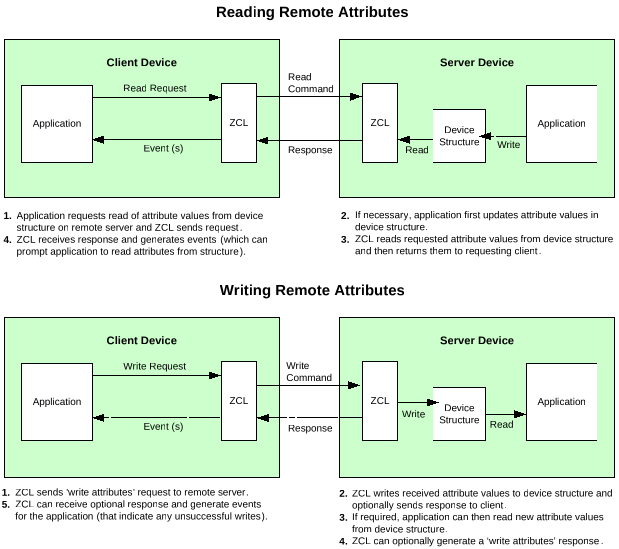
Note: Provided that there are no remote attribute writes, the attributes of a cluster server (in the shared structure) on a device are maintained by the local application(s).
Parent topic:ZCL Fundamentals and Features
Accessing Attributes
This section describes the processes of reading and writing cluster attributes on a remote node. For the attribute access function descriptions, refer to Section 5.2.
Attribute Access Permissions
For each attribute of a cluster, access permissions should be defined for the different types of access to the attribute. These permissions are configured using control flags, with one flag for each access type, as follows:
Access Type |
Flag |
Description |
|---|---|---|
Read |
E_ZCL_AF_RD |
Global commands can read the attribute value |
Write |
E_ZCL_AF_WR |
Global commands can write a new value to the attribute |
Report |
E_ZCL_AF_RP |
Global commands can report the value of the attribute or configure the attribute for default reporting |
Scene |
E_ZCL_AF_SE |
The attribute can be accessed through a scene (if the Scenes cluster is implemented on the same endpoint) |
If a particular access type is required for an individual attribute, the corresponding flag must be defined for that attribute. This is done in the C header file for the cluster. For example, in the case of the On/Off cluster, the required flags must be defined for each attribute in the following structure in the OnOff.c file:
const tsZCL_AttributeDefinition asCLD_OnOffClusterAttributeDefinitions[] = {
#ifdef ONOFF_SERVER
  {E_CLD_ONOFF_ATTR_ID_ONOFF, (E_ZCL_AF_RD|E_ZCL_AF_SE|E_ZCL_AF_RP), E_ZCL_BOOL,
  (uint32)(&((tsCLD_OnOff*)(0))->bOnOff),0}, /* Mandatory */
#ifdef CLD_ONOFF_ATTR_GLOBAL_SCENE_CONTROL
  {E_CLD_ONOFF_ATTR_ID_GLOBAL_SCENE_CONTROL, (E_ZCL_AF_RD), _ZCL_BOOL,
  (uint32)(&((tsCLD_OnOff*)(0))->bGlobalSceneControl),0}, /* Optional */
#endif
#ifdef CLD_ONOFF_ATTR_ON_TIME
  {E_CLD_ONOFF_ATTR_ID_ON_TIME, E_ZCL_AF_RD|E_ZCL_AF_WR), E_ZCL_UINT16,
  (uint32)(&((tsCLD_OnOff*)(0))->u16OnTime),0}, /* Optional */
#endif
#ifdef CLD_ONOFF_ATTR_OFF_WAIT_TIME
  {E_CLD_ONOFF_ATTR_ID_OFF_WAIT_TIME, (E_ZCL_AF_RD|E_ZCL_AF_WR), E_ZCL_UINT16,
  (uint32)(&((tsCLD_OnOff*)(0))->u16OffWaitTime),0}, /* Optional */
#endif
#ifdef CLD_ONOFF_ATTR_STARTUP_ONOFF
  /* ZLO extension for OnOff Cluster */
  {E_CLD_ONOFF_ATTR_ID_STARTUP_ONOFF, E_ZCL_AF_RD|E_ZCL_AF_WR), E_ZCL_ENUM8,
  (uint32)(&((tsCLD_OnOff*)(0))->eStartUpOnOff),0}, /* Optional */
#endif
#endif
  {E_CLD_GLOBAL_ATTR_ID_CLUSTER_REVISION, (E_ZCL_AF_RD|E_ZCL_AF_GA), E_ZCL_UINT16,
  (uint32)(&((tsCLD_OnOff*)(0))->u16ClusterRevision),0}, /* Mandatory */
  #if (defined ONOFF_SERVER) && (defined CLD_ONOFF_ATTR_ATTRIBUTE_REPORTING_STATUS)
  {E_CLD_GLOBAL_ATTR_ID_ATTRIBUTE_REPORTING_STATUS,(E_ZCL_AF_RD|E_ZCL_AF_GA), E_ZCL_ENUM8,
  (uint32)(&((tsCLD_OnOff*)(0))->u8AttributeReportingStatus),0}, /* Optional */
#endif
};
Note: The flag E_ZCL_AF_GA indicates a global attribute.
Parent topic:Accessing Attributes
Reading Attributes
A ZigBee 3.0 application might require to read attribute values from a remote device. Attributes are read by sending a ‘read attributes’ request, normally from a client cluster to a server cluster. This request can be sent using a general ZCL function (see below) or using a function which is specific to the target cluster. The cluster-specific functions for reading attributes are covered in the chapters of this manual that describe the supported clusters.
Note: Users should enable read access to cluster attributes explicitly at compile-time as described in Section 1.3.
A ZCL function is provided for reading a set of attributes of a remote cluster instance, as described in Section 2.3.2.1. A function is also provided for reading a local cluster attribute value, as described in Section 2.3.2.2.
Reading a set of attributes of a remote cluster
This section describes the use of the function eZCL_SendReadAttributesRequest() to send a ‘read attributes’ request to a remote cluster in order to obtain the values of selected attributes. The resulting activities on the source and destination nodes are outlined below and illustrated in the figure ‘Write Attributes’ Request and Response below. The events generated from a ‘read attributes’ request are further described in Chapter 3.
Note: The described sequence is similar when using the cluster-specific ‘read attributes’ functions.
1. On Source Node
The function eZCL_SendReadAttributesRequest() is called to submit a request to read one or more attributes on a cluster on a remote node. The information required by this function includes the following:
Source endpoint (from which the read request is to be sent)
Address of destination node for request
Destination endpoint (on destination node)
Identifier of the cluster containing the attributes [enumerations provided]
Number of attributes to be read
Array of identifiers of attributes to be read [enumerations provided]
2. On Destination Node
On receiving the ‘read attributes’ request, the ZCL software on the destination node performs the following steps:
Generates an
E_ZCL_CBET_READ_REQUESTevent for the destination endpoint callback function which, if required, can update the shared device structure that contains the attributes to be read, before the read takes place.If tasks within the application are not cooperative, the ZCL generates an
E_ZCL_CBET_LOCK_MUTEXevent for the endpoint callback function, which should lock the mutex that protects the shared device structure - for information on mutexes, refer to Appendix A.Reads the relevant attribute values from the shared device structure and creates a ‘read attributes’ response message containing the read values.
If tasks within the application are not cooperative, the ZCL generates an
E_ZCL_CBET_UNLOCK_MUTEXevent for the endpoint callback function, which should now unlock the mutex that protects the shared device structure (other application tasks can now access the structure).Sends the ‘read attributes’ response to the source node of the request.
3. On Source Node
On receiving the ‘read attributes’ response, the ZCL software on the source node performs the following steps:
For each attribute listed in the ‘read attributes’ response, it generates an
E_ZCL_CBET_READ_INDIVIDUAL_ATTRIBUTE_RESPONSEmessage for the source endpoint callback function, which may or may not take action on this message.On completion of the parsing of the ‘read attributes’ response, it generates a single
E_ZCL_CBET_READ_ATTRIBUTES_RESPONSEmessage for the source endpoint callback function, which may or may not take action on this message. ‘Read Attributes’ Request and Response |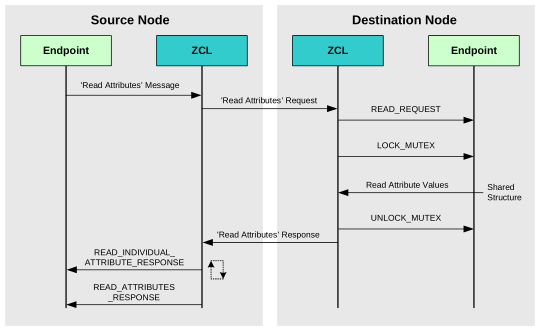 |
|
Note: The ‘read attributes’ requests and responses arrive at their destinations as data messages. Such a message triggers a stack event of the type ZPS_EVENT_APS_DATA_INDICATION, which is handled as described in Section 3.2.
Parent topic:Reading Attributes
Reading an Attribute of a Local Cluster
An individual attribute of a cluster on the local node can be read using the function eZCL_ReadLocalAttributeValue(). The read value is returned by the function (in a memory location for which a pointer must be provided).
Parent topic:Reading Attributes
Parent topic:Accessing Attributes
Writing Attributes
The ZCL provides functions for writing attribute values to both remote and local clusters, as described in Section 2.3.3.1 and Section 2.3.3.2 respectively.
Writing to Attributes of a Remote Cluster
A ZigBee 3.0 application might require to write attribute values to a remote device. Attribute values are written by sending a ‘write attributes’ request, normally from a client cluster to a server cluster, where the relevant attributes in the shared device structure are updated. Write access to cluster attributes must be explicitly enabled at compile time as described in Section 1.3.
Three ‘write attributes’ functions are provided in the ZCL:
eZCL_SendWriteAttributesRequest(): This function sends a ‘write attributes’ request to a remote device, which attempts to update the attributes in its shared structure. The remote device generates a ‘write attributes’ response to the source device, indicating success or listing error codes for any attributes that it could not update.
eZCL_SendWriteAttributesNoResponseRequest(): This function sends a ‘write attributes’ request to a remote device, which attempts to update the attributes in its shared structure. However, the remote device does not generate a ‘write attributes’ response, regardless of whether there are errors.
eZCL_SendWriteAttributesUndividedRequest(): This function sends a ‘write attributes’ request to a remote device, which checks that all the attributes can be written to without error:
If all attributes can be written without error, all the attributes are updated.
If any attribute is in error, all the attributes are left at their existing values.
The remote device generates a ‘write attributes’ response to the source device, indicating success or listing error codes for attributes that are in error.
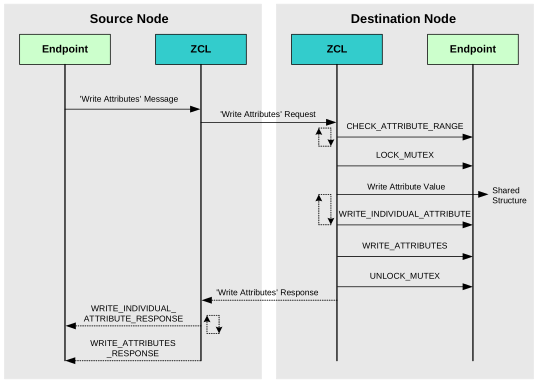
The activities surrounding a ‘write attributes’ request on the source and destination nodes are outlined below and illustrated in 1](reading_a_set_of_attributes_of_a_remote_cluster.md#fig2). The events generated from a ‘write attributes’ request are further described in Chapter 3.
1. On Source Node
In order to send a ‘write attributes’ request, the application on the source node calls one of the above ZCL ‘write attributes’ functions to submit a request to update the relevant attributes on a cluster on a remote node. The information required by this function includes the following:
Source endpoint (from which the write request is to be sent)
Address of destination node for request
Destination endpoint (on destination node)
Identifier of the cluster containing the attributes [enumerations provided]
Number of attributes to be written
Array of identifiers of attributes to be written [enumerations provided]
2. On Destination Node
On receiving the ‘write attributes’ request, the ZCL software on the destination node performs the following steps:
For each attribute to be written, generates an E_ZCL_CBET_CHECK_ATTRIBUTE_RANGE event for the destination endpoint callback function.
If required, the callback function can do either or both of the following:
Check that the new attribute value is in the correct range - if the value is out-of-range, the function should set the
eAttributeStatusfield of the event to E_ZCL_ERR_ATTRIBUTE RANGEBlock the write by setting the the
eAttributeStatusfield of the event to E_ZCL_DENY_ATTRIBUTE_ACCESS
In the case of an out-of-range value or a blocked write, there is no further processing for that particular attribute following the ‘write attributes’ request.
If tasks within the application are not cooperative, the ZCL generates an E_ZCL_CBET_LOCK_MUTEX event for the endpoint callback function, which should lock the mutex that protects the relevant shared device structure - for information on mutexes, refer to Appendix A.
Writes the relevant attribute values to the shared device structure - an E_ZCL_CBET_WRITE_INDIVIDUAL_ATTRIBUTE event is generated for each individual attempt to write an attribute value, which the endpoint callback function can use to keep track of the successful and unsuccessful writes.
Note: If an ‘undivided write attributes’ request is received, an individual failed write would render the whole update process unsuccessful.
Generates an E_ZCL_CBET_WRITE_ATTRIBUTES event to indicate that all relevant attributes have been processed and, if required, creates a ‘write attributes’ response message for the source node.
If tasks within the application are not cooperative, the ZCL generates an E_ZCL_CBET_UNLOCK_MUTEX event for the endpoint callback function, which should now unlock the mutex that protects the shared device structure (other application tasks can now access the structure).
If required, sends a ‘write attributes’ response to the source node of the request.
3. On Source Node
On receiving an optional ‘write attributes’ response, the ZCL software on the source node performs the following steps:
For each attribute listed in the ‘write attributes’ response, it generates an E_ZCL_CBET_WRITE_INDIVIDUAL_ATTRIBUTE_RESPONSE message for the source endpoint callback function, which may or may not take action on this message. Only attributes for which the write has failed are included in the response and will therefore result in one of these events.
On completion of the parsing of the ‘write attributes’ response, it generates a single E_ZCL_CBET_WRITE_ATTRIBUTES_RESPONSE message for the source endpoint callback function, which may or may not take action on this message.
| |
|
Note: The ‘write attributes’ requests and responses arrive at their destinations as data messages. Such a message triggers a stack event of the type ZPS_EVENT_APS_DATA_INDICATION, which is handled as described in Chapter 3.
Parent topic:Writing Attributes
Writing an Attribute Value to a Local Cluster
An individual attribute of a cluster on the local node can be written to using the function eZCL_WriteLocalAttributeValue(). The function is blocking, returning only once the value has been written.
Parent topic:Writing Attributes
Parent topic:Accessing Attributes
Attribute Discovery
A ZigBee cluster may have mandatory and/or optional attributes. The desired optional attributes are enabled in the cluster structure. An application running on a cluster client may need to discover which optional attributes are supported by the cluster server.
The ZCL provides functionality to perform the necessary ‘attribute discovery’, as described in the rest of this section.
Note:
‘Extended’ attribute discovery is also available. When this optional attribute is used, the accessibility of each reported attribute is also indicated. This is described in Appendix C.
Alternatively, the application on a cluster client can check whether a particular attribute exists on the cluster server by attempting to read the attribute (see Section 2.3.2) - if the attribute does not exist on the server, an error is returned.
Compile-time Options
If required, the attribute discovery feature must be explicitly enabled on the cluster server and client at compile time by including the relevant defines, from those below, in the zcl_options.h files:
#define ZCL_ATTRIBUTE_DISCOVERY_SERVER_SUPPORTED
#define ZCL_ATTRIBUTE_DISCOVERY_EXTENDED_SERVER_SUPPORTED
#define ZCL_ATTRIBUTE_DISCOVERY_CLIENT_SUPPORTED
#define ZCL_ATTRIBUTE_DISCOVERY_EXTENDED_CLIENT_SUPPORTED
Application Coding
The application on a cluster client can initiate a discovery of the attributes on the cluster server by calling the function eZCL_SendDiscoverAttributesRequest(), which sends a ‘discover attributes’ request to the server. This function allows a range of attributes to be searched for, defined by:
The ‘start’ attribute in the range (the attribute identifier must be specified)
The number of attributes in the range
Initially, the start attribute should be set to the first attribute of the cluster. If the discovery request does not return all the attributes used on the cluster server, the above function should be called again with the start attribute set to the next ‘undiscovered’ attribute. Multiple function calls may be required to discover all of the attributes used on the server.
On receiving a discover attributes request, the server handles the request automatically (provided that attribute discovery has been enabled in the compile-time options - see above) and replies with a ‘discover attributes’ response containing the requested information.
The arrival of this response at the client results in an E_ZCL_CBET_DISCOVER_INDIVIDUAL_ATTRIBUTE_RESPONSE event for each attribute reported in the response. Therefore, multiple events normally result from a single discover attributes request. This event contains details of the reported attribute in a tsZCL_AttributeDiscoveryResponse structure (see Section 6.1.10).
Following the event for the final attribute reported, the event E_ZCL_CBET_DISCOVER_ATTRIBUTES_RESPONSE is generated to indicate that all attributes from the discover attributes response have been reported.
Parent topic:Accessing Attributes
Attribute Reporting
A cluster client can poll the value of an attribute on the cluster server by sending a ‘read attributes’ request, as described in Section 2.3.2. Alternatively, the server can issue unsolicited attribute reports to the client using the ‘attribute reporting’ feature (in which case there is no need for the client to request attribute values).
The attribute reporting mechanism reduces network traffic compared with the polling method. It also allows a sleeping server to report its attribute values while it is awake. Attribute reporting is an optional feature and is not supported by all devices.
An ‘attribute report’ (from server to client) can be triggered in one of the following ways:
by the user application (on the server device)
automatically (triggered by a change in the attribute value or periodically)
Automatic attribute reporting for an attribute can be enabled and configured remotely from the client or, for some attributes, locally on the server (see below). If it is required, automatic attribute reporting must be enabled at compile-time on both the cluster server and client. Automatic attribute reporting is more fully described in Appendix B.1 and the configuration of attribute reporting is detailed in Appendix B.3.
The ZCL specification states that certain attributes of a cluster must be reportable. Attribute reporting for these attributes remains optional but can be enabled for the individual attributes using a flag (E_ZCL_AF_RP) in the attribute definition structure - see the example code for the On/Off cluster in Section 2.3.1. This defines those attributes that the cluster server will report by default, known as ‘default reporting’, but reports on other attributes can be requested/configured by the cluster client.
Note: Attribute reporting configuration data should be preserved in Non-Volatile Memory (NVM) to allow automatic attribute reporting to resume following a reset of the server device. Persisting this data in NVM is described in Appendix B.7.
An attribute report can be issued directly by the server application as follows:
For all reportable attributes using the function eZCL_ReportAllAttributes()
For an individual reportable attribute using the function eZCL_ReportAttribute()
Only standard attributes can be reported (this does not include manufacturer-specific attributes) and only those attributes for which reporting has been enabled. This method of attribute reporting does not require any configuration, apart from enabling reports for the desired attributes. In this case, attribute reporting does not need to be enabled at compile-time on the server, but it still needs to be enabled at compile-time on the client to allow the client to receive attribute reports.
Sending an attribute report from the server is further described in Appendix B.4 and receiving an attribute report on the client is described in Appendix B.5.
Parent topic:Accessing Attributes
Parent topic:ZCL Fundamentals and Features
Global Attributes
There are two global attributes that are used in multiple clusters. These attributes are additions to the ZCL r6 for ZigBee 3.0 and are described below.
ClusterRevision
The ClusterRevision global attribute is mandatory in all clusters. It indicates the revision of the cluster used by the current instance of the cluster on the local endpoint. The cluster specification from the ZCL r6 acts as the baseline for the revision numbering of a cluster - this is revision 1 of the cluster. The cluster revision number is incremented by one for each subsequent update of the cluster specification. Those cluster specifications that pre-date the ZCL r6 have assumed revision numbers of 0. To check that the local cluster instance is interoperable with a remote instance of the same cluster (perhaps based on a different cluster revision), the ClusterRevision attribute on the remote node should be read - if the remote cluster instance is based on an earlier cluster revision that does not support an essential feature, the two cluster instances will not be interoperable.
AttributeReportingStatus
The AttributeReportingStatus global attribute is optional and used only when attribute reporting is enabled for the cluster (see Section 2.3.5). Where ‘attribute report’ messages are generated for multiple attributes, this attribute indicates whether there are reports pending (0x00) or the reports are complete (0x01).
Parent topic:ZCL Fundamentals and Features
Default Responses
The ZCL provides a default response which is generated in reply to a unicast command in the following circumstances:
When there is no other relevant response and the requirement for default responses has not been disabled on the endpoint that sent the command.
When an error results from a unicast command and there is no other relevant response, even if the requirement for default responses has been disabled on the endpoint that sent the command.
The default response disable setting is made in the bDisableDefaultResponse field of the structure tsZCL_EndPointDefinition detailed in Section 6.1.1. This setting dictates the value of the ‘disable default response’ bit in messages sent by the endpoint. The receiving device then uses this bit to determine whether to return a default response to the source device.
The default response includes the ID of the command that triggered the response and a status field (see Section 6.1.9). Therefore, in the case of an error, the command ID field of the default response contains the the identity of the command that caused the error.
Note: The default response can be generated on reception of all commands, including responses (for example, a ‘read attributes’ response) but not other default responses.
Parent topic:ZCL Fundamentals and Features
Handling Commands for Unsupported Clusters
A node might receive a cluster-specific command or general command for a cluster that is not supported. In such a case, the ZCL sends a ‘default response’ containing the status code E_ZCL_CMDS_UNSUPPORTED_CLUSTER to the originator of the command. This is the standard method of handling the unsupported command (as described in the ZCL specification). Default responses are described in Section 2.5.
The NXP implementation of the ZCL provides an alternative method for dealing with commands for unsupported clusters. A user-defined callback function can be introduced which is invoked when a command is received for an unsupported cluster. This function determines whether the application will handle the command and returns a Boolean value:
If the callback function returns TRUE, the ZCL passes the unsupported command to the application in an appropriate event. For example, consider the case when a Report Attribute command is received for the Occupancy Sensing cluster which is not supported by the device. If the callback function opts to allow the application to handle this command, the callback function returns TRUE and the ZCL then passes the command to the main application in the event E_ZCL_CBET_REPORT_INDIVIDUAL_ATTRIBUTE or E_ZCL_CBET_REPORT_ATTRIBUTES, as appropriate.
If the callback function returns FALSE, the ZCL handles the unsupported command in the standard way by sending a default response containing the status E_ZCL_CMDS_UNSUPPORTED_CLUSTER. The application is not notified about the received command.
The prototype for the user-defined callback function is as follows:
bool_t bZCL_OverrideHandlingEntireProfileCmd(uint16 u16ClusterId);
where u16ClusterId is the ZigBee identifier of the cluster to which the command relates.
This callback function can be registered with the ZCL using the function vZCL_RegisterHandleGeneralCmdCallBack(), detailed in Section 5.1.
Parent topic:ZCL Fundamentals and Features
Handling Commands from Other Manufacturers
Every manufacturer of ZigBee Certified Products is allocated a manufacturer code by the ZigBee Alliance. The manufacturer code for NXP is 0x1037. A manufacturer-specific command that is sent by a node contains the manufacturer code for the node manufacturer.
By default, the NXP implementation of the ZCL rejects manufacturer-specific commands containing manufacturer codes other than NXP’s own code. For a rejected command, the ZCL sends a ‘default response’ containing the status code E_ZCL_CMDS_UNSUP_MANUF_CLUSTER_COMMAND to the originator of the command. Default responses are described in Section 2.5.
However, a mechanism is available to handle multiple manufacturer codes. A user-defined callback function can be introduced, which is invoked when a manufacturer-specific command is received containing a non-NXP manufacturer code. This function determines whether the application handles the command and returns a Boolean value:
If the callback function returns TRUE, the ZCL passes the command to the application in an appropriate event.
If the callback function returns FALSE, the ZCL handles the command with in the standard way by sending a default response containing the status E_ZCL_CMDS_UNSUP_MANUF_CLUSTER_COMMAND. The application is not notified about the received command.
The prototype for the user-defined callback function is as follows:
bool_t bZCL_IsManufacturerCodeSupported(uint16 u16ManufacturerCode);
where u16ManufacturerCode is the manufacturer code in the received command.
This callback function can be registered with the ZCL using the function vZCL_RegisterCheckForManufCodeCallBack(), detailed in Section 5.1.
Parent topic:ZCL Fundamentals and Features
Bound Transmission Management
ZigBee PRO provides the facility for bound transfers/transmissions. In this case, a source endpoint on one node is bound to one or more destination endpoints on other nodes. Data sent from the source endpoint is then automatically transmitted to all the bound endpoints (without the need to specify destination addresses). The bound transmission is handled by a Bind Request Server on the source node. Binding, bound transfers, and the Bind Request Server are fully described in the ZigBee 3.0 Stack User Guide (JNUG3130).
Congestion may occur if a new bound transmission is requested while the Bind Request Server is still busy completing the previous bound transmission (still sending packets to bound nodes). This causes the new bound transmission to fail. The ZCL software incorporates a feature for managing bound transmission requests, so not to overload the Bind Request Server and cause transmissions to fail.
Note: The alternative to using this feature is for the application to re-attempt bound transmissions that fail.
If this feature is enabled and a bound transmission request submitted to the Bind Request Server fails, the bound transmission APDU is automatically put into a queue. A one-second scheduler periodically takes the APDU at the head of the queue and submits it to the Bind Request Server for transmission. If this bound transmission also fails, the APDU is returned to the bound transmission queue.
The bound transmission queue has the following properties:
Number of buffers in the queue
Size of each buffer, in bytes
The feature is enabled and the above properties are defined at compile-time, as described below.
Note: If a single APDU does not fit into a single buffer in the queue, it is stored in multiple buffers (provided that enough buffers are available).
Compile-time Options
In order to use the bound transmission management feature, the following definitions are required in the zcl_options.h file.
Add this line to enable the bound transmission management feature:
#define CLD_BIND_SERVER
Add this line to define the number of buffers in the bound transmission queue (in this example, the queue will contain four buffers):
#define MAX_NUM_BIND_QUEUE_BUFFERS 4
Add this line to define the size, in bytes, of a buffer in the bound transmission queue (in this example, the buffer size is 60 bytes):
#define MAX_PDU_BIND_QUEUE_PAYLOAD_SIZE 60
Certain clusters and the ‘attribute reporting’ feature allow APS acknowledgements to be disabled for bound transmissions. The required definitions are detailed in the cluster-specific compile-time options.
Parent topic:ZCL Fundamentals and Features
Command Discovery
The ZCL provides the facility to discover the commands that a cluster instance on a remote device can receive and generate. This is useful since an individual cluster instance may not be able to receive or generate all of the commands that are theoretically supported by the cluster.
The commands that are supported by a cluster (and that can therefore potentially be discovered) are defined in a Command Definition table which is enabled in the cluster definition when Command Discovery is enabled (see Section 6.1.2).
Two ZCL functions are provided to implement the Command Discovery feature (as indicated in Section 2.9.1 below and fully described in Section 5.3).
Discovering Command Sets
The commands supported by a remote cluster instance can be discovered as described below.
Discovering commands that can be received
The commands that can be received by an instance of a cluster on a remote device can be discovered using the function
eZCL_SendDiscoverCommandReceivedRequest()
This function sends a request to the remote cluster instance, which responds with a list of commands (identified by their Command IDs). On receiving this response, the following events are generated on the local device:
E_ZCL_CBET_DISCOVER_INDIVIDUAL_COMMAND_RECEIVED_RESPONSE
This event is generated for each individual command reported in the response. The reported information is contained in a structure of the type
tsZCL_CommandDiscoveryIndividualResponse(see Section 6.1.17).
E_ZCL_CBET_DISCOVER_COMMAND_RECEIVED_RESPONSE
This event is generated after all the above individual events, in order to indicate the end of these events. The reported information is contained in a structure of the type
tsZCL_CommandDiscoveryResponse(see Section 6.1.18).
Discovering commands that can be generated
The commands that can be generated by an instance of a cluster on a remote device can be discovered using the function
eZCL_SendDiscoverCommandGeneratedRequest()
This function sends a request to the remote cluster instance, which responds with a list of commands (identified by their Command IDs). On receiving this response, the following events are generated on the local device:
E_ZCL_CBET_DISCOVER_INDIVIDUAL_COMMAND_GENERATED_RESPONSE
This event is generated for each individual command reported in the response. The reported information is contained in a structure of the type
tsZCL_CommandDiscoveryIndividualResponse(see Section 6.1.17).
E_ZCL_CBET_DISCOVER_COMMAND_GENERATED_RESPONSE
This event is generated after all the above individual events, in order to indicate the end of these events. The reported information is contained in a structure of the type
tsZCL_CommandDiscoveryResponse(see Section 6.1.18).
Note: The above functions can be called multiple times to discover the commands in stages. After each call, the tsZCL_CommandDiscoveryResponse structure contains a Boolean flag which indicates whether there are more commands to be discovered (see Section 6.1.18). For complete details, refer to the function descriptions in Section 5.3.
Parent topic:Command Discovery
Compile-time Options
If required, the Command Discovery feature must be enabled at compile-time.
To enable the feature, the following must be defined at both the local and remote ends:
#define ZCL_COMMAND_DISCOVERY_SUPPORTED
To enable the handling of Command Discovery requests and the generation of responses at the remote end, the following must be defined on the remote device:
#define ZCL_COMMAND_RECEIVED_DISCOVERY_SERVER_SUPPORTED
#define ZCL_COMMAND_GENERATED_DISCOVERY_SERVER_SUPPORTED
To enable the handling of Command Discovery responses at the local end, the following must be defined on the local device:
#define ZCL_COMMAND_RECEIVED_DISCOVERY_CLIENT_SUPPORTED
#define ZCL_COMMAND_GENERATED_DISCOVERY_CLIENT_SUPPORTED
Parent topic:Command Discovery
Parent topic:ZCL Fundamentals and Features