Ancillary Features and Resources for OTA Upgrade
As indicated in Section 49.5, in order to implement OTA upgrades, a number of other software features and resources are available. These are described in the sub-sections below.
Rate Limiting
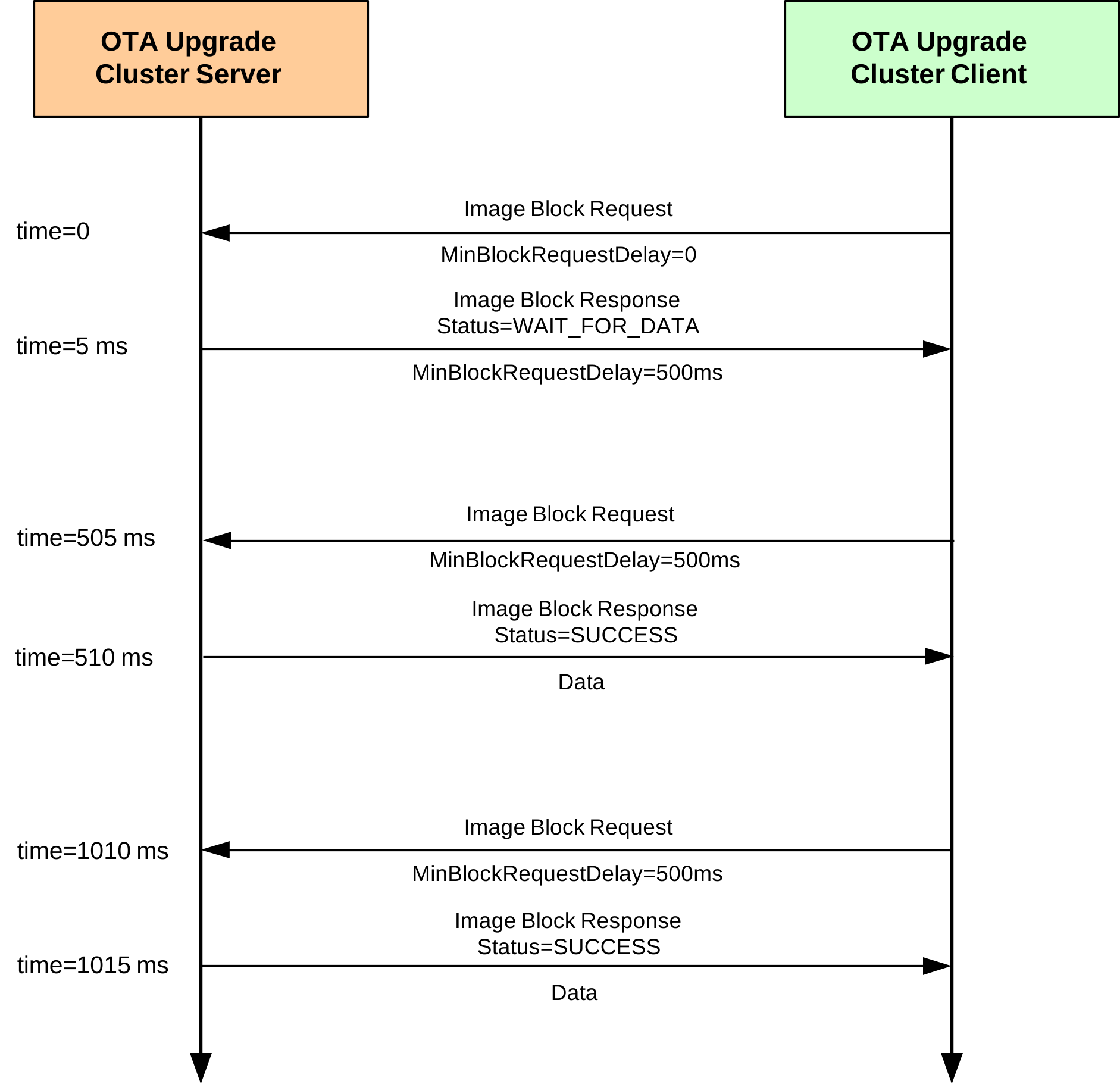
During busy periods when the OTA Upgrade server is downloading images to multiple clients, it is possible to prevent OTA traffic congestion by limiting the download rates to individual clients. This is achieved by introducing a minimum time-delay between consecutive Image Block Requests from a client - for example, if this delay is set to 500 ms for a particular client then after sending one block request to the server, the client must wait at least 500 ms before sending the next block request. This has the effect of restricting the average OTA download rate from the server to the client.
This ‘block request delay’ can be set to different values for different clients. This allows OTA downloads to be prioritized by granting more download bandwidth to some clients than to others. This delay for an individual client can also be modified by the server during a download, allowing the server to react in real-time to varying OTA traffic levels.
The implementation of the above rate limiting is described below and is illustrated in the Figure “Example of Rate limiting exchange” below.
‘Block Request Delay’ Attribute
The download rate to an individual client is controlled using the optional attribute u16MinBlockRequestDelay of the OTA Upgrade cluster (see Section 49.3) on the client. This attribute contains the ‘block request delay’ for the client (described above), in milliseconds, and must be enabled on the client only (see below).
Note: The u16MinBlockRequestDelay attribute is the minimum time-interval between block requests. The application on the client can implement longer intervals between these requests (a slower download rate), if required.
Enabling the Rate Limiting Feature
In order to use the rate limiting feature during an OTA upgrade, the macro OTA_CLD_ATTR_REQUEST_DELAY must be defined in the zcl_options.h file for both the participating client(s). This enables the u16MinBlockRequestDelay attribute in the OTA Upgrade cluster structure.
Implementation in the Server Application
The application on the OTA Upgrade server device can control the OTA download rate to an individual client by remotely setting the value of the ‘block request delay’ attribute on the client. However, first the server must determine whether the client supports the rate limiting feature. The server can do this in either of two ways:
It can attempt to read the
u16MinBlockRequestDelayattribute in the OTA Upgrade cluster on the client - if rate limiting is not enabled on the client, this read will yield an error.It can check whether the first Image Block Request received from the client contains a ‘block request delay’ field - if present, this value is passed to the application in the event E_CLD_OTA_COMMAND_BLOCK_REQUEST.
The server can change the value of the ‘block request delay’ attribute on the client at any time, even during a download. To do this, the server includes the new attribute value in an Image Block Response with status OTA_STATUS_WAIT_FOR_DATA. This is achieved in the application code through a call to the function eOTA_SetWaitForDataParams() following an Image Block Request (indicated by an E_CLD_OTA_COMMAND_BLOCK_REQUEST event). The new attribute value specified in this function call is included in the subsequent Image Block Response and is automatically written to the OTA Upgrade cluster on the client.
The server may update the ‘block request delay’ attribute on a client multiple times during a download in order to react to changing OTA traffic conditions. If the server is downloading an image to only one client then it may choose to allow this download to proceed at the full rate (specified by a zero value of the attribute on the client). However, if two or more clients request downloads at the same time, the server may choose to limit their download rates (by setting the attribute to non-zero values on the clients). The download to one client can be given higher priority than other downloads by setting the attribute on this client to a lower value.
Implementation in the Client Application
The application on the OTA Upgrade client device must control a millisecond timer (a timer with a resolution of one millisecond) to support rate limiting. This timer is used to time the delay between receiving an Image Block Response and submitting the next Image Block Request.
During an image download, a received Image Block Response with the status OTA_STATUS_WAIT_FOR_DATA may contain a new value for the ‘block request delay’ attribute (this type of response may arrive at the start of a download or at any time during the download). The client will automatically write this new value to the u16MinBlockRequestDelay attribute in the local OTA Upgrade cluster structure and will also generate the event E_ZCL_CBET_ENABLE_MS_TIMER (provided that the new attribute value is non-zero).
The E_ZCL_CBET_ENABLE_MS_TIMER event prompts the application to start the millisecond timer for a timed interval greater than or equal to the new value of the ‘block request delay’ attribute. The application can obtain this new attribute value (in milliseconds) from the event via:
sZCL_CallBackEvent.uMessage.u32TimerPeriodMs
The millisecond timer is started for a particular timed interval. The expiry of this timer is indicated by an E_ZCL_CBET_TIMER_MS event, which is handled as described in Section 3.2. The client will then send the next Image Block Request.
After sending an Image Block Request:
If the client now generates an E_ZCL_CBET_DISABLE_MS_TIMER event, this indicates that the last of the Image Block Request (for the required image) has been sent and the application should disable the millisecond timer.
Otherwise, the application must start the next timed interval (until the next request).
Example of Rate limiting exchange
Parent topic:Ancillary Features and Resources for OTA Upgrade
Device-Specific File Downloads
An OTA Ugrade client can request a file (from the server) that is specific to the client device. This file may contain non-firmware data such as security credentials, configuration data or log data. The process of making this request and receiving the file is described in the table below for both the client and server sides.
On Client |
On Server |
|
|---|---|---|
1 |
Client application sends a Query Specific File Request to the server through a call to eOTA_ClientQuerySpecificFileRequest(). |
|
2 |
On arrival at the server, the Query Specific File Request triggers the event E_CLD_OTA_COMMAND_QUERY_SPECI-FIC_FILE_REQUEST. |
|
3 |
Server automatically replies to the request with a Query Specific File Response - the application can also send a response using eOTA_ServerQuerySpecificFileResponse(). |
|
4 |
On arrival at the client, the Query Specific File Response triggers the event E_CLD_OTA_COMMAND_QUERY_SPECIFIC_FILE_RESPONSE. |
|
5 |
Client obtains status from Query Specific File Response. If status is SUCCESS, the client automatically requests the device-specific file one block at a time by sending Image Block Requests to the server. |
|
6 |
On arrival at the server, each Image Block Request triggers an Image Block Request event. |
|
7 |
Server automatically responds to each block request with an Image Block Response containing a block of device-specific file data. |
|
8 |
After receiving each Image Block Response, the client generates the event E_CLD_OTA_INTERNAL_COMMAND_SPECIFIC_FILE_BLOCK_RESPONSE. |
|
9 |
A callback function is invoked on the client to handle the event and store the data block (it is the responsibility of the application to store the data in a convenient place). |
|
10 |
Client determines when the entire file has been received (by referring to the file size that was quoted in the Query Specific File Response before the download started). Once all the file blocks have been received: |
E_CLD_OTA_INTERNAL_COMMAND_SPECIFIC_FILE_DL_COMPLETE event is generated by the client to indicate that the file transfer is complete.
The file can optionally be verified by application.
Client sends an Upgrade End Request to the server to indicate that the download is complete, where this request is the result of an application call to the function eOTA_SpecificFileUpgradeEndRequest().
|| |11||On arrival at the server, the Upgrade End Request triggers an Upgrade End Request event.| |12||Server may reply to the Upgrade End Request with an Upgrade End Response containing an instruction of when the client should use the device-specific file (the message contains both the current time and the upgrade time, and hence an implied delay) - see Footnotes 1 and 2 below.| |13|On arrival at the client, the Upgrade End Response triggers an Upgrade End Response event - see Footnotes 1 and 2 below.|| |14|Client will then count down to the upgrade time (in the Upgrade End Response) and, on reaching it, will generate the event E_CLD_OTA_INTERNAL_COMMAND_SPECIFIC_FILE_USE_NEW_FILE. Finally, it is the responsibility of the application to use device-specific file as appropriate.||
Footnotes
1. For a device-specific file download, it is not mandatory for the server to send an Upgrade End Response to the client. In the case of a client which has just finished retrieving a log file from the server, the Upgrade End Response may not be needed. However, if the client has just retrieved a file containing security credentials or configuration data, the Upgrade End Response may be needed to notify the client of when to apply the file. The decision of whether to send an Upgrade End Response for a device-specific file download is manufacturer-specific.
2. If an Upgrade End Response is not received from the server, the client will perform 3 retries to get the response. If it still does not receive a response, the client will generate the event E_CLD_OTA_INTERNAL_COMMAND_SPECIFIC_FILE_NO_UPGRADE_END_RESPONSE.
Parent topic:Ancillary Features and Resources for OTA Upgrade
Image Block Size and Fragmentation
An OTA Upgrade image is normally requested by the OTA Upgrade client one block at a time. The ZigBee frame for the OTA transfer contains various header data as well as payload data and, for this reason, the payload data is limited to about 48 bytes. Therefore, to transfer one image block per frame, the block size must be restricted to 48 bytes or less. The maximum block size can be configured at compile-time through the OTA_MAX_BLOCK_SIZE define in the zcl_options.h file (see Section 49.13).
A block size of greater than 48 bytes can be used but the image block will need to be transferred across two or more ZigBee frames. In this case, fragmentation must be enabled in which the image block data that is assembled in an APDU (Application Protocol Data Unit) on the server is fragmented into multiple NPDUs (Network Protocol Data Unit) for OTA transfer, where one NPDU is transferred in a single ZigBee frame. Fragmentation is enabled on the OTA Upgrade server and client using network parameters of the ZigBee PRO stack, as follows:
On the server: Set the parameter Maximum Number of Transmitted Simultaneous Fragmented Messages to a non-zero value to allow transmitted messages to be fragmented.
On the client: Set the parameter Maximum Number of Received Simultaneous Fragmented Messages to a non-zero value to allow received fragmented messages to be re-assembled.
The network parameter values are set using the ZPS Configuration Editor and are described in the ZigBee 3.0 Stack User Guide (JNUG3130).
Note: **Note:**The 48-byte limit on the payload data in a ZigBee frame is also applicable when image data is requested and transferred one page at a time (see Section 49.8.4). In this case, fragmentation may need to be enabled.
The maximum APDU size must always be greater than the size of an Image Block Response. It is set through the APDU Size parameter of the PDU Manager, where this parameter is amongst the Advanced Device Parameters that can be configured using the ZPS Configuration Editor.
Depending on the image block size, fragmentation is not always an efficient way of transferring image blocks, as the payload of the final NPDU fragment may contain little data and be mostly empty. For example, if the image block size is set to 64 bytes and fragmentation is enabled, each block is transferred in two ZigBee frames, the first may contain 48 bytes of data and the second may contain only 16 bytes of data, leaving 32 empty bytes in the payload. In contrast, if the block size is set to 48 bytes without fragmentation, two consecutive frames would carry 96 bytes of data, and the image transfer would require fewer frames. This is particularly important when transferring an application image to a battery-powered End Device that needs to conserve energy.
Parent topic:Ancillary Features and Resources for OTA Upgrade
Page Requests
An OTA Upgrade client normally requests image data from the server one block at a time, by sending an Image Block Request when it is ready for the next block. The number of requests can be reduced by requesting the image data one page at a time, where a page may contain many blocks of data. Requesting data by pages reduces the OTA traffic and, in the case of battery-powered client device, extends battery life.
A page of data is requested by sending an Image Page Request to the server. This request contains a page size, which indicates the number of data bytes that should be returned by the server following the request (and before the next request is sent, if any). The server still sends the data one block at a time in Image Block Responses. The Image Page Request also specifies the maximum number of bytes that the client device can receive in any one OTA message and the block size must therefore not exceed this limit (in general, the page size should be a multiple of this limit).
It is the responsibility of the client to keep track of the amount of data so far received since the last Image Page Request was issued - this count is updated after each Image Block Response received. Once this count reaches the page size in the request, the client will issue the next Image Page Request (if the download is not yet complete).
During a download that uses page requests:
If the client fails to receive one or more of the requested blocks then the next Image Page Request will request data starting from the offset which corresponds to the first missing block.
If the client fails to receive all the blocks requested in an Image Page Request then the same request will be repeated up to two more times - if the requested data still fails to arrive, the client will switch to using Image Block Requests to download the remaining image data.
An Image Page Request also contains a ‘response spacing’ value. This indicates the minimum time-interval, in milliseconds, that the server should insert between consecutive Image Block Responses. If the client is a sleepy End Device, it may specify a long response spacing so that it can sleep between consecutive Image Block Responses, or it may specify a short response spacing so that it can quickly receive all blocks requested in a page and sleep between consecutive Image Page Requests.
The implementation of the above page requests in an application is described below. The OTA image download process using page requests is similar to the one described in Section 49.7, except the client submits Image Page Requests to the server instead of Image Block Requests.
Enabling the Page Requests Feature
In order to use page requests, the macro OTA_PAGE_REQUEST_SUPPORT must be defined in the zcl_options.h file for the server and client.
In addition, values for the page size and response spacing can also be defined in this file for the client (if non-default values are required) - see below and Section 49.13.
Implementation in the Server Application
The application on the OTA Upgrade server device must control a millisecond timer (a timer with a resolution of one millisecond) to support page requests. This timer is used to implement the ‘response spacing’ specified in an Image Page Request - that is, to time the interval between the transmissions of consecutive Image Block Responses (sent out in response to the Image Page Request).
When the server receives an Image Page Request, it will generate the event E_ZCL_CBET_ENABLE_MS_TIMER to prompt the application to start the millisecond timer for a timed interval equal in value to the ‘response spacing’ in the request. The application can obtain this value (in milliseconds) from the event via:
sZCL_CallBackEvent.uMessage.u32TimerPeriodMs
The millisecond timer is started for a particular timed interval. The expiry of this timer is indicated by an E_ZCL_CBET_TIMER_MS event, which is handled as described in Section 3.2. The server will then send the next Image Block Response.
After sending an Image Block Response:
If the server now generates an E_ZCL_CBET_DISABLE_MS_TIMER event, this indicates that the last of the Image Block Responses (for the Image Page Request) has been sent and the application should disable the millisecond timer.
Otherwise, the application must start the next timed interval (until the next response).
Implementation in the Client Application
There is nothing specific to do in the client application to implement page requests. Provided that page requests have been enabled in the zcl_options.h file for the client (see above), page requests will be automatically implemented by the stack instead of block requests for OTA image downloads. The page size (in bytes) and response spacing (in milliseconds) for these requests can be specified through the following macros in the zcl_options.h file (see Section 49.13):
OTA_PAGE_REQ_PAGE_SIZE
OTA_PAGE_REQ_RESPONSE_SPACING
The default values are 512 bytes and 300 ms, respectively.
However, the client application can itself submit an Image Page Request to the server by calling the function eOTA_ClientImagePageRequest(). In this case, the page size and response spacing are specified in the Image Page Request payload structure as part of this function call.
The client handles the resulting Image Block Responses as described in Section 49.7 for standard OTA downloads.
Parent topic:Ancillary Features and Resources for OTA Upgrade
Persistent Data Management
The OTA Upgrade cluster on a client requires context data to be preserved in non-volatile memory to facilitate a recovery of the OTA Upgrade status following a device reboot. The Non-Volatile Memory Manager (NVM) module should be used to perform this data saving and recovery. The NVM module is implemented as described in the Connectivity Framework Reference Manual.
Persistent data is normally be stored in the upper sector of the devices Flash memory. Thus, when the NVM module is initialized, these sectors should be specified (just these sectors should be managed by the NVM module).
When it needs to save context data, the OTA Upgrade cluster will generate the event E_CLD_OTA_INTERNAL_COMMAND_SAVE_CONTEXT, which will also contain the data to be saved. A user-defined callback function can then be invoked to perform the data storage using functions of the NVM module.
The OTA Upgrade cluster is implemented for an individual application/endpoint. Therefore, the NVM module should also be implemented per endpoint. The following code illustrates the reservation of memory space for persistent data per endpoint.
typedef struct
{
            uint8 u8Endpoints[APP_NUM_OF_ENDPOINTS];
            uint8 eState; // Current application state to re-instate
    tsOTA_PersistedData sPersistedData[APP_NUM_OF_ENDPOINTS];
} tsDevice;
PUBLIC tsDevice s_sDevice;
If a client is restarted and persisted data is available on the device, the OTA Upgrade cluster data should be restored using the function eOTA_RestoreClientData().
Parent topic:Ancillary Features and Resources for OTA Upgrade
Flash Memory Organization
Flash memory should be organized such that the application images are stored from Sector 0 and, if required, persistent data is stored in the final sectors.
The storage of applications and persistent data in Flash memory is described further below. Guidance on the organization of OTA upgrade applications in the devices internal Flash memory is also provided Appendix.
Application Images
As part of application initialization (see Section 49.6), the OTA Upgrade cluster must be informed of the storage arrangements for application images in Flash memory. This is done through the function eOTA_AllocateEndpointOTASpace(), which applies to a specified endpoint (normally the endpoint of the application which calls the function). The information provided via this function includes:
Start sector for each image that can be stored (specified through an array with one element per image). s
Number of images for the endpoint (the maximum number of images per endpoint is specified in the zcl_options.h file - see Section 49.13)
Maximum number of sectors per image
Type of node (server or client)
Public key for signed images
Persistent Data
The storage of persistent data is handled by the NVM module (see Section 49.8.5) and the sector used is specified as part of the NVM initialization through NvModuleInit() - the final sector of Flash memory should be specified.
Parent topic:Ancillary Features and Resources for OTA Upgrade
Low-Voltage Flag
An OTA Upgrade cluster client should not attempt to participate in an OTA upgrade if the supply voltage to the host hardware device is low (below the normal operating voltage for the device). On the device, sufficient voltage is required to write to the internal Flash There may be a number of reasons for a sudden drop in supply voltage - for example, the voltage on a battery-powered node may fall when the battery is near the end of its life.
The OTA Upgrade cluster incorporates a mechanism which, if enabled, stops the cluster client from sending Image Block Requests to the server when the local supply voltage becomes low. This mechanism allows the application to set a low-voltage flag which, when set, automatically suspends the block requests. When the flag is cleared, the block requests are automatically resumed.
If required, use of the low-voltage flag and associated mechanism must be enabled at compile-time by including the following line in the zcl_options.h file:
#define OTA_UPGRADE_VOLTAGE_CHECK
It is the responsibility of the application to check the supply voltage. This check is system-specific and may be performed periodically or using a voltage monitoring feature - for example, on the device, the Supply Voltage Monitor (SVM) can be used, which is described in the MCUXpresso SDK API Reference Manual.
The application can use the function vOTA_SetLowVoltageFlag() to configure the low-voltage flag. This function is detailed in Section 49.10.3.
When a low voltage is detected, the application should make the following function call to set the low-voltage flag and suspend Image Block Requests:
vOTA_SetLowVoltageFlag(TRUE);
When the voltage is restored to a normal level, the application should make the following function call to clear the low-voltage flag and resume Image Block Requests:
vOTA_SetLowVoltageFlag(FALSE);
Parent topic:Ancillary Features and Resources for OTA Upgrade
Parent topic:OTA Upgrade cluster