OTA Upgrade cluster
This chapter describes the Over-The-Air (OTA) Upgrade cluster. The OTA Upgrade cluster has a Cluster ID of 0x0019.
Note: This chapter assumes that the ZigBee 3.0 network consists of nodes which contain only one processor - such as a JN518x, K32W041, K32W061, MCXW71, or MCXW72 microcontroller. However, the OTA Upgrade cluster can also be used with dual-processor nodes (containing a JN518x, K32W041, K32W061, MCXW71, MCXW72 device and a coprocessor), as described in Appendix F.
Overview
The Over-The-Air (OTA) Upgrade cluster provides the facility to upgrade (or downgrade or re-install) application software on the nodes of a ZigBee PRO network by:
Distributing the replacement software through the network (over the air) from a designated node.
Updating the software in a node with minimal interruption to the operation of the node.
The OTA Upgrade cluster acts as a server on the node that distributes the software and as a client on the nodes that receive software updates from the server. The cluster server receives the software from outside the network.
An application that uses the OTA Upgrade cluster must include the header files zcl_options.h and OTA.h.
The OTA Upgrade cluster is enabled by defining CLD_OTA in the zcl_options.h file. Further compile-time options for the OTA Upgrade cluster are detailed in Section 49.13.
When including the OTA Upgrade facility in your application, you should increase the CPU stack size from the default value (as described in Section 49.5).
Parent topic:OTA Upgrade cluster
OTA Upgrade Images in Internal Flash Memory
This section provides guidance on how to organize Over-The-Air (OTA) upgrade images in internal Flash memory on the target node (OTA Upgrade client). The OTA Upgrade cluster is described in Chapter 49.
By default, OTA upgrade images are downloaded to a Flash memory device that is internal to the device of the OTA Upgrade client. However, the images can optionally be downloaded directly to devices internal Flash memory - this is enabled using the compile-time option, OTA_INTERNAL_STORAGE (see Section 49.13).
The function eOTA_AllocateEndpointOTASpace() is used in the application to allocate locations in Flash memory to store application images as part of the OTA upgrade process. The OTA code then uses these locations to store the upgrade image before switching to it, after validation.
There are two issues relating to OTA upgrade and Flash memory remapping:
Whether the size of the OTA upgrade binary file is larger than the previous version, such that it must use another sector
Where in the memory space the OTA image is written to
Consider the following cases.
We have a 154 KB image (5 sectors) and download a new image of the same size, starting at sector 8:
Case 1 (Sector 8)

When we switch to the new image, the physical sectors are moved in the memory map by the bootloader so that the new image becomes the running image and the previous running image becomes the old image. Only the sectors that must be moved are actually moved by the bootloader, and the other sectors are left alone:
Case 2

If we now download a further new image that is 161KB (6 sectors) in size, it would replace the old running image and be placed into logical sectors 8 to 13, which are physical sectors 0, 1, 2, 3, 4 and 13. However, this new image is then unusable because the physical sectors are not contiguous and the bootloader does not take this into account when it remaps the memory (if the new image was less than 160KB, there would be no problem).
The simple solution to this problem is to replace the remapping that the bootloader has chosen with our own remapping in which logical sector 13 becomes physical sector 5, thus allowing the new image to be stored in contiguous physical sectors (0 to 5).
Case 3

However, this does not leave any space for permanent data and it also assumes that the new image is stored at logical sector 8.
You may choose to put the new image anywhere in the Flash memory (ZigBee allows this to be configured, and a user-developed solution is free to do what it requires). So you need to adjust the remapping to match. For example, if the OTA image was placed at logical sector 7:
Case 4

The purpose of this is to leave some sectors at the end of Flash memory for permanent data (otherwise you could always start the OTA image at sector 8).
In such cases, the sensible approach is to:
Calculate how much permanent data space is required and reserve the end sectors for this data.
Divide the remaining space into two equal blocks of sectors
Configure the OTA upgrade to start at the beginning of the second block of sectors.
Force the remapping to swap the two blocks, regardless of the actual image size.
Consider the example in which a user wants 64KB for permanent data, which requires 2 sectors. This leaves 14 sectors for applications, so we have two blocks of 7 sectors for each application (even though the application may be smaller than this):
Case 5

To avoid any problem with the new image growing and needing 6 sectors rather than 5 sectors, we force the remapping to swap all 7 sectors over:
Case 6

This leaves sectors 14 and 15 in a fixed location.
The code to achieve this is as follows:
`     if (u8CurrentImageSector > 0)`
`     { `
`        /* Remapping will not affect the current running image,`
`           which was already running in a continuous block at the base `
`           application Flash address */ `
`        vREG_SysWrite(REG_SYS_FLASH_REMAP,  0x0dcba987); `
`        vREG_SysWrite(REG_SYS_FLASH_REMAP2, 0xfe654321);`
`     }`
Parent topic:OTA Upgrade cluster
OTA Upgrade Cluster structure and attributes
The attributes of the OTA Upgrade cluster are contained in the following structure, which is located only on cluster clients:
typedef struct
{
#ifdef OTA_CLIENT
    uint64 u64UgradeServerID;
    uint32 u32FileOffset;
    uint32 u32CurrentFileVersion;
    uint16 u16CurrentStackVersion;
    uint32 u32DownloadedFileVersion;
    uint16 u16DownloadedStackVersion;
    uint8  u8ImageUpgradeStatus;
    uint16 u16ManfId;
    uint16 u16ImageType;
    uint16 u16MinBlockRequestDelay;
#endif
    uint16 u16ClusterRevision;
} tsCLD_AS_Ota;
where:
u64UgradeServerIDcontains the 64-bit IEEE/MAC address of the OTA Upgrade server for the client. This address can be fixed during manufacture or discovered during network formation/operation. If not pre-set, the default value is 0xFFFFFFFFFFFFFFFF. This attribute is mandatory.u32FileOffsetcontains the start address in local Flash memory of the upgrade image (that may be currently in transfer from server to client). This attribute is optional.u32CurrentFileVersioncontains the file version of the firmware currently running on the client. This attribute is optional.u16CurrentStackVersioncontains the version of the ZigBee stack currently running on the client. This attribute is optional.u32DownloadedFileVersioncontains the file version of the downloaded upgrade image on the client. This attribute is optional.u16DownloadedStackVersioncontains the version of the ZigBee stack for which the downloaded upgrade image was built. This attribute is optional.u8ImageUpgradeStatuscontains the status of the client device in relation to image downloads and upgrades. This attribute is mandatory and the possible values are shown in the table below.
u8ImageUpgradeStatus |
Status |
Notes |
|---|---|---|
0x00 |
Normal |
Has not participated in a download/upgrade or the previous download/upgrade was unsuccessful |
0x01 |
Download in progress |
Client is requesting and successfully receiving blocks of image data from server |
0x02 |
Download complete |
All image data received and image saved to memory |
0x03 |
Waiting to upgrade |
Waiting for instruction from server to upgrade from the saved image |
0x04 |
Count down |
Server instructs the Client to count down to start of upgrade |
0x05 |
Wait for more |
Client is waiting for further upgrade image(s) from server - relevant to multi-processor devices, where each processor requires a different image |
0x06 - 0xFF |
Reserved |
- |
u16ManfIdcontains the device’s manufacturer code, assigned by the ZigBee Alliance. This attribute is optional.u16ImageTypecontains an image type identifier for the upgrade image that is currently being downloaded to the client or waiting on the client for the upgrade process to begin. When neither of these cases apply, the attribute is set to 0xFFFF. This attribute is optional.u16MinBlockRequestDelayis the minimum time, in seconds, that the local client must wait between submitting consecutive block requests to the server during an image download. It is used by the ‘rate limiting’ feature to control the average download rate to the client. The attribute can take values in the range 0 to OTA_BLOCK_REQUEST_DELAY_MAX_VALUE seconds, where this upper limit can be defined in the zcl_options.h file (see Section 49.13) - if undefined, its default value is 5 seconds. The value 0x0000 (default) indicates that the download can be performed at the full rate with no minimum delay between block requests. This attribute is optional.u16ClusterRevisionis a mandatory attribute that specifies the revision of the cluster specification on which this cluster instance is based. The cluster specification in the ZCL r6 corresponds to a cluster revision of 1. The value is incremented by one for each subsequent revision of the cluster specification. This attribute is also described in Section 2.4.
Thus, the OTA Upgrade cluster structure contains only two mandatory elements, u64UgradeServerID and u8ImageUpgradeStatus. The remaining elements are optional, each being enabled/disabled through a corresponding macro defined in the zcl_options.h file (see Section 49.13).
Parent topic:OTA Upgrade cluster
Basic Principles
Over-the-Air (OTA) Upgrade allows the application software on a ZigBee node to be upgraded with minimal disruption to node operation and without physical intervention by the user/installer. For example, there is no need for a cabled connection to the node. Using this technique, the replacement software is distributed to nodes through the wireless network, allowing application upgrades to be performed remotely.
The software upgrade is performed from a node which acts as an OTA Upgrade cluster server, which is able to obtain the upgrade software from an external source. The nodes that receive the upgrade software act as OTA Upgrade cluster clients. The server node and client node(s) may be from different manufacturers.
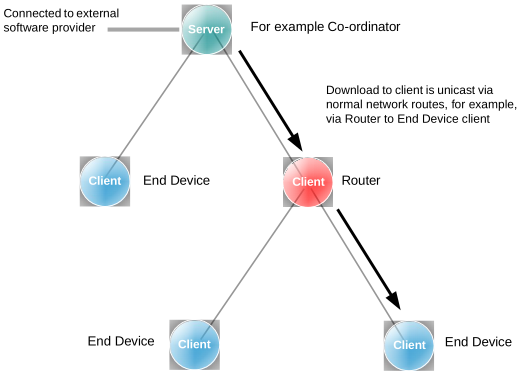
The download of an application image from the server to the network is done on a per client basis and follows normal network routes (including routing via Routers). This is illustrated in the figure below.
OTA Download Example
| |
|
The upgrade application is downloaded into Flash memory internal to the device on the client node. Note that the upper section of Flash memory should normally be reserved for persistent data storage - for example, in an 8-sector Flash device, Sector 7 is used for persistent data storage, leaving Sectors 0-6 available to store application software.
The requirements of the devices which act as the OTA Upgrade cluster server and clients are detailed in the sub-sections below. See Connectivity Framework Reference Manual for details of the Non-Volatile Memory Manager (NVM).
OTA Upgrade Cluster Server
The OTA Upgrade cluster server is a network node that distributes application upgrades to other nodes of the network (as well as performing its own functions). The server must, therefore, be connected to the provider of the upgrade software. The server would also usually be the Coordinator of the ZigBee network.
The server may need to store different upgrade images for different nodes (possibly from different manufacturers) and must have ample Flash memory space for this purpose. Therefore, the server must keep a record of the software required by each client in the network and the software version number that the client is currently on. When a new version of an application image becomes available, the server may notify the relevant client(s) or respond to poll requests for software upgrades from the clients (see Section 49.4.2 below).
Parent topic:Basic Principles
OTA Upgrade Cluster Client
An OTA Upgrade cluster client is a node which receives software upgrades from the server and can be any type of node in a ZigBee network. However, an End Device client which sleeps is not always available to receive notifications of software upgrades from the server and must therefore, periodically poll the server for upgrades. In fact, all types of client can poll the server, if preferred.
During a software download from server to client, the upgrade image is transferred over the air in a series of data blocks. It is the responsibility of the client (and not the server) to keep track of the blocks received and then to validate the final image. The upgrade image is initially saved to the relevant sectors of Flash memory on the client. There must be enough Flash memory space on the client to store the upgrade image and the image of the currently running software.
An OTA upgrade image is downloaded into a Flash memory of the device, utilizing Flash sectors is currently not used for the running image.
Parent topic:Basic Principles
Parent topic:OTA Upgrade cluster
Application Requirements
In order to implement OTA upgrades, the application images for the server and clients must be designed and built according to certain requirements.
These requirements include the following:
Inclusion of the header files zcl_options.h and OTA.h
Inclusion of the relevant #defines in the file zcl_options.h, as described in Section 49.13
Specific application initialization requirements, as outlined in Section 49.6
Use of the Non-Volatile Memory Manager (NVM) to preserve context data, as outlined in Section 49.8.5
Organization of Flash memory, as outlined in Section 49.8.6
It is necessary to remove references to the Certicom security certificate, as indicated in Section 49.13
Note: Some of above requirements differ between the server image, the first client image and client upgrade images. These differences are pointed out, where relevant, in Section 49.6 and Section 49.8.
In addition, you should increase the CPU stack size from the default value. With OTA Upgrade, the recommended stack size is 6000 bytes. This can be done by including the following line in your application makefile:
__stack_size = 6000;
Parent topic:OTA Upgrade cluster
Initialization
Initialization of the various software components used with the OTA Upgrade cluster (see Section 49.5) must be performed in a particular order in the application code. The initialization could be incorporated in a function APP_vInitialise(), as is the case in the NXP ZigBee PRO Application Template (JN-AN-1248).
Initialization must be performed in the following order:
The NVM module must first be initialized using the function NvModuleInit().
The persistent data record(s) should then be initialized using the function and registered NVM_RegisterDataSet().
The ZigBee PRO stack must now be started by first calling the function ZPS_vSetOverrideLocalMacAddress() to over-ride the existing MAC address, followed by ZPS_eAplAfInit() to initialize the Application Framework and then ZPS_eAplZdoStartStack() to start the stack.
The ZCL initialization function, eZCL_Initialise(), can now be called. An OTA Upgrade cluster instance should then be created using eOTA_Create(), followed by a call to eOTA_UpdateClientAttributes() or eOTA_RestoreClientData() on a client to initialize the cluster attributes.
The Flash programming of the OTA Upgrade cluster must now be initialized using the function vOTA_FlashInit().
The required device endpoint(s) can now be registered (for example, a Simple Sensor device).
The function eOTA_AllocateEndpointOTASpace() must be called to allocate Flash memory space to an endpoint. The information provided to this function includes the numbers of the start sectors for storage of application images and the maximum number of sectors per image.
On the server, a set of client devices can be defined for which OTA upgrades are authorized - that is, a list of clients that are allowed to use the server for OTA upgrades. This client list is set up using the function eOTA_SetServerAuthorisation().
For a client, a server must be found (provided this is a first-time start or a reboot with no persisted data, and so there is no record of a previous server address). This can be done by sending out a Match Descriptor Request using the function ZPS_eAplZdpMatchDescRequest(), described in the ZigBee 3.0 Stack User Guide (JNUG3130). Once a server has been found, its address must be registered with the OTA Upgrade cluster using the function eOTA_SetServerAddress().
The coding that is then required to implement OTA upgrade in the server and client applications is outlined in Section 49.7.
Parent topic:OTA Upgrade cluster
Implementing OTA Upgrade Mechanism
The OTA upgrade mechanism is implemented in code as described below.
Note: The stack automatically handles part of an OTA upgrade and calls some of the OTA functions. However, if preferred, the application can handle all aspects of an OTA upgrade and filter all OTA data indications. In this case, the application must call all the relevant OTA functions (these are indicated below).
On the server, when a new client image is available for download, the function eOTA_NewImageLoaded() should be called to request the OTA Upgrade cluster to validate the image.
Then, optionally, the function eOTA_SetServerParams() can be called to set the server parameter values for the new image. Otherwise, the default parameter values will be used.
The server must then notify the relevant client(s) of the availability of the new image. The notification method depends on the ZigBee node type of the client:
Coordinator or Router client: The server can notify the Coordinator or a Router client directly by sending an Image Notify message to the client through a call to the function eOTA_ServerImageNotify(). This message can be unicast, multicast or broadcast. On arrival at a client, this message will trigger an Image Notify event. If the new software is required, the client can request the upgrade image by sending a Query Next Image Request to the server through a call to eOTA_ClientQueryNextImageRequest().
All clients: The server cannot notify an End Device client directly, since the End Device may be asleep when a notification message is sent. Therefore, an End Device client must poll the server periodically (during wake periods) in order to establish whether new software is available. In fact, any client can implement polling of the server. The client does this by sending a Query Next Image Request to the server through a call to the function eOTA_ClientQueryNextImageRequest().
On arrival at the server, the Query Next Image Request message triggers a Query Next Image Request event.
The server automatically replies to the request with a Query Next Image Response (the application can also send this response by calling the function eOTA_ServerQueryNextImageResponse()). The contents of this response message depend on whether the client is using notifications or polling:
Coordinator or Router client (notifications): The response contains details of the upgrade image, such as manufacturer, image type, image size, and file version.
All clients (polling): If upgrade software is available, the response reports success and the message contains details of the upgrade image, as indicated above. If no upgrade software is available, the response simply reports failure (the client must then poll again later).
On arrival at the client, the Query Next Image Response message triggers a Query Next Image Response event.
The OTA Upgrade cluster on the client now automatically requests the upgrade image one block at a time by sending an Image Block Request to the server (this request can also be sent by the application through a call to the function eOTA_ClientImageBlockRequest()). The maximum size of a block and the time interval between requests can both be configured in the header file zcl-_options.h - see Section 49.13.
On arrival at the server, the Image Block Request message triggers an Image Block Request event.
The server automatically responds to each block request with an Image Block Response containing a block of data (the application can also send this response by calling the function eOTA_ServerImageBlockResponse()).
On arrival at the client, the Image Block Response message triggers an Image Block Response event.
The client determines when the entire image has been received (by referring to the image size that was quoted in the Query Next Image Response before the download started). Once the final block of image data has been received, the client application should transmit an Upgrade End Request to the server (that is, by calling eOTA_HandleImageVerification()).
This Upgrade End Request may report success or an invalid image. In the case of an invalid image, the image will be discarded by the client, which may initiate a new download of the image by sending a Query Next Image Request to the server.
On arrival at the server, the Upgrade End Request message triggers an Upgrade End Request event.
Note: An Upgrade End Request may also be sent to the server during a download in order to abort the download.
The server replies to the request with an Upgrade End Response containing an instruction of when the client should use the downloaded image to upgrade the running software on the node (the message contains both the current time and the upgrade time, and hence an implied delay).
On arrival at the client, the Upgrade End Response message triggers an Upgrade End Response event.
The client will then count down to the upgrade time (in the Upgrade End Response) and on reaching it, start the upgrade. If the upgrade time has been set to an indefinite value (represented by 0xFFFFFFFF), the client should poll the server for an Upgrade Command at least once per minute and start the upgrade once this command has been received.
Once triggered on the client, the upgrade process proceeds as follows (although the details will be manufacturer-specific):
a) A reboot of the device is initiated causing the default bootloader to run.
b) The bootloader scans through Flash looking for various image headers, including the running one and the one received via OTA. If the OTA image in newer, indicated by version number in the header, this is selected as the new running image.
Note: The client automatically invalidates the existing image and validates the new upgrade image once the allotted upgrade time is reached.
c) The new software image is then executed.
Query Jitter
The ‘query jitter’ mechanism can be used to prevent a flood of replies to an Image Notify broadcast or multicast (Step 2 above). The server includes a number, n, in the range 1-100 in the notification. If interested in the image, the receiving client generates a random number in the range 1-100. If this number is greater than n, the client discards the notification, otherwise it responds with a Query Next Image Request. This results in only a fraction of interested clients responding to each broadcast/multicast and therefore helps to avoid traffic congestion.
Parent topic:OTA Upgrade cluster
Ancillary Features and Resources for OTA Upgrade
As indicated in Section 49.5, in order to implement OTA upgrades, a number of other software features and resources are available. These are described in the sub-sections below.
Rate Limiting
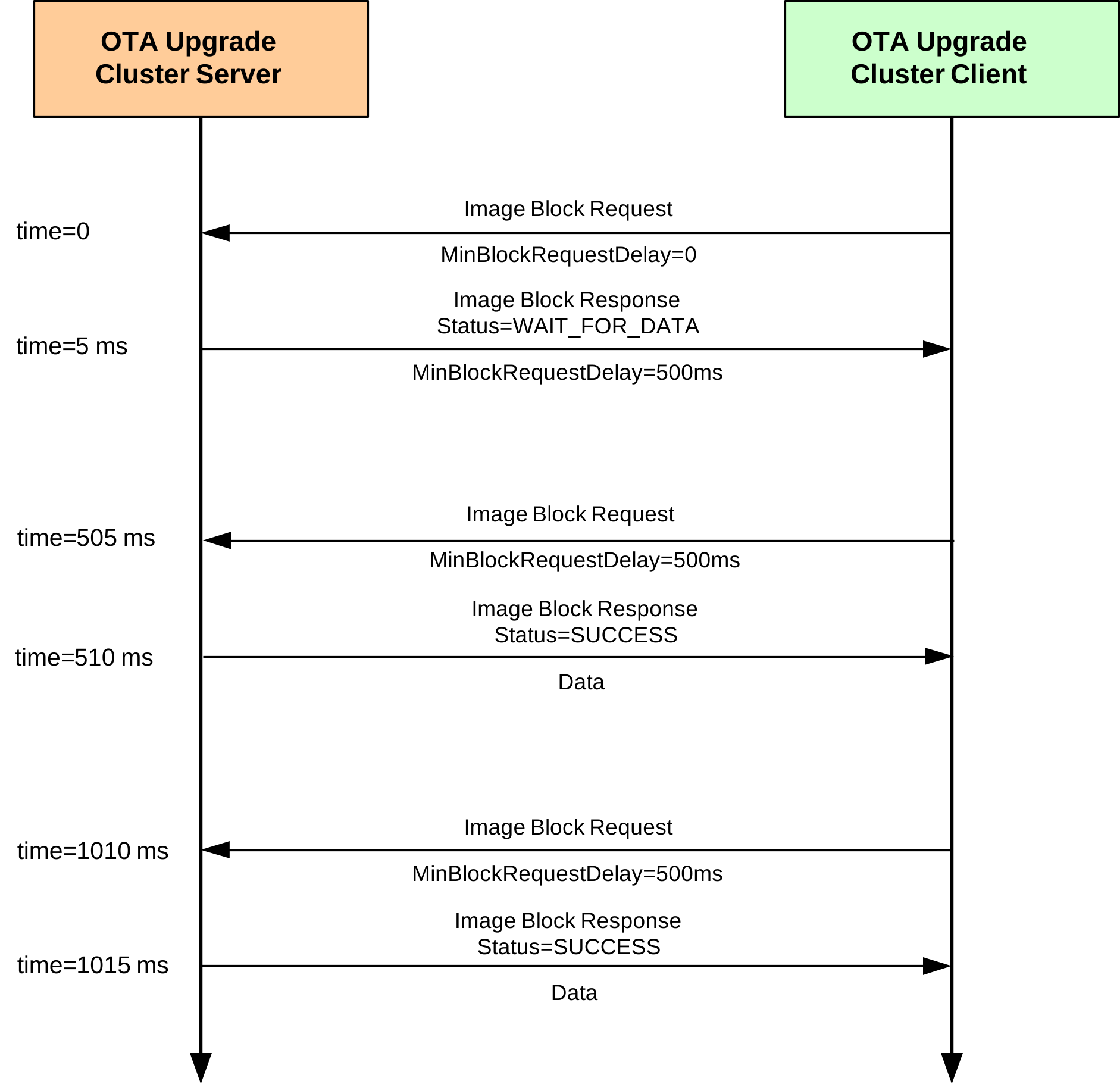
During busy periods when the OTA Upgrade server is downloading images to multiple clients, it is possible to prevent OTA traffic congestion by limiting the download rates to individual clients. This is achieved by introducing a minimum time-delay between consecutive Image Block Requests from a client - for example, if this delay is set to 500 ms for a particular client then after sending one block request to the server, the client must wait at least 500 ms before sending the next block request. This has the effect of restricting the average OTA download rate from the server to the client.
This ‘block request delay’ can be set to different values for different clients. This allows OTA downloads to be prioritized by granting more download bandwidth to some clients than to others. This delay for an individual client can also be modified by the server during a download, allowing the server to react in real-time to varying OTA traffic levels.
The implementation of the above rate limiting is described below and is illustrated in the Figure “Example of Rate limiting exchange” below.
‘Block Request Delay’ Attribute
The download rate to an individual client is controlled using the optional attribute u16MinBlockRequestDelay of the OTA Upgrade cluster (see Section 49.3) on the client. This attribute contains the ‘block request delay’ for the client (described above), in milliseconds, and must be enabled on the client only (see below).
Note: The u16MinBlockRequestDelay attribute is the minimum time-interval between block requests. The application on the client can implement longer intervals between these requests (a slower download rate), if required.
Enabling the Rate Limiting Feature
In order to use the rate limiting feature during an OTA upgrade, the macro OTA_CLD_ATTR_REQUEST_DELAY must be defined in the zcl_options.h file for both the participating client(s). This enables the u16MinBlockRequestDelay attribute in the OTA Upgrade cluster structure.
Implementation in the Server Application
The application on the OTA Upgrade server device can control the OTA download rate to an individual client by remotely setting the value of the ‘block request delay’ attribute on the client. However, first the server must determine whether the client supports the rate limiting feature. The server can do this in either of two ways:
It can attempt to read the
u16MinBlockRequestDelayattribute in the OTA Upgrade cluster on the client - if rate limiting is not enabled on the client, this read will yield an error.It can check whether the first Image Block Request received from the client contains a ‘block request delay’ field - if present, this value is passed to the application in the event E_CLD_OTA_COMMAND_BLOCK_REQUEST.
The server can change the value of the ‘block request delay’ attribute on the client at any time, even during a download. To do this, the server includes the new attribute value in an Image Block Response with status OTA_STATUS_WAIT_FOR_DATA. This is achieved in the application code through a call to the function eOTA_SetWaitForDataParams() following an Image Block Request (indicated by an E_CLD_OTA_COMMAND_BLOCK_REQUEST event). The new attribute value specified in this function call is included in the subsequent Image Block Response and is automatically written to the OTA Upgrade cluster on the client.
The server may update the ‘block request delay’ attribute on a client multiple times during a download in order to react to changing OTA traffic conditions. If the server is downloading an image to only one client then it may choose to allow this download to proceed at the full rate (specified by a zero value of the attribute on the client). However, if two or more clients request downloads at the same time, the server may choose to limit their download rates (by setting the attribute to non-zero values on the clients). The download to one client can be given higher priority than other downloads by setting the attribute on this client to a lower value.
Implementation in the Client Application
The application on the OTA Upgrade client device must control a millisecond timer (a timer with a resolution of one millisecond) to support rate limiting. This timer is used to time the delay between receiving an Image Block Response and submitting the next Image Block Request.
During an image download, a received Image Block Response with the status OTA_STATUS_WAIT_FOR_DATA may contain a new value for the ‘block request delay’ attribute (this type of response may arrive at the start of a download or at any time during the download). The client will automatically write this new value to the u16MinBlockRequestDelay attribute in the local OTA Upgrade cluster structure and will also generate the event E_ZCL_CBET_ENABLE_MS_TIMER (provided that the new attribute value is non-zero).
The E_ZCL_CBET_ENABLE_MS_TIMER event prompts the application to start the millisecond timer for a timed interval greater than or equal to the new value of the ‘block request delay’ attribute. The application can obtain this new attribute value (in milliseconds) from the event via:
sZCL_CallBackEvent.uMessage.u32TimerPeriodMs
The millisecond timer is started for a particular timed interval. The expiry of this timer is indicated by an E_ZCL_CBET_TIMER_MS event, which is handled as described in Section 3.2. The client will then send the next Image Block Request.
After sending an Image Block Request:
If the client now generates an E_ZCL_CBET_DISABLE_MS_TIMER event, this indicates that the last of the Image Block Request (for the required image) has been sent and the application should disable the millisecond timer.
Otherwise, the application must start the next timed interval (until the next request).
Example of Rate limiting exchange
Parent topic:Ancillary Features and Resources for OTA Upgrade
Device-Specific File Downloads
An OTA Ugrade client can request a file (from the server) that is specific to the client device. This file may contain non-firmware data such as security credentials, configuration data or log data. The process of making this request and receiving the file is described in the table below for both the client and server sides.
On Client |
On Server |
|
|---|---|---|
1 |
Client application sends a Query Specific File Request to the server through a call to eOTA_ClientQuerySpecificFileRequest(). |
|
2 |
On arrival at the server, the Query Specific File Request triggers the event E_CLD_OTA_COMMAND_QUERY_SPECI-FIC_FILE_REQUEST. |
|
3 |
Server automatically replies to the request with a Query Specific File Response - the application can also send a response using eOTA_ServerQuerySpecificFileResponse(). |
|
4 |
On arrival at the client, the Query Specific File Response triggers the event E_CLD_OTA_COMMAND_QUERY_SPECIFIC_FILE_RESPONSE. |
|
5 |
Client obtains status from Query Specific File Response. If status is SUCCESS, the client automatically requests the device-specific file one block at a time by sending Image Block Requests to the server. |
|
6 |
On arrival at the server, each Image Block Request triggers an Image Block Request event. |
|
7 |
Server automatically responds to each block request with an Image Block Response containing a block of device-specific file data. |
|
8 |
After receiving each Image Block Response, the client generates the event E_CLD_OTA_INTERNAL_COMMAND_SPECIFIC_FILE_BLOCK_RESPONSE. |
|
9 |
A callback function is invoked on the client to handle the event and store the data block (it is the responsibility of the application to store the data in a convenient place). |
|
10 |
Client determines when the entire file has been received (by referring to the file size that was quoted in the Query Specific File Response before the download started). Once all the file blocks have been received: |
E_CLD_OTA_INTERNAL_COMMAND_SPECIFIC_FILE_DL_COMPLETE event is generated by the client to indicate that the file transfer is complete.
The file can optionally be verified by application.
Client sends an Upgrade End Request to the server to indicate that the download is complete, where this request is the result of an application call to the function eOTA_SpecificFileUpgradeEndRequest().
|| |11||On arrival at the server, the Upgrade End Request triggers an Upgrade End Request event.| |12||Server may reply to the Upgrade End Request with an Upgrade End Response containing an instruction of when the client should use the device-specific file (the message contains both the current time and the upgrade time, and hence an implied delay) - see Footnotes 1 and 2 below.| |13|On arrival at the client, the Upgrade End Response triggers an Upgrade End Response event - see Footnotes 1 and 2 below.|| |14|Client will then count down to the upgrade time (in the Upgrade End Response) and, on reaching it, will generate the event E_CLD_OTA_INTERNAL_COMMAND_SPECIFIC_FILE_USE_NEW_FILE. Finally, it is the responsibility of the application to use device-specific file as appropriate.||
Footnotes
1. For a device-specific file download, it is not mandatory for the server to send an Upgrade End Response to the client. In the case of a client which has just finished retrieving a log file from the server, the Upgrade End Response may not be needed. However, if the client has just retrieved a file containing security credentials or configuration data, the Upgrade End Response may be needed to notify the client of when to apply the file. The decision of whether to send an Upgrade End Response for a device-specific file download is manufacturer-specific.
2. If an Upgrade End Response is not received from the server, the client will perform 3 retries to get the response. If it still does not receive a response, the client will generate the event E_CLD_OTA_INTERNAL_COMMAND_SPECIFIC_FILE_NO_UPGRADE_END_RESPONSE.
Parent topic:Ancillary Features and Resources for OTA Upgrade
Image Block Size and Fragmentation
An OTA Upgrade image is normally requested by the OTA Upgrade client one block at a time. The ZigBee frame for the OTA transfer contains various header data as well as payload data and, for this reason, the payload data is limited to about 48 bytes. Therefore, to transfer one image block per frame, the block size must be restricted to 48 bytes or less. The maximum block size can be configured at compile-time through the OTA_MAX_BLOCK_SIZE define in the zcl_options.h file (see Section 49.13).
A block size of greater than 48 bytes can be used but the image block will need to be transferred across two or more ZigBee frames. In this case, fragmentation must be enabled in which the image block data that is assembled in an APDU (Application Protocol Data Unit) on the server is fragmented into multiple NPDUs (Network Protocol Data Unit) for OTA transfer, where one NPDU is transferred in a single ZigBee frame. Fragmentation is enabled on the OTA Upgrade server and client using network parameters of the ZigBee PRO stack, as follows:
On the server: Set the parameter Maximum Number of Transmitted Simultaneous Fragmented Messages to a non-zero value to allow transmitted messages to be fragmented.
On the client: Set the parameter Maximum Number of Received Simultaneous Fragmented Messages to a non-zero value to allow received fragmented messages to be re-assembled.
The network parameter values are set using the ZPS Configuration Editor and are described in the ZigBee 3.0 Stack User Guide (JNUG3130).
Note: **Note:**The 48-byte limit on the payload data in a ZigBee frame is also applicable when image data is requested and transferred one page at a time (see Section 49.8.4). In this case, fragmentation may need to be enabled.
The maximum APDU size must always be greater than the size of an Image Block Response. It is set through the APDU Size parameter of the PDU Manager, where this parameter is amongst the Advanced Device Parameters that can be configured using the ZPS Configuration Editor.
Depending on the image block size, fragmentation is not always an efficient way of transferring image blocks, as the payload of the final NPDU fragment may contain little data and be mostly empty. For example, if the image block size is set to 64 bytes and fragmentation is enabled, each block is transferred in two ZigBee frames, the first may contain 48 bytes of data and the second may contain only 16 bytes of data, leaving 32 empty bytes in the payload. In contrast, if the block size is set to 48 bytes without fragmentation, two consecutive frames would carry 96 bytes of data, and the image transfer would require fewer frames. This is particularly important when transferring an application image to a battery-powered End Device that needs to conserve energy.
Parent topic:Ancillary Features and Resources for OTA Upgrade
Page Requests
An OTA Upgrade client normally requests image data from the server one block at a time, by sending an Image Block Request when it is ready for the next block. The number of requests can be reduced by requesting the image data one page at a time, where a page may contain many blocks of data. Requesting data by pages reduces the OTA traffic and, in the case of battery-powered client device, extends battery life.
A page of data is requested by sending an Image Page Request to the server. This request contains a page size, which indicates the number of data bytes that should be returned by the server following the request (and before the next request is sent, if any). The server still sends the data one block at a time in Image Block Responses. The Image Page Request also specifies the maximum number of bytes that the client device can receive in any one OTA message and the block size must therefore not exceed this limit (in general, the page size should be a multiple of this limit).
It is the responsibility of the client to keep track of the amount of data so far received since the last Image Page Request was issued - this count is updated after each Image Block Response received. Once this count reaches the page size in the request, the client will issue the next Image Page Request (if the download is not yet complete).
During a download that uses page requests:
If the client fails to receive one or more of the requested blocks then the next Image Page Request will request data starting from the offset which corresponds to the first missing block.
If the client fails to receive all the blocks requested in an Image Page Request then the same request will be repeated up to two more times - if the requested data still fails to arrive, the client will switch to using Image Block Requests to download the remaining image data.
An Image Page Request also contains a ‘response spacing’ value. This indicates the minimum time-interval, in milliseconds, that the server should insert between consecutive Image Block Responses. If the client is a sleepy End Device, it may specify a long response spacing so that it can sleep between consecutive Image Block Responses, or it may specify a short response spacing so that it can quickly receive all blocks requested in a page and sleep between consecutive Image Page Requests.
The implementation of the above page requests in an application is described below. The OTA image download process using page requests is similar to the one described in Section 49.7, except the client submits Image Page Requests to the server instead of Image Block Requests.
Enabling the Page Requests Feature
In order to use page requests, the macro OTA_PAGE_REQUEST_SUPPORT must be defined in the zcl_options.h file for the server and client.
In addition, values for the page size and response spacing can also be defined in this file for the client (if non-default values are required) - see below and Section 49.13.
Implementation in the Server Application
The application on the OTA Upgrade server device must control a millisecond timer (a timer with a resolution of one millisecond) to support page requests. This timer is used to implement the ‘response spacing’ specified in an Image Page Request - that is, to time the interval between the transmissions of consecutive Image Block Responses (sent out in response to the Image Page Request).
When the server receives an Image Page Request, it will generate the event E_ZCL_CBET_ENABLE_MS_TIMER to prompt the application to start the millisecond timer for a timed interval equal in value to the ‘response spacing’ in the request. The application can obtain this value (in milliseconds) from the event via:
sZCL_CallBackEvent.uMessage.u32TimerPeriodMs
The millisecond timer is started for a particular timed interval. The expiry of this timer is indicated by an E_ZCL_CBET_TIMER_MS event, which is handled as described in Section 3.2. The server will then send the next Image Block Response.
After sending an Image Block Response:
If the server now generates an E_ZCL_CBET_DISABLE_MS_TIMER event, this indicates that the last of the Image Block Responses (for the Image Page Request) has been sent and the application should disable the millisecond timer.
Otherwise, the application must start the next timed interval (until the next response).
Implementation in the Client Application
There is nothing specific to do in the client application to implement page requests. Provided that page requests have been enabled in the zcl_options.h file for the client (see above), page requests will be automatically implemented by the stack instead of block requests for OTA image downloads. The page size (in bytes) and response spacing (in milliseconds) for these requests can be specified through the following macros in the zcl_options.h file (see Section 49.13):
OTA_PAGE_REQ_PAGE_SIZE
OTA_PAGE_REQ_RESPONSE_SPACING
The default values are 512 bytes and 300 ms, respectively.
However, the client application can itself submit an Image Page Request to the server by calling the function eOTA_ClientImagePageRequest(). In this case, the page size and response spacing are specified in the Image Page Request payload structure as part of this function call.
The client handles the resulting Image Block Responses as described in Section 49.7 for standard OTA downloads.
Parent topic:Ancillary Features and Resources for OTA Upgrade
Persistent Data Management
The OTA Upgrade cluster on a client requires context data to be preserved in non-volatile memory to facilitate a recovery of the OTA Upgrade status following a device reboot. The Non-Volatile Memory Manager (NVM) module should be used to perform this data saving and recovery. The NVM module is implemented as described in the Connectivity Framework Reference Manual.
Persistent data is normally be stored in the upper sector of the devices Flash memory. Thus, when the NVM module is initialized, these sectors should be specified (just these sectors should be managed by the NVM module).
When it needs to save context data, the OTA Upgrade cluster will generate the event E_CLD_OTA_INTERNAL_COMMAND_SAVE_CONTEXT, which will also contain the data to be saved. A user-defined callback function can then be invoked to perform the data storage using functions of the NVM module.
The OTA Upgrade cluster is implemented for an individual application/endpoint. Therefore, the NVM module should also be implemented per endpoint. The following code illustrates the reservation of memory space for persistent data per endpoint.
typedef struct
{
            uint8 u8Endpoints[APP_NUM_OF_ENDPOINTS];
            uint8 eState; // Current application state to re-instate
    tsOTA_PersistedData sPersistedData[APP_NUM_OF_ENDPOINTS];
} tsDevice;
PUBLIC tsDevice s_sDevice;
If a client is restarted and persisted data is available on the device, the OTA Upgrade cluster data should be restored using the function eOTA_RestoreClientData().
Parent topic:Ancillary Features and Resources for OTA Upgrade
Flash Memory Organization
Flash memory should be organized such that the application images are stored from Sector 0 and, if required, persistent data is stored in the final sectors.
The storage of applications and persistent data in Flash memory is described further below. Guidance on the organization of OTA upgrade applications in the devices internal Flash memory is also provided Appendix.
Application Images
As part of application initialization (see Section 49.6), the OTA Upgrade cluster must be informed of the storage arrangements for application images in Flash memory. This is done through the function eOTA_AllocateEndpointOTASpace(), which applies to a specified endpoint (normally the endpoint of the application which calls the function). The information provided via this function includes:
Start sector for each image that can be stored (specified through an array with one element per image). s
Number of images for the endpoint (the maximum number of images per endpoint is specified in the zcl_options.h file - see Section 49.13)
Maximum number of sectors per image
Type of node (server or client)
Public key for signed images
Persistent Data
The storage of persistent data is handled by the NVM module (see Section 49.8.5) and the sector used is specified as part of the NVM initialization through NvModuleInit() - the final sector of Flash memory should be specified.
Parent topic:Ancillary Features and Resources for OTA Upgrade
Low-Voltage Flag
An OTA Upgrade cluster client should not attempt to participate in an OTA upgrade if the supply voltage to the host hardware device is low (below the normal operating voltage for the device). On the device, sufficient voltage is required to write to the internal Flash There may be a number of reasons for a sudden drop in supply voltage - for example, the voltage on a battery-powered node may fall when the battery is near the end of its life.
The OTA Upgrade cluster incorporates a mechanism which, if enabled, stops the cluster client from sending Image Block Requests to the server when the local supply voltage becomes low. This mechanism allows the application to set a low-voltage flag which, when set, automatically suspends the block requests. When the flag is cleared, the block requests are automatically resumed.
If required, use of the low-voltage flag and associated mechanism must be enabled at compile-time by including the following line in the zcl_options.h file:
#define OTA_UPGRADE_VOLTAGE_CHECK
It is the responsibility of the application to check the supply voltage. This check is system-specific and may be performed periodically or using a voltage monitoring feature - for example, on the device, the Supply Voltage Monitor (SVM) can be used, which is described in the MCUXpresso SDK API Reference Manual.
The application can use the function vOTA_SetLowVoltageFlag() to configure the low-voltage flag. This function is detailed in Section 49.10.3.
When a low voltage is detected, the application should make the following function call to set the low-voltage flag and suspend Image Block Requests:
vOTA_SetLowVoltageFlag(TRUE);
When the voltage is restored to a normal level, the application should make the following function call to clear the low-voltage flag and resume Image Block Requests:
vOTA_SetLowVoltageFlag(FALSE);
Parent topic:Ancillary Features and Resources for OTA Upgrade
Parent topic:OTA Upgrade cluster
OTA Upgrade events
The events that can be generated on an OTA Upgrade cluster server or client are defined in the structure teOTA_UpgradeClusterEvents (see Section 49.12.2). The events are listed in the table below, which also indicates on which side of the cluster (server or client) the events can occur:
Cluster Side(s) |
Event |
|---|---|
Server |
E_CLD_OTA_COMMAND_QUERY_NEXT_IMAGE_REQUEST |
E_CLD_OTA_COMMAND_BLOCK_REQUEST |
|
E_CLD_OTA_COMMAND_PAGE_REQUEST |
|
E_CLD_OTA_COMMAND_UPGRADE_END_REQUEST |
|
E_CLD_OTA_COMMAND_QUERY_SPECIFIC_FILE_REQUEST |
|
E_CLD_OTA_INTERNAL_COMMAND_SEND_UPGRADE_END_RESPONSE |
|
E_CLD_OTA_INTERNAL_COMMAND_CO_PROCESSOR_IMAGE_BLOCK_REQUEST |
|
Client |
E_CLD_OTA_COMMAND_IMAGE_NOTIFY |
E_CLD_OTA_COMMAND_QUERY_NEXT_IMAGE_RESPONSE |
|
E_CLD_OTA_COMMAND_BLOCK_RESPONSE |
|
E_CLD_OTA_COMMAND_UPGRADE_END_RESPONSE |
|
E_CLD_OTA_COMMAND_QUERY_SPECIFIC_FILE_RESPONSE |
|
E_CLD_OTA_INTERNAL_COMMAND_TIMER_EXPIRED |
|
E_CLD_OTA_INTERNAL_COMMAND_POLL_REQUIRED |
|
E_CLD_OTA_INTERNAL_COMMAND_RESET_TO_UPGRADE |
|
E_CLD_OTA_INTERNAL_COMMAND_SAVE_CONTEXT |
|
E_CLD_OTA_INTERNAL_COMMAND_OTA_DL_ABORTED |
|
E_CLD_OTA_INTERNAL_COMMAND_CO_PROCESSOR_BLOCK_RESPONSE |
|
E_CLD_OTA_INTERNAL_COMMAND_CO_PROCESSOR_DL_ABORT |
|
E_CLD_OTA_INTERNAL_COMMAND_CO_PROCESSOR_IMAGE_DL_COMPLETE |
|
E_CLD_OTA_INTERNAL_COMMAND_CO_PROCESSOR_SWITCH_TO_NEW_IMAGE |
|
E_CLD_OTA_INTERNAL_COMMAND_SPECIFIC_FILE_BLOCK_RESPONSE |
|
E_CLD_OTA_INTERNAL_COMMAND_SPECIFIC_FILE_DL_COMPLETE |
|
E_CLD_OTA_INTERNAL_COMMAND_SPECIFIC_FILE_DL_ABORT |
|
E_CLD_OTA_INTERNAL_COMMAND_SPECIFIC_FILE_USE_NEW_FILE |
|
E_CLD_OTA_INTERNAL_COMMAND_SPECIFIC_FILE_NO_UPGRADE_END_RESPONSE |
|
E_CLD_OTA_COMMAND_QUERY_NEXT_IMAGE_RESPONSE_ERROR |
|
E_CLD_OTA_INTERNAL_COMMAND_VERIFY_SIGNER_ADDRESS |
|
E_CLD_OTA_INTERNAL_COMMAND_RCVD_DEFAULT_RESPONSE |
|
E_CLD_OTA_INTERNAL_COMMAND_VERIFY_IMAGE_VERSION |
|
E_CLD_OTA_INTERNAL_COMMAND_SWITCH_TO_UPGRADE_DOWNGRADE |
|
E_CLD_OTA_INTERNAL_COMMAND_REQUEST_QUERY_NEXT_IMAGES |
|
E_CLD_OTA_INTERNAL_COMMAND_OTA_START_IMAGE_VERIFICATION_IN_LOW_PRIORITY |
|
E_CLD_OTA_INTERNAL_COMMAND_FAILED_VALIDATING_UPGRADE_IMAGE |
|
E_CLD_OTA_INTERNAL_COMMAND_FAILED_COPYING_SERIALIZATION_DATA |
|
E_CLD_OTA_BLOCK_RESPONSE_TAG_OTHER_THAN_UPGRADE_IMAGE |
|
Both |
E_CLD_OTA_INTERNAL_COMMAND_LOCK_FLASH_MUTEX |
E_CLD_OTA_INTERNAL_COMMAND_FREE_FLASH_MUTEX |
OTA Upgrade events are treated as ZCL events. Thus, an event is received by the application, which wraps the event in a tsZCL_CallBackEventstructure and passes it into the ZCL using the function vZCL_EventHandler() - for further details of ZCL event processing, refer to Chapter 3.
The above events are outlined in the sub-sections below.
Server-side Events
E_CLD_OTA_COMMAND_QUERY_NEXT_IMAGE_REQUEST
This event is generated on the server when a Query Next Image Request is received from a client to enquire whether a new application image is available for download. The event may result from a poll request from the client or may be a consequence of an Image Notify message previously sent by the server. The server reacts to this event by returning a Query Next Image Response.
E_CLD_OTA_COMMAND_BLOCK_REQUEST
This event is generated on the server when an Image Block Request is received from a client to request a block of image data as part of a download. The application reacts to this event by returning an Image Block Response containing a data block.
E_CLD_OTA_COMMAND_PAGE_REQUEST
This event is generated on the server when an Image Page Request is received from a client to request a page of image data as part of a download.
E_CLD_OTA_COMMAND_UPGRADE_END_REQUEST
This event is generated on the server when an Upgrade End Request is received from a client to indicate that the complete image has been downloaded and verified. The application reacts to this event by returning an Upgrade End Response.
E_CLD_OTA_COMMAND_QUERY_SPECIFIC_FILE_REQUEST
This event is generated on the server when a Query Specific File Request is received from a client to request a particular application image. The server reacts to this event by returning a Query Specific File Response.
E_CLD_OTA_INTERNAL_COMMAND_SEND_UPGRADE_END_RESPONSE
This event is generated on the server to notify the application that the stack is going to send an Upgrade End Response to a client. No specific action is required by the application on the server.
Parent topic:OTA Upgrade events
Client-side Events
E_CLD_OTA_COMMAND_IMAGE_NOTIFY
This event is generated on the client when an Image Notify message is received from the server to indicate that a new application image is available for download. If the client decides to download the image, the application should react to this event by sending a Query Next Image Request to the server using the function eOTA_ClientQueryNextImageRequest().
E_CLD_OTA_COMMAND_QUERY_NEXT_IMAGE_RESPONSE
This event is generated on the client when a Query Next Image Response is received from the server (in response to a Query Next Image Request) to indicate whether a new application image is available for download. If a suitable image is reported, the client initiates a download by sending an Image Block Request to the server.
E_CLD_OTA_COMMAND_BLOCK_RESPONSE
This event is generated on the client when an Image Block Response is received from the server (in response to an Image Block Request) and contains a block of image data which is part of a download. Following this event, the client can request the next block of image data by sending an Image Block Request to the server or, if the entire image has been received and verified, the client can close the download by sending an Upgrade End Request to the server.
E_CLD_OTA_COMMAND_UPGRADE_END_RESPONSE
This event is generated on the client when an Upgrade End Response is received from the server (in response to an Upgrade End Request) to confirm the end of a download. This event contains the time delay before the upgrade of the running application must be performed.
E_CLD_OTA_COMMAND_QUERY_SPECIFIC_FILE_RESPONSE
This event is generated on the client when a Query Specific File Response is received from the server (in response to a Query Specific File Request) to indicate whether the requested application image is available for download.
E_CLD_OTA_INTERNAL_COMMAND_TIMER_EXPIRED
This event is generated on the client when the local one-second timer has expired. It is an internal event and is not passed to the application.
E_CLD_OTA_INTERNAL_COMMAND_POLL_REQUIRED
This event is generated on the client to prompt the application to poll the server for a new application image by calling the function eOTA_ClientQueryNextImageRequest().
E_CLD_OTA_INTERNAL_COMMAND_RESET_TO_UPGRADE
This event is generated on the client to notify the application that the stack is going to reset the device. No specific action is required by the application.
E_CLD_OTA_INTERNAL_COMMAND_SAVE_CONTEXT
This event prompts the client application to store context data in Flash memory. The data to be stored is passed to the application within this event.
E_CLD_OTA_INTERNAL_COMMAND_OTA_DL_ABORTED
This event is generated on a client if the received image is invalid or the client has aborted the image download. This allows the application to request the new image again.
E_CLD_OTA_INTERNAL_COMMAND_SPECIFIC_FILE_BLOCK_RESPONSE
This event is generated on the client when an Image Block Response is received from the server in response to an Image Block Request for a device-specific file. The event contains a block of file data which is part of a download. Following this event, the client stores the data block in an appropriate location and can request the next block of file data by sending an Image Block Request to the server (if the complete image has not yet been received and verified).
E_CLD_OTA_INTERNAL_COMMAND_SPECIFIC_FILE_DL_COMPLETE
This event is generated on the client when the final Image Block Response of a device-specific file download has been received from the server - the event indicates that all the data blocks that make up the file have been received.
E_CLD_OTA_INTERNAL_COMMAND_SPECIFIC_FILE_USE_NEW_FILE
This event is generated on the client following a device-specific file download to indicate that the file can now be used by the client. At the end of the download, the server sends an Upgrade End Response that may include an ‘upgrade time’ - this is the UTC time at which the new file can be applied. Thus, on receiving this response, the client starts a timer and, on reaching the upgrade time, generates this event.
E_CLD_OTA_INTERNAL_COMMAND_SPECIFIC_FILE_DL_ABORT
This event is generated to indicate that the OTA Upgrade cluster needs to abort a device-specific file download. Following this event, the application should discard data that has already been received as part of the aborted download.
E_CLD_OTA_INTERNAL_COMMAND_SPECIFIC_FILE_NO_UPGRADE_
END_RESPONSE
This event is generated when no Upgrade End Response has been received for a device-specific file download. The client makes three attempts to obtain an Upgrade End Response. If no response is received, the client raises this event.
Note: For a device-specific file download, it is not mandatory for the server to send an Upgrade End Response. The decision of whether to send the Upgrade End Response is manufacturer-specific.
E_CLD_OTA_COMMAND_QUERY_NEXT_IMAGE_RESPONSE_ERROR
This event is generated on the client when a Query Next Image Response message is received from the server, in response to a Query Next Image Request with a status of Invalid Image Size.
E_CLD_OTA_INTERNAL_COMMAND_RCVD_DEFAULT_RESPONSE
This event is generated on the client when a default response message is received from the server, in response to a Query Next Image Request, Image Block Request or Upgrade End Request. This is an internal ZCL event that results in an OTA download being aborted, thus activating the callback function for the E_CLD_OTA_INTERNAL_COMMAND_OTA_DL_ABORTED event.
E_CLD_OTA_INTERNAL_COMMAND_VERIFY_IMAGE_VERSION
This event is generated to prompt the application to verify the image version received in a Query Next Image Response. This event allows the application to verify that the new upgrade image has a valid image version. After checking the image version, the application should set the status field of the event to E_ZCL_SUCCESS (valid version) or E_ZCL_FAIL (invalid version).
E_CLD_OTA_INTERNAL_COMMAND_SWITCH_TO_UPGRADE_
DOWNGRADE
This event is generated to prompt the application to verify the image version received in an upgrade end response. This event allows the application to verify that the new upgrade image has a valid image version.
After checking the image version, the application should set the status field of the event to E_ZCL_SUCCESS (valid version) or E_ZCL_FAIL (invalid version).
E_CLD_OTA_INTERNAL_COMMAND_FAILED_VALIDATING_UPGRADE_
IMAGE
This event is generated on the client when the validation of a new upgrade image fails. This validation takes place when the upgrade time is reached.
E_CLD_OTA_INTERNAL_COMMAND_FAILED_COPYING_SERIALIZATION_DATA
This event is generated on the client when the copying of serialisation data from the active image to the new upgrade image fails. This process takes place after image validation (if applicable) is completed successfully.
E_CLD_OTA_BLOCK_RESPONSE_TAG_OTHER_THAN_UPGRADE_
IMAGE
This event is generated on the client when an Image Block Response is received from the server but the response contains a block of data that is not upgrade image data (it may contain tags such as an integrity code or ECDA signature).Thus, this event can help the application to process tags or data other than upgrade image data.
Parent topic:OTA Upgrade events
Server-side and Client-side Events
E_CLD_OTA_INTERNAL_COMMAND_LOCK_FLASH_MUTEX
This event prompts the application to lock the mutex used for accesses to external Flash memory (via the SPI bus).
E_CLD_OTA_INTERNAL_COMMAND_FREE_FLASH_MUTEX
This event prompts the application to unlock the mutex used for accesses to external Flash memory (via the SPI bus).
Parent topic:OTA Upgrade events
Parent topic:OTA Upgrade cluster
Functions
The OTA Upgrade cluster functions that are provided in the NXP implementation of the ZCL are divided into the following three categories:
General functions (used on server and client) - see Section 49.10.1
Server functions - see Section 49.10.2
Client functions - see Section 49.10.3
General Functions
The following OTA Upgrade cluster functions can be used on the cluster server and the cluster client:
eOTA_Create
teZCL_Status eOTA_Create(
    tsZCL_ClusterInstance *psClusterInstance,
    bool_t bIsServer,
    tsZCL_ClusterDefinition *psClusterDefinition,
    void *pvEndPointSharedStructPtr,
    uint8 u8Endpoint,
    uint8 *pu8AttributeControlBits,
    tsOTA_Common *psCustomDataStruct);
Description
This function creates an instance of the OTA Upgrade cluster on the specified endpoint. The cluster instance can act as a server or a client, as specified. The shared structure of the device associated with cluster must also be specified.
The function must be the first OTA function called in the application, and must be called after the stack has been started and after the ZCL has been initialized.
Parameters
psClusterInstance: Pointer to structure containing information about the cluster instance to be created (see Section 6.1.16)
bIsServer: Side of cluster to be implemented on this device:
TRUE - Server
FALSE - Client
psClusterDefinition: Pointer to structure indicating the type of cluster (see Section 6.1.2) - this structure must contain the details of the OTA Upgrade cluster
pvEndPointSharedStructPtr: Pointer to shared device structure for relevant endpoint (depends on device type, e.g. Door Lock)
u8Endpoint: Number of endpoint with which cluster will be associated
pu8AttributeControlBits: Pointer to an array of bitmaps, one for each attribute in the relevant cluster - for internal cluster definition use only, array should be initialised to 0
tpsCustomDataStruct: Pointer to structure containing custom data for OTA Upgrade cluster (see Section 49.11.2)
Returns
E_ZCL_SUCCESS
E_ZCL_FAIL
Parent topic:General Functions
vOTA_FlashInit
void vOTA_FlashInit(void *pvFlashTable,
    tsNvmDefs *psNvmStruct);
Description
This function initializes the Flash memory device to be used by the OTA Upgrade cluster. Information about the device must be provided, such as the device type and sector size.
If a custom or unsupported Flash memory device is used then user-defined callback functions must be provided to perform Flash memory read, write, erase and initialization operations (if an NXP-supported device is used, standard callback functions will be used):
A general set of functions (for use by all software components) can be specified through pvFlashTable.
Optionally, an additional set of functions specifically for use by the OTA Upgrade cluster can be specified in the structure referenced by psNvmStruct.
This function must be called after the OTA Upgrade cluster has been created (after eOTA_Create() has been called either directly or indirectly) and before any other OTA Upgrade functions are called.
Parameters
pvFlashTable: Pointer to general set of callback functions to perform Flash memory read, write, erase and initialization operations. If using an NXP-supported Flash memory device, set a null pointer to use standard callback functions
psNvmStruct: Pointer to structure containing information on Flash memory device - see Section 49.11.4
Returns
None
Parent topic:General Functions
eOTA_AllocateEndpointOTASpace
teZCL_Status eOTA_AllocateEndpointOTASpace(
    uint8 u8Endpoint,
    uint8 *pu8Data,
    uint8 u8NumberOfImages,
    uint8 u8MaxSectorsPerImage,
    bool_t bIsServer,
    uint8 *pu8CAPublicKey);
Description
This function is used to allocate Flash memory space to store application images as part of the OTA upgrade process for the specified endpoint. The maximum number of images that are held at any one time must be specified as well the Flash memory start sector of every image. The maximum number of sectors used to store an image must also be specified.
The start sectors of the image space allocations are provided in an array. The index of an element of this array will subsequently be used to identify the stored image in other function calls.
Advice about the allocation of internal Flash memory space to OTA upgrade images on the client is provided in Appendix E.2
Parameters
u8Endpoint: Number of endpoint for which Flash memory space is to be allocated
pu8Data: Pointer to array containing the Flash memory start sector of each image (array index identifies image)
u8NumberOfImages: Maximum number of application images that are stored in Flash memory at any one time
u8MaxSectorsPerImage: Maximum number of sectors to be used to store an individual application image
bIsServer: Side of cluster implemented on this device:
TRUE - Server
FALSE - Client
pu8CAPublicKey: Pointer to Certificate Authority public key (provided in the security certificate from a company such as Certicom)
Returns
E_ZCL_SUCCESS
E_ZCL_FAIL
E_ZCL_ERR_INVALID_VALUE
E_ZCL_ERR_EP_RANGE
E_ZCL_ERR_CLUSTER_NOT_FOUND
E_ZCL_ERR_PARAMETER_NULL
Parent topic:General Functions
vOTA_GenerateHash
void vOTA_GenerateHash(
    tsZCL_EndPointDefinition *psEndPointDefinition,
    tsOTA_Common *psCustomData,
    bool bIsServer,
    bool bHeaderPresent,
    AESSW_Block_u *puHash,
    uint8 u8ImageLocation);
Description
This function can be used to generate a hash checksum for an application image in Flash memory, using the Matyas-Meyer-Oseas cryptographic hash.
Parameters
psEndPointDefinition Pointer to structure which defines endpoint corresponding to the application (see Section 6.1.1)
psCustomData Pointer to data structure connected with event associated with the checksum (see Section 49.11.2)
bIsServer Side of cluster implemented on this device:
TRUE - Server
FALSE - Client
bHeaderPresent Presence of image header:
TRUE - Present
FALSE - Absent
puHash Pointer to structure to receive calculated hash checksum
u8ImageLocation Number of sector where image starts in Flash memory
Returns
None
Parent topic:General Functions
eOTA_GetCurrentOtaHeader
teZCL_Status eOTA_GetCurrentOtaHeader(
    uint8 u8Endpoint,
    bool_t bIsServer,
    tsOTA_ImageHeader *psOTAHeader);
Description
This function can be used to obtain the OTA header of the application image which is currently running on the local node.
The obtained parameter values are received in a tsOTA_ImageHeader structure.
Parameters
u8Endpoint Number of endpoint on which cluster operates
bIsServer Side of the cluster implemented on this device:
TRUE - Server
FALSE - Client
psOTAHeader Pointer to structure to receive the current OTA header (see Section 49.11.1)
Returns
E_ZCL_SUCCESS
E_ZCL_ERR_EP_RANGE
E_ZCL_ERR_CLUSTER_NOT_FOUND
E_ZCL_ERR_PARAMETER_NULL
Parent topic:General Functions
Parent topic:Functions
Server Functions
The following OTA Upgrade cluster functions can be used on the cluster server only:
eOTA_SetServerParams
teZCL_Status eOTA_SetServerParams(
    uint8 u8Endpoint,
    uint8 u8ImageIndex,
    tsCLD_PR_Ota *psOTAData);
Description
This function can be used to set server parameter values (including query jitter, data size, image data, current time and upgrade time) for a particular image stored on the server. The parameter values to be set are specified in a structure, described in Section 49.11.22. For detailed descriptions of these parameters, refer to the *ZigBee Over-the-Air Upgrading Cluster Specification (095264)*from the ZigBee Alliance.
If this function is not called, default values are used for these parameters.
The current values of these parameters can be obtained using the function eOTA_GetServerData().
The index of the image for which server parameter values are to be set must be specified. For an image stored in Flash memory, this index will take a value in the range 0 to (OTA_MAX_IMAGES_PER_ENDPOINT - 1).
Parameters
u8Endpoint: Number of endpoint (on server) on which cluster operates
u8ImageIndex: Index number of image
psOTAData: Pointer to structure containing parameter values to be set (see Section 49.11.22)
Returns
E_ZCL_SUCCESS
E_ZCL_FAIL
Parent topic:Server Functions
eOTA_GetServerData
teZCL_Status eOTA_GetServerData(
    uint8 u8Endpoint,
    uint8 u8ImageIndex,
    tsCLD_PR_Ota *psOTAData);
Description
This function can be used to obtain server parameter values (including query jitter, data size, image data, current time and upgrade time). The obtained parameter values are received in a structure, described in Section 49.11.22. For detailed descriptions of these parameters, refer to the *ZigBee Over-the-Air Upgrading Cluster Specification (095264)*from the ZigBee Alliance.
The values of these parameters can be set by the application using the function eOTA_SetServerParams().
The index of the image for which server parameter values are to be obtained must be specified. For an image stored in the Flash memory, this index will take a value in the range 0 to (OTA_MAX_IMAGES_PER_ENDPOINT - 1).
Parameters
u8Endpoint: Number of endpoint (on server) on which cluster operates
u8ImageIndex: Index number of image
psOTAData: Pointer to structure to receive parameter values (see Section 49.11.22)
Returns
E_ZCL_SUCCESS
E_ZCL_FAIL
Parent topic:Server Functions
eOTA_EraseFlashSectorsForNewImage
teZCL_Status eOTA_EraseFlashSectorsForNewImage(
    uint8 u8Endpoint,
    uint8 u8ImageIndex);
Description
This function can be used to erase certain sectors of the Flash memory of the device in the OTA server node. The sectors allocated to the specified image index number will be erased so that the sectors (and index number) can be re-used. The function is normally called before writing a new upgrade image to Flash memory.
The specified image index number must be in the range 0 to (OTA_MAX_IMAGES_PER_ENDPOINT - 1).
Parameters
u8Endpoint: Number of endpoint (on server) on which cluster operates
u8ImageIndex: Index number of image
Returns
E_ZCL_ERR_EP_RANGE
E_ZCL_ERR_PARAMETER_NULL
E_ZCL_ERR_CLUSTER_NOT_FOUND
E_ZCL_SUCCESS
Parent topic:Server Functions
eOTA_FlashWriteNewImageBlock
teZCL_Status eOTA_FlashWriteNewImageBlock(
    uint8 u8Endpoint,
    uint8 u8ImageIndex,
    bool bIsServerImage,
    uint8 *pu8UpgradeBlockData,
    uint8 u8UpgradeBlockDataLength,
    uint32 u32FileOffSet);
Description
This function can be used to write a block of an upgrade image to the devices internal Flash memory in the OTA server node. The image may be either of the following:
An upgrade image for the server itself (the server will later be rebooted from this image)
An upgrade image for one or more clients, which will later be made available for OTA distribution through the wireless network
The image in Flash memory to which the block belongs is identified by its index number. The specified image index number must be in the range 0 to (OTA_MAX_IMAGES_PER_ENDPOINT - 1).
Note that for JN518x, K32W041, and K32W061, internal Flash memory, writes must be 512-byte aligned.
Parameters
u8Endpoint: Number of endpoint (on server) on which cluster operates
u8ImageIndex: Index number of image
bIsServerImage: Indicates whether new image is for the server or a client:
TRUE - Server image
FALSE - Client image
pu8UpgradeBlockData: Pointer to image block to be written
u8UpgradeBlockDataLength: Size, in bytes, of image block to be written
u32FileOffSet: Offset of block from start of image file (in terms of number of bytes)
Returns
E_ZCL_ERR_EP_RANGE
E_ZCL_ERR_PARAMETER_NULL
E_ZCL_ERR_CLUSTER_NOT_FOUND
E_ZCL_FAIL
E_ZCL_SUCCESS
Parent topic:Server Functions
eOTA_NewImageLoaded
teZCL_Status eOTA_NewImageLoaded(
        uint8 u8Endpoint,
        bool bIsImageOnCoProcessorMedia,
        tsOTA_CoProcessorOTAHeader
    *psOTA_CoProcessorOTAHeader);
Description
This function can be used for two purposes which relate to a new application image and which depend on whether the image has been stored in the internal Flash memory of the device or in the external storage device of a co-processor (if any) within the server node:
For an image stored in internal Flash memory, the function can be used to notify the OTA Upgrade cluster server on the specified endpoint that a new application image has been loaded into Flash memory and is available for download to clients. The server then validates the new image.
For one or more images stored in the co-processor’s external storage device, the function can be used to provide OTA header information for the image(s) to the cluster server. In the case of more than one image stored in co-processor storage, this function may replicate OTA header information for older images already registered with the server.
Note: The co-processor option is currently not supported for JN518x, K32W041, or K32W061.
Parameters
u8Endpoint: Number of endpoint (on server) on which cluster operates
bIsImageOnCoProcessorMedia: Flag indicating whether image is stored in co-processor external storage device:
TRUE - Stored in co-processor
FALSE - Stored in internal Flash memory
psOTA_CoProcessorOTAHeader: Pointer to OTA headers of images which are held in co-processor storage device
Returns
E_ZCL_SUCCESS
E_ZCL_FAIL
Parent topic:Server Functions
eOTA_ServerImageNotify
teZCL_Status eOTA_ServerImageNotify(
    uint8 u8SourceEndpoint,
    uint8 u8DestinationEndpoint,
    tsZCL_Address *psDestinationAddress,
    tsOTA_ImageNotifyCommand *psImageNotifyCommand);
Description
This function issues an Image Notify message to one or more clients to indicate that a new application image is available for download.
The message can be unicast to an individual client or multicast to selected clients (but cannot be broadcast to all clients, for security reasons).
Parameters
u8SourceEndpoint: Number of endpoint (on server) from which the message is sent
u8DestinationEndpoint: Number of endpoint (on client) to which the message is sent
psDestinationAddress: Pointer to structure containing the address of the target client for the message - a multicast to more than one client is also possible (see Section 6.1.4)
psImageNotifyCommand: Pointer to structure containing payload for message (see Section 49.11.5)
Returns
E_ZCL_SUCCESS
E_ZCL_FAIL
Parent topic:Server Functions
eOTA_ServerQueryNextImageResponse
teZCL_Status eOTA_ServerQueryNextImageResponse(
        uint8 u8SourceEndpoint,
    uint8 u8DestinationEndpoint,
    tsZCL_Address *psDestinationAddress,
    tsOTA_QueryImageResponse
    *psQueryImageResponsePayload,
    uint8 u8TransactionSequenceNumber);
Description
This function issues a Query Next Image Response to a client which has sent a Query Next Image Request (the arrival of this request triggers the event E_CLD_OTA_COMMAND_QUERY_NEXT_IMAGE_REQUEST on the server).
The Query Next Image Response contains information on the latest application image available for download to the client, including the image size and file version.
Note: The cluster server responds automatically to a Query Next Image Request, so it is not normally necessary for the application to call this function.
You are also required to provide a pointer to a location to receive a Transaction Sequence Number (TSN) for the request. The TSN in the response is set to match the TSN in the request, allowing an incoming response to be paired with a request. This is useful when sending more than one request to the same destination endpoint.
Parameters
u8SourceEndpoint: Number of endpoint (on server) from which the response is sent
u8DestinationEndpoint: Number of endpoint (on client) to which the response is sent
psDestinationAddress: Pointer to structure containing the address of the target client for the response (see Section 6.1.4)
psQueryImageResponsePayload: Pointer to structure containing payload for response (see Section 49.11.7)
u8TransactionSequenceNumber: Pointer to a location to store the Transaction Sequence Number (TSN) of the request
Returns
E_ZCL_SUCCESS
E_ZCL_FAIL
Parent topic:Server Functions
eOTA_ServerImageBlockResponse
teZCL_Status eOTA_ServerImageBlockResponse(
    uint8 u8SourceEndpoint,
    uint8 u8DestinationEndpoint,
    tsZCL_Address *psDestinationAddress,
    tsOTA_ImageBlockResponsePayload
    *psImageBlockResponsePayload,
    uint8 u8BlockSize,
    uint8 u8TransactionSequenceNumber);
Description
This function issues an Image Block Response, containing a block of image data, to a client to which the server is downloading an application image. The function is called after receiving an Image Block Request from the client, indicating that the client is ready to receive the next block of the application image (the arrival of this request triggers the event E_CLD_OTA_COMMAND_BLOCK_REQUEST on the server).
The size of the block, in bytes, is specified as part of the function call. This must be less than or equal to the maximum possible block size defined in the zcl_options.h file (see Section 49.13).
Note: The cluster server responds automatically to an Image Block Request, so it is not normally necessary for the application to call this function.
You are also required to provide a pointer to a location to receive a Transaction Sequence Number (TSN) for the request. The TSN in the response is set to match the TSN in the request, allowing an incoming response to be paired with a request. This is useful when sending more than one request to the same destination endpoint.
Parameters
u8SourceEndpoint: Number of endpoint (on server) from which the response is sent
u8DestinationEndpoint: Number of endpoint (on client) to which the response is sent
psDestinationAddress: Pointer to structure containing the address of the target client for the response (see Section 6.1.4)
psImageBlockResponsePayload: Pointer to structure containing payload for response (see Section 49.11.10)
u8BlockSize: Size, in bytes, of block to be transferred
u8TransactionSequenceNumber: Pointer to a location to store the Transaction Sequence Number (TSN) of the request
Returns
E_ZCL_SUCCESS
E_ZCL_FAIL
Parent topic:Server Functions
eOTA_SetWaitForDataParams
teZCL_Status eOTA_SetWaitForDataParams(
    uint8 u8Endpoint,
    uint16 u16ClientAddress,
    tsOTA_WaitForData *sWaitForDataParams);
Description
This function can be used to send an Image Block Response with a status of OTA_STATUS_WAIT_FOR_DATA to a client, in response to an Image Block Request from the client.
The payload of this response includes a new value for the ‘block request delay’ attribute on the client. This value can be used by the client for ‘rate limiting’ -that is, to control the rate at which the client requests data blocks from the server and therefore the average OTA download rate from the server to the client.
Rate limiting is described in more detail in Section 49.8.1.
Parameters
u8Endpoint: Number of endpoint (on server) from which the response is sent
u16ClientAddress: Network address of client device to which the response is sent
sWaitForDataParams: Pointer to structure containing ‘Wait for Data’ parameter values for Image Block Response payload (see Section49.11.15)
Returns
E_ZCL_SUCCESS
E_ZCL_FAIL
Parent topic:Server Functions
eOTA_ServerUpgradeEndResponse
teZCL_Status eOTA_ServerUpgradeEndResponse(
    uint8 u8SourceEndpoint,
    uint8 u8DestinationEndpoint,
    tsZCL_Address *psDestinationAddress,
    tsOTA_UpgradeEndResponsePayload
    *psUpgradeResponsePayload,
    uint8 u8TransactionSequenceNumber);
Description
This function issues an Upgrade End Response to a client to which the server has been downloading an application image. The function is called after receiving an Upgrade End Request from the client, indicating that the client has received the entire application image and verified it (the arrival of this request triggers the event E_CLD_OTA_COMMAND_UPGRADE_END_REQUEST on the server).
The Upgrade End Response includes the upgrade time for the downloaded image as well as the current time (the client will use this information to implement a delay before upgrading the running application image).
Note: The cluster server responds automatically to an Upgrade End Request, so it is not normally necessary for the application to call this function.
You are also required to provide a pointer to a location to receive a Transaction Sequence Number (TSN) for the request. The TSN in the response is set to match the TSN in the request, allowing an incoming response to be paired with a request. This is useful when sending more than one request to the same destination endpoint.
Parameters
u8SourceEndpoint: Number of endpoint (on server) from which the response is sent
u8DestinationEndpoint: Number of endpoint (on client) to which the response is sent
psDestinationAddress: Pointer to structure containing the address of the target client for the response (see Section 6.1.4)
psUpgradeResponsePayload: Pointer to structure containing payload for response (see Section 49.11.12)
u8TransactionSequenceNumber: Pointer to a location to store the Transaction Sequence Number (TSN) of the request
Returns
E_ZCL_SUCCESS
E_ZCL_FAIL
Parent topic:Server Functions
eOTA_ServerSwitchToNewImage
teZCL_Status eOTA_ServerSwitchToNewImage(
    uint8 u8Endpoint,
    uint8 u8ImageIndex);
Description
This function can be used to force a reset of the device in the OTA server node and, on reboot, run a new application image that has been saved in the attached Flash memory.
Before forcing the reset of the remove device, the function checks whether the version of the new image is greater than the version of the current image. If this is the case, the function invalidates the currently running image in Flash memory and initiates a software reset - otherwise, it returns an error.
The new application image is identified by its index number. The specified image index number must be in the range 0 to (OTA_MAX_IMAGES_PER_ENDPOINT - 1).
Parameters
u8Endpoint: Number of endpoint (on server) on which cluster operates
u8ImageIndex: Index number of image
Returns
E_ZCL_ERR_EP_RANGE
E_ZCL_ERR_CLUSTER_NOT_FOUND
E_ZCL_FAIL
E_ZCL_SUCCESS
Parent topic:Server Functions
eOTA_InvalidateStoredImage
teZCL_Status eOTA_InvalidateStoredImage(
    uint8 u8Endpoint,
    uint8 u8ImageIndex);
Description
This function can be used to invalidate an application image that is held in the Flash memory of the device. Once the image has been invalidated, it will no longer to available for OTA upgrade.
The image to be invalidated is identified by its index number. The specified image index number must be in the range 0 to (OTA_MAX_IMAGES_PER_ENDPOINT - 1).
Parameters
u8Endpoint: Number of endpoint (on server) on which cluster operates
u8ImageIndex: Index number of image to be invalidated
Returns
E_ZCL_ERR_EP_RANGE
E_ZCL_ERR_PARAMETER_NULL
E_ZCL_ERR_CLUSTER_NOT_FOUND
E_ZCL_SUCCESS
Parent topic:Server Functions
eOTA_ServerQuerySpecificFileResponse
teZCL_Status eOTA_ServerQuerySpecificFileResponse(
    uint8 u8SourceEndpoint,
    uint8 u8DestinationEndpoint,
    tsZCL_Address *psDestinationAddress,
    tsOTA_QuerySpecificFileResponsePayload
    *psQuerySpecificFileResponsePayload,
    uint8 u8TransactionSequenceNumber);
Description
This function can be used to issue a Query Specific File Response to a client which has sent a Query Specific File Request (the arrival of this request triggers the event E_CLD_OTA_COMMAND_QUERY_SPECIFIC_FILE_REQUEST on the server). The Query Specific File Response contains information on the latest device-specific file available for download to the client, including the file size and file version.
You are also required to provide a pointer to a location to receive a Transaction Sequence Number (TSN) for the request. The TSN in the response is set to match the TSN in the request, allowing an incoming response to be paired with a request. This is useful when sending more than one request to the same destination endpoint.
Parameters
u8SourceEndpoint: Number of endpoint (on server) from which the response is sent
u8DestinationEndpoint: Number of endpoint (on client) to which the response is sent
psDestinationAddress: Pointer to structure containing the address of the target client
psQuerySpecificFileResponsePayload:
Pointer to structure containing payload for Query Specific File Response (see Section 49.11.20)
u8TransactionSequenceNumber: Pointer to a location to store the Transaction Sequence Number (TSN) of the request
Returns
E_ZCL_SUCCESS
E_ZCL_FAIL
Parent topic:Server Functions
Parent topic:Functions
Client Functions
The following OTA Upgrade cluster functions can be used on the cluster client only:
eOTA_SetServerAddress
teZCL_Status eOTA_SetServerAddress(
    uint8 u8Endpoint,
    uint64 u64IeeeAddress,
    uint16 u16ShortAddress);
Description
This function sets the addresses (64-bit IEEE/MAC address and 16-bit network address) of the OTA Upgrade cluster server that will be used to provide application upgrade images to the local client.
The function should be called after a server discovery has been performed to find a suitable server - this is done by sending out a Match Descriptor Request using the function ZPS_eAplZdpMatchDescRequest() described in theZigBee 3.0 Stack User Guide (JNUG3130). The server discovery must be completed and a server address set before any OTA-related message exchanges can occur (e.g. image request).
Parameters
u8Endpoint: Number of endpoint corresponding to application
u64IeeeAddress: IEEE/MAC address of server
u16ShortAddress: Network address of server
Returns
E_ZCL_SUCCESS
E_ZCL_FAIL
Parent topic:Client Functions
eOTA_ClientQueryNextImageRequest
teZCL_Status eOTA_ClientQueryNextImageRequest(
    uint8 u8SourceEndpoint,
    uint8 u8DestinationEndpoint,
    tsZCL_Address *psDestinationAddress,
    tsOTA_QueryImageRequest
*psQueryImageRequest);
Description
This function issues a Query Next Image Request to the server and should be called in either of the following situations:
to poll for a new application image (typically used in this way by an End Device) - in this case, the function should normally be called periodically
to respond to an Image Notify message from the server, which indicated that a new application image is available for download - in this case, the function call should be prompted by the event E_CLD_OTA_COMMAND_IMAGE_NOTIFY
The payload of the request includes the relevant image type, current file version, hardware version and manufacturer code.
As a result of this function call, a Query Next Image Response will (eventually) be received from the server. The arrival of this response will trigger an E_CLD_OTA_COMMAND_QUERY_NEXT_IMAGE_RESPONSE event.
Parameters
u8SourceEndpoint: Number of endpoint (on client) from which the request is sent
u8DestinationEndpoint: Number of endpoint (on server) to which the request is sent
psDestinationAddress: Pointer to structure containing the address of the target server (see Section 6.1.4)
psQueryImageRequest: Pointer to structure containing payload for request (see Section 49.11.6)
Returns
E_ZCL_SUCCESS
E_ZCL_FAIL
Parent topic:Client Functions
eOTA_ClientImageBlockRequest
teZCL_Status eOTA_ClientImageBlockRequest(
        uint8 u8SourceEndpoint,
        uint8 u8DestinationEndpoint,
        tsZCL_Address *psDestinationAddress,
        tsOTA_BlockRequest
    *psOtaBlockRequest);
Description
This function can be used during an image download to send an Image Block Request to the server, in order to request the next block of image data.
As a result of this function call, an Image Block Response containing the requested data block will (eventually) be received from the server. The arrival of this response will trigger an E_CLD_OTA_COMMAND_QUERY_NEXT_IMAGE_RESPONSE event.
Note: The cluster client automatically sends Image Block Requests to the server during a download, so it is not normally necessary for the application to call this function.
Parameters
u8SourceEndpoint: Number of endpoint (on client) from which the request is sent
u8DestinationEndpoint: Number of endpoint (on server) to which the request is sent
psDestinationAddress: Pointer to structure containing the address of the target server (see Section 6.1.4)
psOtaBlockRequest: Pointer to structure containing payload for request (see Section 49.11.8)
Returns
E_ZCL_SUCCESS
E_ZCL_FAIL
Parent topic:Client Functions
eOTA_ClientImagePageRequest
teZCL_Status eOTA_ClientImagePageRequest(
    uint8 u8SourceEndpoint,
    uint8 u8DestinationEndpoint,
    tsZCL_Address *psDestinationAddress,
    tsOTA_ImagePageRequest *psOtaPageRequest);
Description
This function can be used during an image download to send an Image Page Request to the server, in order to request the next page of image data. In this function call, a structure must be supplied which contains the payload data for the request. This data includes the page size, in bytes.
Note 1: Image Page Requests can be used instead of Image Block Requests if page requests have been enabled in the zcl_options.h file for the client and server (see Section 49.13).
Note 2: The cluster client automatically sends Image Page Requests (if enabled) to the server during a download, so it is not normally necessary for the application to call this function.
As a result of this function call, a sequence of Image Block Responses containing the requested data will (eventually) be received from the server. The arrival of each response will trigger an E_CLD_OTA_COMMAND_BLOCK_RESPONSE event on the client. If this function is used (rather than the stack) to issue Image Page Requests, it is the responsibility of the application to keep a count of the number of data bytes received since the Image Page Request was issued - when all the requested page data has been received, this count will equal the specified page size.
Page requests are described in more detail in Section 49.8.4.
Parameters
u8SourceEndpoint: Number of endpoint (on client) from which the request is sent
u8DestinationEndpoint: Number of endpoint (on server) to which the request is sent
psDestinationAddress: Pointer to structure containing the address of the target server (see Section 6.1.4)
psOtaPageRequest: Pointer to structure containing payload for request (see Section 49.11.9)
Returns
E_ZCL_SUCCESS
E_ZCL_FAIL
Parent topic:Client Functions
eOTA_ClientUpgradeEndRequest
teZCL_Status eOTA_ClientUpgradeEndRequest(
    uint8 u8SourceEndpoint,
    uint8 u8DestinationEndpoint,
    tsZCL_Address *psDestinationAddress,
    tsOTA_UpgradeEndRequestPayload
    *psUpgradeEndRequestPayload);
Description
This function can be used during an image download to send an Upgrade End Request to the server. This is normally used to indicate that all the image data has been received and that the image has been successfully verified - it is the responsibility of the client to determine when all the image data has been received (using the image size quoted in the original Query Next Image Response) and then to verify the image.
In addition to the status OTA_STATUS_SUCCESS described above, the function can be used by the client to report other conditions to the server:
OTA_REQUIRE_MORE_IMAGE: The downloaded image was successfully received and verified, but the client requires multiple images before performing an upgrade
OTA_STATUS_INVALID_IMAGE: The downloaded image failed the verification checks and will be discarded
OTA_STATUS_ABORT The image download that is currently in progress should be cancelled
In all three of the above cases, the client may then request another download.
When the function is called to report success, an Upgrade End Response will (eventually) be received from the server, indicating when the image upgrade should be implemented (a time delay may be indicated in the response). The arrival of this response will trigger an E_CLD_OTA_COMMAND_UPGRADE_END_RESPONSE event.
Note: The cluster client automatically sends an Upgrade End Request to the server on completion of a download, so it is not normally necessary for the application to call this function.
Parameters
u8SourceEndpoint: Number of endpoint (on client) from which the request is sent
u8DestinationEndpoint: Number of endpoint (on server) to which the request is sent
psDestinationAddress: Pointer to structure containing the address of the target server (see Section 6.1.4)
psUpgradeEndRequestPayload: Pointer to structure containing payload for request, including reported status (see Section49.11.11)
Returns
E_ZCL_SUCCESS
E_ZCL_FAIL
Parent topic:Client Functions
eOTA_HandleImageVerification
teZCL_Status eOTA_HandleImageVerification(
    uint8 u8SourceEndPointId,
    uint8 u8DstEndpoint,
    teZCL_Status eImageVerificationStatus);
Description
This function transmits an upgrade end request with the specified status.
Parameters
u8SourceEndPointId: Identifier of endpoint on which the cluster client operates
u8DstEndpoint: Identifier of endpoint (on the server) to which the upgrade end request is sent
eImageVerificationStatus: Image status code
Returns
E_ZCL_FAIL
E_ZCL_SUCCESS
Parent topic:Client Functions
eOTA_UpdateClientAttributes
teZCL_Status eOTA_UpdateClientAttributes(
    uint8 u8Endpoint);
Description
This function can be used on a client to set the OTA Upgrade cluster attributes to their default values. It should be called during application initialization after the cluster instance has been created using eOTA_Create().
Following subsequent resets, provided that context data has been saved, the application should call eOTA_RestoreClientData() instead of this function.
Parameters
u8Endpoint: Number of endpoint corresponding to context data
Returns
E_ZCL_SUCCESS
E_ZCL_FAIL
Parent topic:Client Functions
eOTA_RestoreClientData
teZCL_Status eOTA_RestoreClientData(
    uint8 u8Endpoint,
    tsOTA_PersistedData *psOTAData,
    bool_t bReset);
Description
This function can be used to restore OTA Upgrade context data that has been previously saved to Flash memory (using the NVM) on the local client - for example, it restores the OTA Upgrade attribute values. The function can be used to restore the data in RAM following a device reset or simply to refresh the data in RAM.
Parameters
8Endpoint: Number of endpoint corresponding to context data
psOTAData: Pointer to structure containing the context data to be restored (see Section 49.11.13)
bReset: Indicates whether the data restoration follows a reset:
TRUE - Follows a reset
FALSE - Does not follow a reset
Returns
E_ZCL_SUCCESS
E_ZCL_FAIL
Parent topic:Client Functions
vOTA_SetImageValidityFlag
void vOTA_SetImageValidityFlag(
    uint8 u8Location,
    tsOTA_Common *psCustomData,
    bool bSet,
    tsZCL_EndPointDefinition *psEndPointDefinition);
Description
This function can be used to set an image validity flag once a downloaded upgrade image has been received and verified by the client.
Parameters
u8Location: Number of sector where image starts in Flash memory
psCustomData: Pointer to custom data for image (see Section 49.11.2)
bSet: Flag state to be set:
TRUE - Reset
FALSE - No reset
psEndPointDefinition: Pointer to endpoint definition (see Section 6.1.1)
Returns
None
Parent topic:Client Functions
eOTA_ClientQuerySpecificFileRequest
eOTA_ClientQuerySpecificFileRequest(
    uint8 u8SourceEndpoint,
    uint8 u8DestinationEndpoint,
    tsZCL_Address *psDestinationAddress,
    tsOTA_QuerySpecificFileRequestPayload
*psQuerySpecificFileRequestPayload);
Description
This function can be used to issue a Query Specific File Request to the server. It should be called to request a device-specific file from the server. As a result of this function call, a Query Specific File Response will (eventually) be received in reply.
Parameters
u8SourceEndpoint: Number of endpoint (on client) from which the request is sent
u8DestinationEndpoint: Number of endpoint (on server) to which the request is sent
psDestinationAddress: Pointer to structure containing the address of the target server
psQuerySpecificFileRequestPayload: Pointer to structure containing payload for Query Specific File Request
Returns
E_ZCL_SUCCESS
E_ZCL_FAIL
Parent topic:Client Functions
eOTA_SpecificFileUpgradeEndRequest
eOTA_SpecificFileUpgradeEndRequest(
    uint8 u8SourceEndPointId,
    uint8 u8Status);
Description
This function can be used to issue an Upgrade End Request for the device-specific file download that is in progress in order to indicate to the server that the download has completed. This request can be issued by the client optionally after the downloaded image has been verified and found to be valid.
Parameters
u8SourceEndPointId: Number of endpoint (on client) from which the request is sent
u8Status: Download status of device-specific file - if the file has been completely and successfully received, this parameter must be set to OTA_STATUS_SUCCESS
Returns
E_ZCL_SUCCESS
E_ZCL_FAIL
Parent topic:Client Functions
vOTA_SetLowVoltageFlag
void vOTA_SetLowVoltageFlag(bool bValue);
Description
This function can be used to configure the low-voltage flag on a node hosting an OTA Upgrade cluster client. This flag should be set when the supply voltage to the underlying hardware is below that required for normal operation and the node should not participate in an OTA upgrade.
When the flag is set, the client stops sending Image Block Requests to the server
When the flag is cleared, the client resumes sending Image Block Requests to the server
Use of the low-voltage flag must be enabled at compile-time by including the macro OTA_UPGRADE_VOLTAGE_CHECK in the zcl_options.h file.
Use of the low-voltage flag is described further in Section 49.8.7.
Parameters
bValue: Determines the state of the low-voltage flag, as follows:
TRUE - Sets the flag
FALSE - Clears the flag
Returns
None
Parent topic:Client Functions
Parent topic:Functions
Parent topic:OTA Upgrade cluster
Structures
tsOTA_ImageHeader
The following structure contains information for the OTA header:
typedef struct
{
            uint32 u32FileIdentifier;
    uint16 u16HeaderVersion;
    uint16 u16HeaderLength;
    uint16 u16HeaderControlField;
    uint16 u16ManufacturerCode;
    uint16 u16ImageType;
    uint32 u32FileVersion;
    uint16 u16StackVersion;
    uint8  stHeaderString[OTA_HEADER_STRING_SIZE];
            uint32 u32TotalImage;
    uint8  u8SecurityCredVersion;
    uint64 u64UpgradeFileDest;
    uint16 u16MinimumHwVersion;
    uint16 u16MaxHwVersion;
}tsOTA_ImageHeader;
where:
u32FileIdentifieris a 4-byte value equal to 0x0BEEF11E which indicates that the file contains an OTA upgrade imageu16HeaderVersionis the version of the OTA header expressed as a 2-byte value in which the most significant byte contains the major version number and the least significant byte contains the minor version numberu16HeaderLengthis the full length of the OTA header, in bytesu16HeaderControlFieldis a bitmap indicating certain information about the file, as detailed in table below.
Bit |
Information |
|---|---|
0 |
Security credential version (in OTA header): |
1: Field present in header
0: Field not present in header
|
|1|Device-specific file (also see u64UpgradeFileDest):
1: File is device-specific
0: File is not device-specific
| |2|Maximum and minimum hardware version (in OTA header):
1: Field present in header
0: Field not present in header
| |3-15|Reserved|
u16ManufacturerCodeis the ZigBee-assigned manufacturer code (0xFFFF is a wildcard value, representing any manufacturer)u16ImageTypeis a unique value representing the image type, where this value is normally manufacturer-specific but certain values have been reserved for specific file types, as indicated below (the wildcard value of 0xFFFF represents any file type):
Value |
File Type |
|---|---|
0x0000 – 0xFFBF |
Manufacturer-specific |
0xFFC0 |
Security credential |
0xFFC1 |
Configuration |
0xFFC2 |
Log |
0xFFC3 – 0xFFFE |
Reserved |
0xFFFF |
Wildcard |
u32FileVersioncontains the release and build numbers of the application and stack used to produce the application image - for details of the file version format, refer to the ZigBee Over-the-Air Upgrading Cluster Specification (095264)u16StackVersioncontains ZigBee stack version that is used by the application (this is 0x0002 for ZigBee PRO)stHeaderString[]is a manufacturer-specific string that can be used to store any useful human-readable informationu32TotalImageis the total size, in bytes, of the image that will be transferred over-the air (including the OTA header and any optional data)u8SecurityCredVersionindicates the security credential version type that is required by the client in order to install the image - the possibilities are SE1.0 (0x0), SE1.1 (0x1) and SE2.0 (0x2)u64UpgradeFileDestcontains the IEEE/MAC address of the destination device for the file, in the case when the file is device-specific (as indicated by bit 1 ofu16HeaderControlField)u16MinimumHwVersionindicates the earliest hardware platform on which the image should be used, expressed as a 2-byte value in which the most significant byte contains the hardware version number and the least significant byte contains the revision numberu16MaxHwVersionindicates the latest hardware platform on which the image should be used, expressed as a 2-byte value in which the most significant byte contains the hardware version number and the least significant byte contains the revision number
Parent topic:Structures
tsOTA_Common
The following structure contains data relating to an OTA message received by the cluster (server or client) - this data is used for callback functions and the local OTA state machine:
typedef struct
{
    tsZCL_ReceiveEventAddress  sReceiveEventAddress;
    tsZCL_CallBackEvent        sOTACustomCallBackEvent;
    tsOTA_CallBackMessage      sOTACallBackMessage;
} tsOTA_Common;
The fields are for internal use and no knowledge of them is required. The tsOTA_CallBackMessage structure is described in Section 49.11.21.
Parent topic:Structures
tsOTA_HwFncTable
The following structure contains pointers to callback functions to be used by the OTA Upgrade cluster to perform initialization, erase, write and read operations on Flash memory (if these functions are not specified, standard NXP functions will be used):
typedef struct
{
     void (*prInitHwCb)(uint8, void*);
     void (*prEraseCb) (uint8 u8Sector);
     void (*prWriteCb) (uint32 u32FlashByteLocation,
                        uint16 u16Len,
                        uint8 *pu8Data);
     void (*prReadCb)  (uint32 u32FlashByteLocation,
                        uint16 u16Len,
                        uint8 *pu8Data);
} tsOTA_HwFncTable;
where:
prInitHwCbis a pointer to a callback function that is called after a cold or warm start to perform any initialization required for the Flash memory deviceprEraseCbis a pointer to a callback function that is called to erase a specified sector of Flash memoryprWriteCbis a pointer to a callback function that is called to write a block of data to a sector, starting the write at a specified byte location in the sector (address zero is the start of the sector)prReadCbis a pointer to a callback function that is called to read a block of data from a sector, starting the read at a specified byte location in the sector (address zero is the start of the sector)
Parent topic:Structures
tsNvmDefs
The following structure contains information used to configure access to Flash memory:
typedef struct
{
    tsOTA_HwFncTable sOtaFnTable;
    uint32           u32SectorSize;
    uint8            u8FlashDeviceType;
}tsNvmDefs;
where:
sOtaFnTableis a structure specifying the callback functions to be used by the cluster to perform initialization, erase, write and read operations on the Flash memory device (see Section 49.11.3) - if user-defined callback functions are not specified, standard NXP functions will be usedu32SectorSizeis the size of a sector of the Flash memory device, in bytesu8FlashDeviceTypeis a value indicating the type of Flash memory device, one of:E_FL_CHIP_INTERNAL (Device internal Flash- default)
Parent topic:Structures
tsOTA_ImageNotifyCommand
The following structure contains the payload data for an Image Notify message issued by the server when a new upgrade image is available for download:
typedef struct
{
            teOTA_ImageNotifyPayloadType ePayloadType;
            uint32                       u32NewFileVersion;
            uint16                       u16ImageType;
            uint16                       u16ManufacturerCode;
            uint8                        u8QueryJitter;
}tsOTA_ImageNotifyCommand;
where:
ePayloadTypeis a value indicating the type of payload of the command (enumerations are available - see Section 49.12.4)u32NewFileVersionis the file version of the client upgrade image that is currently available for download (the wild card of 0xFFFFFFFF is used to indicate that all clients should upgrade to this image)u16ImageTypeis a number indicating the type of image that is available for download (the wild card of 0xFFFF is used to indicate that all image types are involved)u16ManufacturerCodeis a ZigBee-assigned number identifying the manufacturer to which the available image is connected (if all manufacturers are involved, this value should not be set)u8QueryJitteris a value between 1 and 100 (inclusive) which is used by the receiving client to decide whether to reply to this Image Notify message - for information on ‘Query Jitter’, refer to Section 49.7
Parent topic:Structures
tsOTA_QueryImageRequest
The following structure contains payload data for a Query Next Image Request issued by a client to poll the server for an upgrade image or to respond to an Image Notify message from the server:
typedef struct
{
    uint32 u32CurrentFileVersion;
    uint16 u16HardwareVersion;
    uint16 u16ImageType;
    uint16 u16ManufacturerCode;
    uint8  u8FieldControl;
}tsOTA_QueryImageRequest;
where:
u32CurrentFileVersionis the file version of the application image that is currently running on the client that sent the requestu16HardwareVersionis the hardware version of the client device (this information is optional - seeu8FieldControlbelow)u16ImageTypeis a value in the range 0x0000-0xFFBF which identifies the type of image currently running on the clientu16ManufacturerCodeis the ZigBee-assigned number identifying the manufacturer of the client deviceu8FieldControlis a bitmap indicating whether certain optional information about the client is included in this Query Next Image Request message. Currently, this optional information consists only of the hardware version (contained inu16HardwareVersionabove) - bit 0 is set to ‘1’ if the hardware version is included or to ‘0’ otherwise (all other bits are reserved)
Parent topic:Structures
tsOTA_QueryImageResponse
The following structure contains payload data for a Query Next Image Response issued by the server (as the result of a Query Next Image Request from a client):
typedef struct
{
    uint32 u32ImageSize;
    uint32 u32FileVersion;
    uint16 u16ManufacturerCode;
    uint16 u16ImageType;
    uint8  u8Status;
}tsOTA_QueryImageResponse;
where:
u32ImageSizeis the total size of the available image, in bytesu32FileVersionis the file version of the available imageu16ManufacturerCodeis the manufacturer code that was received from the client in the Query Next Image Request messageu16ImageTypeis the image type that was received from the client in the Query Next Image Request messageu8Statusindicates whether a suitable image is available for download:OTA_STATUS_SUCCESS: A suitable image is available
OTA_STATUS_NO_IMAGE_AVAILABLE: No suitable image is available
The other elements of the structure are only included in the case of success.
Parent topic:Structures
tsOTA_BlockRequest
The following structure contains payload data for an Image Block Request issued by a client to request an image data block from the server:
typedef struct
{
    uint64 u64RequestNodeAddress;
    uint32 u32FileOffset;
    uint32 u32FileVersion;
    uint16 u16ImageType;
    uint16 u16ManufactureCode;
    uint16 u16BlockRequestDelay;
    uint8 u8MaxDataSize;
    uint8 u8FieldControl;
}tsOTA_BlockRequest;
where:
u64RequestNodeAddressis the IEEE/MAC address of the client device from which the request originates (this information is optional - seeu8FieldControlbelow)u32FileOffsetspecifies the offset from the beginning of the upgrade image, in bytes, of the requested data block (this value is therefore determined by the amount of image data previously received)u32FileVersionis the file version of the upgrade image for which a data block is being requestedu16ImageTypeis a value in the range 0x0000-0xFFBF which identifies the type of image for which a data block is being requestedu16ManufactureCodeis the ZigBee-assigned number identifying the manufacturer of the client device from which the request originatesu16BlockRequestDelayis used in ‘rate limiting’ to specify the value of the ‘block request delay’ attribute for the client - this is minimum time, in milliseconds, that the client must wait between consecutive block requests (the client will update the local attribute with this value). If the server does not support rate limiting or does not need to limit the download rate to the client, this field will be set to 0u8MaxDataSizespecifies the maximum size, in bytes, of the data block that the client can receive in one transfer (the server must therefore not send a data block that is larger than indicated by this value)u8FieldControlis a bitmap indicating whether certain optional information about the client is included in this Image Block Request message. Currently, this optional information consists only of the IEEE/MAC address of the client (contained in64RequestNodeAddressabove) - bit 0 is set to ‘1’ if this address is included or to ‘0’ otherwise (all other bits are reserved)
Parent topic:Structures
tsOTA_ImagePageRequest
The following structure contains payload data for an Image Page Request issued by a client to request a page of image data (multiple blocks) from the server:
typedef struct
{
    uint64 u64RequestNodeAddress;
    uint32 u32FileOffset;
    uint32 u32FileVersion;
    uint16 u16PageSize;
    uint16 u16ResponseSpacing;
    uint16 u16ImageType;
    uint16 u16ManufactureCode;
    uint8 u8MaxDataSize;
    uint8 u8FieldControl;
}tsOTA_ImagePageRequest;
where:
u64RequestNodeAddressis the IEEE/MAC address of the client device from which the request originates (this information is optional - seeu8FieldControlbelow)u32FileOffsetspecifies the offset from the beginning of the upgrade image, in bytes, of the first data block of the requested page (this value is therefore determined by the amount of image data previously received)u32FileVersionis the file version of the upgrade image for which data is being requestedu16PageSizeis the total number of data bytes (in the page) to be returned by the server before the next Image Page Request can be issued (this must be larger than the value ofu8MaxDataSizebelow)u16ResponseSpacingspecifies the time-interval, in milliseconds, that the server should introduce between consecutive transmissions of Image Block Responses (which is sent in response to the Image Page Request)u16ImageTypeis a value in the range 0x0000-0xFFBF which identifies the type of image for which data is being requestedu16ManufactureCodeis the ZigBee-assigned number identifying the manufacturer of the client device from which the request originatesu8MaxDataSizespecifies the maximum size, in bytes, of the data block that the client can receive in one transfer (the server must therefore not send a data block in an Image Block Response that is larger than indicated by this value)u8FieldControlis a bitmap indicating whether certain optional information about the client is included in this Image Page Request message. Currently, this optional information consists only of the IEEE/MAC address of the client (contained in64RequestNodeAddressabove) - bit 0 is set to ‘1’ if this address is included or to ‘0’ otherwise (all other bits are reserved)
Parent topic:Structures
tsOTA_ImageBlockResponsePayload
The following structure contains payload data for an Image Block Response issued by the server (as the result of an Image Block Request from a client):
typedef struct
{
            uint8 u8Status;
            union
            {
                         tsOTA_WaitForData                   sWaitForData;
         tsOTA_SuccessBlockResponsePayload   sBlockPayloadSuccess;
            }uMessage;
}tsOTA_ImageBlockResponsePayload;
where:
u8Statusindicates whether a data block is included in the response:OTA_STATUS_SUCCESS: A data block is included
OTA_STATUS_WAIT_FOR_DATA: No data block is included - client should re-request a data block after a waiting time
The element used from the union depends on the status reported above:
sWaitForDatais a structure containing information used to instruct the requesting client to wait for a time before requesting the data block again or requesting the next data block (see Section 49.11.15) - this information is only provided in the case of the status OTA_STATUS_WAIT_FOR_DATAsBlockPayloadSuccessis a structure containing a requested data block and associated information (see Section 49.11.13) - this data is only provided in the case of the status OTA_STATUS_SUCCESS
Parent topic:Structures
tsOTA_UpgradeEndRequestPayload
The following structure contains payload data for an Upgrade End Request issued by a client to terminate/close an image download from the server:
typedef struct
{
    uint32 u32FileVersion;
    uint16 u16ImageType;
    uint16 u16ManufacturerCode;
            uint8  u8Status;
}tsOTA_UpgradeEndRequestPayload;
where:
u32FileVersionis the file version of the upgrade image which has been downloadedu16ImageTypeis the type of the upgrade image which has been downloadedu16ManufacturerCodeis the ZigBee-assigned number identifying the manufacturer of the client device from which the request originatesu8Statusis the reported status of the image download, one of:OTA_STATUS_SUCCESS (successfully downloaded and verified)
OTA_STATUS_INVALID_IMAGE (downloaded but failed verification)
OTA_REQUIRE_MORE_IMAGE (other images needed)
OTA_STATUS_ABORT (download in progress is to be aborted)
Parent topic:Structures
tsOTA_UpgradeEndResponsePayload
The following structure contains payload data for an Upgrade End Response issued by the server (as the result of an Upgrade End Request from a client):
typedef struct
{
    uint32 u32UpgradeTime;
    uint32 u32CurrentTime;
    uint32 u32FileVersion;
    uint16 u16ImageType;
    uint16 u16ManufacturerCode;
}tsOTA_UpgradeEndResponsePayload;
where:
u32UpgradeTimeis the UTC time, in seconds, at which the client should upgrade the running image with the downloaded image. If the server does not support UTC time (indicated by a zero value foru32CurrentTime), the client should interpret this value as a time delay before performing the image upgradeu32CurrentTimeis the current UTC time, in seconds, on the server. If UTC time is not supported by the server, this value should be set to zero. If this value is set to 0xFFFFFFFF, this indicates that the client should wait for an upgrade command from the server before performing the image upgrade
Note: If the client does not support UTC time but both of the above time values are non-zero, the client will take the difference between the two times as a time delay before performing the image upgrade.
u32FileVersionis the file version of the downloaded application image (a wild card value of 0xFFFFFFFF can be used when the same response is sent to client devices from different manufacturers)u16ImageTypeis the type of the downloaded application image (a wild card value of 0xFFFF can be used when the same response is sent to client devices from different manufacturers)u16ManufacturerCodeis the manufacturer code that was received from the client in the Upgrade End Request message (a wild card value of 0xFFFF can be used when the same response is sent to client devices from different manufacturers)
Parent topic:Structures
tsOTA_SuccessBlockResponsePayload
The following structure contains payload data for an Image Block Response which reports ‘success’ and therefore contains a block of image data (see Section 49.11.10):
typedef struct
{
    uint8* pu8Data;
            uint32 u32FileOffset;
            uint32 u32FileVersion;
            uint16 u16ImageType;
            uint16 u16ManufacturerCode;
    uint8  u8DataSize;
}tsOTA_SuccessBlockResponsePayload;
where:
pu8Datais a pointer to the start of the data block being transferredu32FileOffsetis the offset, in bytes, of the start of the data block from the start of the image (normally, the same offset as specified in the Image Block Request)u32FileVersionis the file version of the upgrade image to which the included data block belongsu16ImageTypeis the type of the upgrade image to which the included data block belongsu16ManufacturerCodeis the manufacturer code that was received from the client in the Image Block Requestu8DataSizeis the length, in bytes, of the included data block (this must be less than or equal to the maximum data block length for the client, specified in the Image Block Request)
Parent topic:Structures
tsOTA_BlockResponseEvent
The following structure contains payload data for an Image Block Response containing data other than upgrade image data.
typedef struct
{
    uint8    u8Status;
    uint8   *pu8Data;
    uint8    u8DataSize;
}tsOTA_BlockResponseEvent;
where:
u8Statusindicates whether a suitable upgrade image is available:OTA_STATUS_SUCCESS: A suitable image is available
OTA_STATUS_NO_IMAGE_AVAILABLE: No suitable image is available
pu8Datais a pointer to the start of the data block being transferredu8DataSizeis the length, in bytes, of the included data block (this must be less than or equal to the maximum data block length for the client, specified in the Image Block Request)
Parent topic:Structures
tsOTA_WaitForData
The following structure contains time information for an Image Block Response. It can be used by a response which reports ‘failure’, to instruct the client to re-request the data block after a certain waiting time (see Section 49.11.10). It can also be used in ‘rate limiting’ to specify a new value for the ‘block request delay’ attribute on the client.
typedef struct
{
    uint32 u32CurrentTime;
    uint32 u32RequestTime;
    uint16 u16BlockRequestDelayMs;
}tsOTA_WaitForData;
where:
u32CurrentTimeis the current UTC time, in seconds, on the server. If UTC time is not supported by the server, this value should be set to zerou32RequestTimeis the UTC time, in seconds, at which the client should re-issue an Image Block Request. If the server does not support UTC time (indicated by a zero value foru32CurrentTime), the client should interpret this value as a time delay before re-issuing an Image Block Request
Note: If the client does not support UTC time but both of the above values are non-zero, the client will take the difference between the two times as a time delay before re-issuing an Image Block Request.
u16BlockRequestDelayMsis used in ‘rate limiting’ to specify the value of the ‘block request delay’ attribute for the client - this is minimum time, in milliseconds, that the client must wait between consecutive block requests (the client will update the local attribute with this value). If the server does not support rate limiting or does not need to limit the download rate to the client, this field must be set to 0
Parent topic:Structures
tsOTA_WaitForDataParams
The following structure is used in the tsOTA_CallBackMessage structure (see Section 49.11.21) on an OTA Upgrade server. It contains the data needed to notify a client that rate limiting is required or the client must wait to receive an upgrade image.
typedef struct
{
   bool_t             bInitialized;
   uint16             u16ClientAddress;
   tsOTA_WaitForData  sWaitForDataPyld;
}tsOTA_WaitForDataParams;
where:
bInitializedis a boolean flag indicating the server’s request to the client:TRUE - Implement rate limiting or wait to receive upgrade image
FALSE - Otherwise
u16ClientAddresscontains the 16-bit network address of the clientsWaitForDataPyldis a structure containing the payload for an Image Block Response with status OTA_STATUS_WAIT_FOR_DATA (see Section49.11.15)
Parent topic:Structures
tsOTA_PageReqServerParams
The following structure is used in the tsOTA_CallBackMessage structure (see Section 49.11.21) on an OTA Upgrade server. It contains the data from an Image Page Request received from a client.
typedef struct
{
    uint8                      u8TransactionNumber;
    bool_t                     bPageReqRespSpacing;
    uint16                     u16DataSent;
    tsOTA_ImagePageRequest     sPageReq;
    tsZCL_ReceiveEventAddress  sReceiveEventAddress;
}tsOTA_PageReqServerParams;
where:
u8TransactionNumberis the Transaction Sequence Number (TSN) which is used in the Image Page RequestbPageReqRespSpacingis a boolean used to request a spacing between consecutive Image Block Responses:TRUE - Implement spacing
FALSE - Otherwise
u16DataSentindicates the number of data bytes contained in the Image Page RequestsPageReqis a structure containing the payload data from the Image Page Request (see Section 49.11.9)sReceiveEventAddresscontains the address of the OTA Upgrade client that made the page request
Parent topic:Structures
tsOTA_PersistedData
The following structure contains the persisted data that is stored in Flash memory using the NVM module:
typedef struct
{
    tsCLD_AS_Ota sAttributes;
    uint32 u32FunctionPointer;
    uint32 u32RequestBlockRequestTime;
    uint32 u32CurrentFlashOffset;
    uint32 u32TagDataWritten;
    uint32 u32Step;
    uint16 u16ServerShortAddress;
#ifdef OTA_CLD_ATTR_REQUEST_DELAY
    bool_t bWaitForBlockReq;
#endif
    uint8 u8ActiveTag[OTA_TAG_HEADER_SIZE];
    uint8 u8PassiveTag[OTA_TAG_HEADER_SIZE];
    uint8 au8Header[OTA_MAX_HEADER_SIZE];
    uint8 u8Retry;
    uint8 u8RequestTransSeqNo;
    uint8 u8DstEndpoint;
    bool_t bIsCoProcessorImage;
    bool_t bIsSpecificFile;
    bool_t bIsNullImage;
    uint8  u8CoProcessorOTAHeaderIndex;
    uint32 u32CoProcessorImageSize;
    uint32 u32SpecificFileSize;
#ifdef OTA_PAGE_REQUEST_SUPPORT
    tsOTA_PageReqParams sPageReqParams;
#endif
#if (OTA_MAX_CO_PROCESSOR_IMAGES != 0)
    uint8 u8NumOfDownloadableImages;
#endif
#ifdef OTA_INTERNAL_STORAGE
    uint8 u8Buf[4];
#endif
}tsOTA_PersistedData;
The fields are for internal use and no knowledge of them is required.
Parent topic:Structures
tsOTA_QuerySpecificFileRequestPayload
The following structure contains the payload for a Query Specific File Request which is issued by an OTA Upgrade client to request a device-specific file from the server.
typedef struct
{
    uint64 u64RequestNodeAddress;
    uint16 u16ManufacturerCode;
    uint16 u16ImageType;
    uint32 u32FileVersion;
    uint16 u16CurrentZibgeeStackVersion;
}tsOTA_QuerySpecificFileRequestPayload;
where:
u64RequestNodeAddressis the IEEE/MAC address of the node requesting the device-specific file from the serveru16ManufactuerCodeis the ZigBee-assigned manufacturer code of the requesting node (0xFFFF is used to indicate any manufacturer)u16ImageTypeindicates the requested file type - one of the reserved values that are assigned to the device-specific file types (the value should be in the range 0xFFC0 to 0xFFFE, but only 0xFFC0 to 0xFFC2 are currently in use)32FileVersioncontains the release and build numbers of the application and stack that correspond to the device-specific file - for details of the format, refer to the ZigBee Over-the-Air Upgrading Cluster Specification (095264)u16CurrentZ``ig``beeStackVersioncontains the version of ZigBee stack that is currently running on the client
Parent topic:Structures
tsOTA_QuerySpecificFileResponsePayload
The following structure contains the payload for a Query Specific File Response which is issued by an OTA Upgrade server in response to a request for a device-specific file.
typedef struct
{
    uint32 u32FileVersion;
    uint32 u32ImageSize;
    uint16 u16ImageType;
    uint16 u16ManufacturerCode;
    uint8 u8Status;
}tsOTA_QuerySpecificFileResponsePayload;
where:
32FileVersioncontains the release and build numbers of the application and stack that correspond to the device-specific file - this field will take the same value as the equivalent field in the corresponding Query Specific File Request (see Section 49.11.19)u32ImageSizeis the size of the requested file, in bytesu16ImageTypeindicates the requested file type - this field will take the same value as the equivalent field in the corresponding Query Specific File Request (see Section 49.11.19)u16ManufactuerCodeis the ZigBee-assigned manufacturer code of the requesting node - this field will take the same value as the equivalent field in the corresponding Query Specific File Request (see Section 49.11.19)u8Statusindicates whether a suitable file is available for download:OTA_STATUS_SUCCESS: A suitable file is available
OTA_STATUS_NO_IMAGE_AVAILABLE: No suitable file is available
The other elements of the structure are only included in the case of success.
Parent topic:Structures
tsOTA_CallBackMessage
For an OTA event, the eEventType field of the tsZCL_CallBackEvent structure is set to E_ZCL_CBET_CLUSTER_CUSTOM. This event structure also contains an element sClusterCustomMessage, which is itself a structure containing a field pvCustomData. This field is a pointer to the following tsOTA_CallBackMessage structure:
typedef struct
{
    teOTA_UpgradeClusterEvents     eEventId;
#ifdef OTA_CLIENT
    tsOTA_PersistedData sPersistedData;
    uint8 au8ReadOTAData[OTA_MAX_BLOCK_SIZE];
    uint8 u8NextFreeImageLocation;
    uint8 u8CurrentActiveImageLocation;
#endif
#ifdef OTA_SERVER
    tsCLD_PR_Ota aServerPrams[OTA_MAX_IMAGES_PER_ENDPOINT+OTA_MAX_CO_PROCESSOR_IMAGES];
    tsOTA_AuthorisationStruct               sAuthStruct;
    uint8  u8ServerImageStartSector;
    bool bIsOTAHeaderCopied;
    uint8 au8ServerOTAHeader[OTA_MAX_HEADER_SIZE+OTA_TAG_HEADER_SIZE];
    tsOTA_WaitForDataParams  sWaitForDataParams;
#ifdef OTA_PAGE_REQUEST_SUPPORT
    tsOTA_PageReqServerParams  sPageReqServerParams;
#endif
#endif
    uint8  u8ImageStartSector[OTA_MAX_IMAGES_PER_ENDPOINT];
    uint8 au8CAPublicKey[22];
    uint8 u8MaxNumberOfSectors;
    union
    {
        tsOTA_ImageNotifyCommand              sImageNotifyPayload;
        tsOTA_QueryImageRequest               sQueryImagePayload;
        tsOTA_QueryImageResponse              sQueryImageResponsePayload;
        tsOTA_BlockRequest                    sBlockRequestPayload;
        tsOTA_ImagePageRequest                sImagePageRequestPayload;
        tsOTA_ImageBlockResponsePayload       sImageBlockResponsePayload;
        tsOTA_UpgradeEndRequestPayload        sUpgradeEndRequestPayload;
        tsOTA_UpgradeEndResponsePayload       sUpgradeResponsePayload;
        tsOTA_QuerySpecificFileRequestPayload sQuerySpFileRequestPayload;
        tsOTA_QuerySpecificFileResponsePayload
                sQuerySpFileResponsePayload;
        teZCL_Status                          eQueryNextImgRspErrStatus;
        tsOTA_SignerMacVerify                 sSignerMacVerify;
        tsOTA_ImageVersionVerify              sImageVersionVerify;
        tsOTA_UpgradeDowngradeVerify          sUpgradeDowngradeVerify;
    }uMessage;
}tsOTA_CallBackMessage;
where:
eEventIdis the OTA event type (enumerations are detailed in Section49.12.2)sPersistedDatais the structure (see Section 49.11.18) which contains the persisted data that is stored in Flash memory using the NVM module on the clientau8ReadOTADatais an array containing the payload data from an Image Block Responseu8NextFreeImageLocationidentifies the next free image location where a new upgrade image can be storedu8CurrentActiveImageLocationidentifies the location of the currently active image on the clientaServerPramsis an array containing the server data for each image which can be updated by applicationsAuthStructis a structure which stores the authorisation state and list of client devices that are authorised for OTA upgradeu8ServerImageStartSectoridentifies the server self-image start-sectorbIsOTAHeaderCopiedspecifies whether the new OTA header is copied (TRUE) or not (FALSE)au8ServerOTAHeaderspecifies the current server OTA headersWaitForDataParamsis a structure containing time information that may need to be modified by the server for inclusion in an Image Block Response (for more information, refer to Section 49.11.15)sPageReqServerParamsis a structure containing page request information that may need to be modified by the serveru8ImageStartSectoris used to store the image start-sector for each image which is stored or will be stored in the devices internal Flash memory - note that this variable assumes a 32-Kbyte sector size and so, for example, if64-Kbyte sectors are used, its value will be twice the actual start-sector value
au8CAPublicKeyspecifies the CA public keyu8MaxNumberOfSectorsspecifies the maximum number of sectors to be used per imageuMessageis a union containing the command payload in one of the following forms (depending on the command specified byeEventId):sImageNotifyPayloadis a structure containing the payload of an Image Notify commandsQueryImagePayloadis a structure containing the payload of a Query Next Image RequestsQueryImageResponsePayloadis a structure containing the payload of a Query Next Image ResponsesBlockRequestPayloadis a structure containing the payload of an Image Block RequestsImagePageRequestPayloadis a structure containing the payload of an Image Page RequestsImageBlockResponsePayloadis a structure containing the payload of an Image Block ResponsesUpgradeEndRequestPayloadis a structure containing the payload of an Upgrade End RequestsUpgradeResponsePayloadis a structure containing the payload of an Upgrade End ResponsesQuerySpFileRequestPayloadis a structure containing the payload of a Query Specific File RequestsQuerySpFileResponsePayloadis a structure containing the payload of a Query Specific File ResponseeQueryNextImgRspErrStatusis the status returned from the query image response command handler and can be passed up to the application when there is an error via the callback event E_CLD_OTA_COMMAND_QUERY_NEXT_IMAGE_RESPONSE_ERROR. The returned status value will be either E_ZCL_ERR_INVALID_IMAGE_SIZE or E_ZCL_ERR_INVALID_IMAGE_VERSION
sSignerMacVerifyis a structure containing the signer’s IEEE/MAC address from a new upgrade image and a status field (which is set by the application after verifying the signer’s address)sImageVersionVerifyis a structure containing the image version received in the query next image response and status field (which is set by the application after verifying the image version)sUpgradeDowngradeVerifyis a structure containing the image version received in the upgrade end response and a status field (which is set by the application after verifying the image version)
Parent topic:Structures
tsCLD_PR_Ota
The following structure contains server parameter data that can be pre-set using the function eOTA_SetServerParams() and obtained using eOTA_GetServerData():
typedef struct
{
    uint8* pu8Data;
    uint32 u32CurrentTime;
    uint32 u32RequestOrUpgradeTime;
    uint8  u8QueryJitter;
    uint8  u8DataSize;
} tsCLD_PR_Ota;
where:
pu8Datais a pointer to the start of a block of datau32CurrentTimeis the current UTC time, in seconds, on the server. If UTC time is not supported by the server, this value should be set to zerou32RequestOrUpgradeTimeis used by the server as the ‘request time’ and the ‘upgrade time’ when sending responses to clients:As a ‘request time’, the value may be included in an Image Block Response (see Section 49.11.10 and Section 49.11.15)
As an ‘upgrade time’, the value will be included in an Upgrade End Response (see Section 49.11.12)
u8QueryJitteris a value between 1 and 100 (inclusive) which is used by a receiving client to decide whether to reply to an Image Notify message - for information on ‘Query Jitter’, refer to Section 49.7u8DataSizeis the length, in bytes, of the data block pointed to bypu8Data
Parent topic:Structures
tsCLD_AS_Ota
This structure contains attribute values which are stored as part of the persisted data in Flash memory:
typedef struct
{
    uint64 u64UgradeServerID;
    uint32 u32FileOffset;
    uint32 u32CurrentFileVersion;
    uint16 u16CurrentStackVersion;
    uint32 u32DownloadedFileVersion;
    uint16 u16DownloadedStackVersion;
    uint8  u8ImageUpgradeStatus;
    uint16 u16ManfId;
    uint16 u16ImageType;
    uint16 u16MinBlockRequestDelay;
} tsCLD_AS_Ota;
where the structure elements are OTA Upgrade cluster attribute values, as described in [Section 49.3](ota_upgrade_cluster_structure_and_attributes.md#id_accc84e1-e4af-4078-b61f-af69b4b4314c).
Parent topic:Structures
tsOTA_ImageVersionVerify
The following structure contains the data for an event of the type E_CLD_OTA_INTERNAL_COMMAND_VERIFY_IMAGE_VERSION.
typedef struct
{
    uint32 u32NotifiedImageVersion;
    uint32 u32CurrentImageVersion;
    teZCL_Status eImageVersionVerifyStatus;
}tsOTA_ImageVersionVerify;
where:
u32NotifiedImageVersionis the version received in the query next image responseu32CurrentImageVersionis the version of the running imageeImageVersionVerifyStatusis a status field which should be updated to E_ZCL_SUCCESS or E_ZCL_FAIL by the application after checking the received image version, to indicate whether the upgrade image has a valid image version
Parent topic:Structures
tsOTA_UpgradeDowngradeVerify
The following structure contains the data for an event of the type E_CLD_OTA_INTERNAL_COMMAND_SWITCH_TO_UPGRADE_DOWNGRADE.
typedef struct
{
    uint32 u32DownloadImageVersion;
    uint32 u32CurrentImageVersion;
    teZCL_Status eUpgradeDowngradeStatus;
}tsOTA_UpgradeDowngradeVerify;
where:
u32DownloadImageVersionis the version received in upgrade end responseu32CurrentImageVersionis the version of running imageeImageVersionVerifyStatusis a status field which should be updated to E_ZCL_SUCCESS or E_ZCL_FAIL by the application after checking the received image version, to indicate whether the upgrade image has a valid image version
Parent topic:Structures
Parent topic:OTA Upgrade cluster
Enumerations
teOTA_Cluster
The following enumerations represent the OTA Upgrade cluster attributes:
typedef enum
{
    E_CLD_OTA_ATTR_UPGRADE_SERVER_ID,
    E_CLD_OTA_ATTR_FILE_OFFSET,
    E_CLD_OTA_ATTR_CURRENT_FILE_VERSION,
    E_CLD_OTA_ATTR_CURRENT_ZIGBEE_STACK_VERSION,
    E_CLD_OTA_ATTR_DOWNLOADED_FILE_VERSION,
    E_CLD_OTA_ATTR_DOWNLOADED_ZIGBEE_STACK_VERSION,
    E_CLD_OTA_ATTR_IMAGE_UPGRADE_STATUS,
    E_CLD_OTA_ATTR_MANF_ID,
    E_CLD_OTA_ATTR_IMAGE_TYPE,
    E_CLD_OTA_ATTR_REQUEST_DELAY
}teOTA_Cluster;
The above enumerations are described in the table below.
Enumeration |
Attribute |
|---|---|
E_CLD_OTA_ATTR_UPGRADE_SERVER_ID |
Upgrade Server ID |
E_CLD_OTA_ATTR_FILE_OFFSET |
File Offset |
E_CLD_OTA_ATTR_CURRENT_FILE_VERSION |
Current File Version |
E_CLD_OTA_ATTR_CURRENT_ZIGBEE_STACK_VERSION |
Current ZigBee Stack Version |
E_CLD_OTA_ATTR_DOWNLOADED_FILE_VERSION |
Downloaded File Version |
E_CLD_OTA_ATTR_DOWNLOADED_ZIGBEE_STACK_VERSION |
Downloaded ZigBee Stack Version |
E_CLD_OTA_ATTR_IMAGE_UPGRADE_STATUS |
Image Upgrade Status |
E_CLD_OTA_ATTR_MANF_ID |
Manufacturer ID |
E_CLD_OTA_ATTR_IMAGE_TYPE |
Image Type |
E_CLD_OTA_ATTR_REQUEST_DELAY |
Minimum Block Request Delay |
The above attributes are described in Section 49.3.
Parent topic:Enumerations
teOTA_UpgradeClusterEvents
The following enumerations represent the OTA Upgrade cluster events:
typedef enum
{
    E_CLD_OTA_COMMAND_IMAGE_NOTIFY,
    E_CLD_OTA_COMMAND_QUERY_NEXT_IMAGE_REQUEST,
    E_CLD_OTA_COMMAND_QUERY_NEXT_IMAGE_RESPONSE,
    E_CLD_OTA_COMMAND_BLOCK_REQUEST,
    E_CLD_OTA_COMMAND_PAGE_REQUEST,
    E_CLD_OTA_COMMAND_BLOCK_RESPONSE,
    E_CLD_OTA_COMMAND_UPGRADE_END_REQUEST,
    E_CLD_OTA_COMMAND_UPGRADE_END_RESPONSE,
    E_CLD_OTA_COMMAND_QUERY_SPECIFIC_FILE_REQUEST,
    E_CLD_OTA_COMMAND_QUERY_SPECIFIC_FILE_RESPONSE,
    E_CLD_OTA_INTERNAL_COMMAND_TIMER_EXPIRED,
    E_CLD_OTA_INTERNAL_COMMAND_SAVE_CONTEXT,
    E_CLD_OTA_INTERNAL_COMMAND_OTA_DL_ABORTED,
    E_CLD_OTA_INTERNAL_COMMAND_POLL_REQUIRED,
    E_CLD_OTA_INTERNAL_COMMAND_RESET_TO_UPGRADE,
    E_CLD_OTA_INTERNAL_COMMAND_LOCK_FLASH_MUTEX,
    E_CLD_OTA_INTERNAL_COMMAND_FREE_FLASH_MUTEX,
    E_CLD_OTA_INTERNAL_COMMAND_SEND_UPGRADE_END_RESPONSE,
    E_CLD_OTA_INTERNAL_COMMAND_CO_PROCESSOR_BLOCK_RESPONSE,
    E_CLD_OTA_INTERNAL_COMMAND_CO_PROCESSOR_DL_ABORT,
    E_CLD_OTA_INTERNAL_COMMAND_CO_PROCESSOR_IMAGE_DL_COMPLETE,
    E_CLD_OTA_INTERNAL_COMMAND_CO_PROCESSOR_SWITCH_TO_NEW_IMAGE,
    E_CLD_OTA_INTERNAL_COMMAND_CO_PROCESSOR_IMAGE_BLOCK_REQUEST,
    E_CLD_OTA_INTERNAL_COMMAND_SPECIFIC_FILE_BLOCK_RESPONSE,
    E_CLD_OTA_INTERNAL_COMMAND_SPECIFIC_FILE_DL_ABORT,
    E_CLD_OTA_INTERNAL_COMMAND_SPECIFIC_FILE_DL_COMPLETE,
    E_CLD_OTA_INTERNAL_COMMAND_SPECIFIC_FILE_USE_NEW_FILE,
    E_CLD_OTA_INTERNAL_COMMAND_SPECIFIC_FILE_NO_UPGRADE_END_RESPONSE,
    E_CLD_OTA_COMMAND_QUERY_NEXT_IMAGE_RESPONSE_ERROR,
    E_CLD_OTA_INTERNAL_COMMAND_VERIFY_SIGNER_ADDRESS,
    E_CLD_OTA_INTERNAL_COMMAND_RCVD_DEFAULT_RESPONSE,
    E_CLD_OTA_INTERNAL_COMMAND_VERIFY_IMAGE_VERSION,
    E_CLD_OTA_INTERNAL_COMMAND_SWITCH_TO_UPGRADE_DOWNGRADE,
    E_CLD_OTA_INTERNAL_COMMAND_REQUEST_QUERY_NEXT_IMAGES,
    E_CLD_OTA_INTERNAL_COMMAND_OTA_START_IMAGE_VERIFICATION_IN_LOW_PRIORITY,
    E_CLD_OTA_INTERNAL_COMMAND_FAILED_VALIDATING_UPGRADE_IMAGE,
    E_CLD_OTA_INTERNAL_COMMAND_FAILED_COPYING_SERIALIZATION_DATA
}teOTA_UpgradeClusterEvents;
The above enumerations are described in the table below.
Enumeration |
Event Description |
|---|---|
E_CLD_OTA_COMMAND_IMAGE_NOTIFY |
Generated on client when an Image Notify message is received from the server to indicate that a new application image is available for download |
E_CLD_OTA_COMMAND_QUERY_NEXT_IMAGE_REQUEST |
Generated on server when a Query Next Image Request is received from a client to enquire whether a new application image is available for download |
E_CLD_OTA_COMMAND_QUERY_NEXT_IMAGE_RESPONSE |
Generated on client when a Query Next Image Response is received from the server (in response to a Query Next Image Request) to indicate whether a new application image is available for download |
E_CLD_OTA_COMMAND_BLOCK_REQUEST |
Generated on server when an Image Block Request is received from a client to request a block of image data as part of a download |
E_CLD_OTA_COMMAND_PAGE_REQUEST |
Generated on server when an Image Page Request is received from a client to request a page of image data as part of a download |
E_CLD_OTA_COMMAND_BLOCK_RESPONSE |
Generated on client when an Image Block Response is received from the server (in response to an Image Block Request) and contains a block of image data which is part of a download |
E_CLD_OTA_COMMAND_UPGRADE_END_REQUEST |
Generated on server when an Upgrade End Request is received from a client to indicate that the complete image has been downloaded and verified |
E_CLD_OTA_COMMAND_UPGRADE_END_RESPONSE |
Generated on client when an Upgrade End Response is received from the server (in response to an Upgrade End Request) to confirm the end of a download |
E_CLD_OTA_COMMAND_QUERY_SPECIFIC_FILE_REQUEST |
Generated on server when a Query Specific File Request is received from a client to request a particular application image |
E_CLD_OTA_COMMAND_QUERY_SPECIFIC_FILE_RESPONSE |
Generated on client when a Query Specific File Response is received from the server (in response to a Query Specific File Request) to indicate whether the requested application image is available for download |
E_CLD_OTA_INTERNAL_COMMAND_TIMER_EXPIRED |
Generated on client to notify the application that the local one-second timer has expired |
E_CLD_OTA_INTERNAL_COMMAND_SAVE_CONTEXT |
Generated on server or client to prompt the application to store context data in Flash memory |
E_CLD_OTA_INTERNAL_COMMAND_OTA_DL_ABORTED |
Generated on a client if the received image is invalid or the client has aborted the image download (allowing the application to request the new image again) |
E_CLD_OTA_INTERNAL_COMMAND_POLL_REQUIRED |
Generated on client to prompt the application to poll the server for a new application image |
E_CLD_OTA_INTERNAL_COMMAND_RESET_TO_UPGRADE |
Generated on client to notify the application that the stack is going to reset the device |
E_CLD_OTA_INTERNAL_COMMAND_LOCK_-FLASH_MUTEX |
Generated on server or client to prompt the application to lock the mutex used for accesses to external Flash |
memory
| |E_CLD_OTA_INTERNAL_COMMAND_FREE_-FLASH_MUTEX|Generated on server or client to prompt the application to unlock the mutex used for accesses to external Flash memory| |E_CLD_OTA_INTERNAL_COMMAND_SEND_UPGRADE_END_RESPONSE|Generated on server to notify the application that the stack is going to send an Upgrade End Response to a client| |E_CLD_OTA_INTERNAL_COMMAND_CO_PROCESSOR_BLOCK_RESPONSE|Generated on client to notify the application that Image Block Response has been received for co-processor image| |E_CLD_OTA_INTERNAL_COMMAND_CO_PROCESSOR_DL_ABORT|Generated on client to notify the application that download of co-processor image from the server has been aborted| |E_CLD_OTA_INTERNAL_COMMAND_CO_PROCESSOR_IMAGE_DL_COMPLETE|Generated on client to notify the application that download of co-processor image from the server has completed| |E_CLD_OTA_INTERNAL_COMMAND_CO_PROCESSOR_SWITCH_TO_NEW_IMAGE|Generated on client to notify the application that the upgrade time for a previously downloaded co-processor image has been reached (this event is generated after receiving the Upgrade End Response which contains the upgrade time)| |E_CLD_OTA_INTERNAL_COMMAND_CO_PROCESSOR_IMAGE_BLOCK_REQUEST|Generated on server when an Image Block Request is
received from a client to request a block of image data
as part of a download and the server finds that the required image is stored in the co-processor’s external storage device
| |E_CLD_OTA_INTERNAL_COMMAND_SPECIFIC_FILE_BLOCK_RESPONSE|Generated on client when an Image Block Response is received from server as part of a device-specific file download - the event contains a block of file data which the client stores in an appropriate location| |E_CLD_OTA_INTERNAL_COMMAND_SPECIFIC_FILE_DL_ABORT|Generated on client when the final Image Block Response of a device-specific file download has been received from the server| |E_CLD_OTA_INTERNAL_COMMAND_SPECIFIC_FILE_DL_COMPLETE|Generated on client following a device-specific file download to indicate that the upgrade time has been reached and the file can now be used by the client| |E_CLD_OTA_INTERNAL_COMMAND_SPECIFIC_FILE_USE_NEW_FILE|Generated to indicate that a device-specific file download is being aborted and any received data must be discarded by the application| |E_CLD_OTA_INTERNAL_COMMAND_SPECIFIC_FILE_NO_UPGRADE_END_RESPONSE|Generated to indicate that no Upgrade End Response has been received for a device-specific file download (after three attempts to obtain one)| |E_CLD_OTA_COMMAND_QUERY_NEXT_IMAGE_RESPONSE_ERROR|This event is generated on the client when a Query Next Image Response message is received from the server, in response to a Query Next Image Request with a status of Invalid Image Size.| |E_CLD_OTA_INTERNAL_COMMAND_VERIFY_SIGNER_ADDRESS|This event is generated to prompt the application to verify the signer address received in a new OTA upgrade image. This event gives control to the application to verify that the new upgrade image came from a trusted source. After checking the signer address, the application should set the status field of the event to E_ZCL_SUCCESS (valid source) or E_ZCL_FAIL (invalid source).| |E_CLD_OTA_INTERNAL_COMMAND_RCVD_DEFAULT_RESPONSE|This event is generated on the client when a default response message is received from the server, in response to a Query Next Image Request, Image Block Request or Upgrade End Request. This is an internal ZCL event that results in an OTA download being aborted, thus activating the callback function for the event E_CLD_OTA_INTERNAL_COMMAND_OTA_DL_ABORTED.| |E_CLD_OTA_INTERNAL_COMMAND_VERIFY_IMAGE_VERSION|This event is generated to prompt the application to verify the image version received in a Query Next Image Response. This event allows the application to verify that the new upgrade image has a valid image version. After checking the image version, the application should set the status field of the event to E_ZCL_SUCCESS (valid version) or E_ZCL_FAIL (invalid version).| |E_CLD_OTA_INTERNAL_COMMAND_SWITCH_TO_UPGRADE_DOWNGRADE|This event is generated to prompt the application to verify the image version received in an upgrade end response. This event allows the application to verify that the new upgrade image has a valid image version.
After checking the image version, the application should set the status field of the event to E_ZCL_SUCCESS (valid version) or E_ZCL_FAIL (invalid version).
| |E_CLD_OTA_INTERNAL_COMMAND_REQUEST_QUERY_NEXT_IMAGES|This event is generated on the client when a co-processor image also requires the client to update its own image. After the first file is downloaded (co-processor image) this event notifies the application to allow it to send a Query Next Image command for its own upgrade image, using the function eOTA_ClientQueryNextImageRequest().| |E_CLD_OTA_INTERNAL_COMMAND_OTA_START_IMAGE_VERIFICATION_IN_LOW_PRIORITY|This event is generated to prompt the application to verify the downloaded JN516x client image from a low priority task. Once the low priority task is running, the application should call eOTA_VerifyImage() to start image verification.| |E_CLD_OTA_INTERNAL_COMMAND_FAILED_VALIDATING_UPGRADE_IMAGE|This event is generated on the client when the validation of a new upgrade image fails. This validation takes place when the upgrade time is reached.| |E_CLD_OTA_INTERNAL_COMMAND_FAILED_COPYING_SERIALIZATION_DATA|This event is generated on the client when the copying of serialization data from the active image to the new upgrade image fails. This process takes place after image validation (if applicable) are completed successfully.|
The above events are described in more detail in Section 49.9.
Parent topic:Enumerations
teOTA_ImageNotifyPayloadType
The following enumerations represent the payload options for an Image Notify message issued by the server:
typedef enum
{
    E_CLD_OTA_QUERY_JITTER,
    E_CLD_OTA_MANUFACTURER_ID_AND_JITTER,
    E_CLD_OTA_ITYPE_MDID_JITTER,
    E_CLD_OTA_ITYPE_MDID_FVERSION_JITTER
}teOTA_ImageNotifyPayloadType;
The above enumerations are described in the table below.
Enumeration |
Description |
|---|---|
E_CLD_OTA_QUERY_JITTER |
Include only ‘Query Jitter’ in payload |
E_CLD_OTA_MANUFACTURER_ID_AND_JITTER |
Include ‘Manufacturer Code’ and ‘Query Jitter’ in payload |
E_CLD_OTA_ITYPE_MDID_JITTER |
Include ‘Image Type’, ‘Manufacturer Code’ and ‘Query Jit-ter’ in payload |
E_CLD_OTA_ITYPE_MDID_FVERSION_JITTER |
Include ‘Image Type’, ‘Manufacturer Code’, ‘File Version’ and ‘Query Jitter’ in payload |
Parent topic:Enumerations
Parent topic:OTA Upgrade cluster
Compile-time options
To enable the OTA Upgrade cluster in the code to be built, it is necessary to add the following to the zcl_options.h file:
#define CLD_OTA
In addition, to enable the cluster as a client or server or both, it is also necessary to add one or both of the following to the same file:
#define OTA_CLIENT
#define OTA_SERVER
Note: The OTA Upgrade cluster must be enabled as a client or server, as appropriate, in the application images to be downloaded using the cluster. The relevant cluster options (see below) should also be enabled for the image.
The following may also be defined in the zcl_options.h file.
Optional Attributes (Client only)
The OTA Upgrade cluster has attributes on the client side only. The optional attributes may be specified by defining some or all of the following.
Add this line to enable the optional File Offset attribute:
#define OTA_CLD_ATTR_FILE_OFFSET
Add this line to enable the optional Current File Version attribute:
#define OTA_CLD_ATTR_CURRENT_FILE_VERSION
Add this line to enable the optional Current ZigBee Stack Version attribute:
#define OTA_CLD_ATTR_CURRENT_ZIGBEE_STACK_VERSION
Add this line to enable the optional Downloaded File Version attribute:
#define OTA_CLD_ATTR_DOWNLOADED_FILE_VERSION
Add this line to enable the optional Downloaded ZigBee Stack Version attribute:
#define OTA_CLD_ATTR_DOWNLOADED_ZIGBEE_STACK_VERSION
Add this line to enable the optional Manufacturer ID attribute:
#define OTA_CLD_MANF_ID
Add this line to enable the optional Image Type attribute:
#define OTA_CLD_IMAGE_TYPE
Add this line to enable the optional Minimum Block Request Delay attribute:
#define OTA_CLD_ATTR_REQUEST_DELAY
Global Attributes
Add this line to define the value (n) of the Cluster Revision attribute:
#define CLD_THERMOSTAT_CLUSTER_REVISION <n>
The default value is 1, which corresponds to the revision of the cluster in the ZCL r6 specification (see Section 2.4).
Number of Images
The maximum number of images that can be stored in the Flash memory of the device of a server or client node must be specified as follows, where in this example the maximum is two images:
#define OTA_MAX_IMAGES_PER_ENDPOINT 2
Note that the active image should not be included.
OTA Block Size
The maximum size of a block of image data to be transferred over the air is defined, in bytes, as follows:
#define OTA_MAX_BLOCK_SIZE 100
If a large maximum block size is configured, it is recommended to enable fragmentation for data transfers between nodes. Fragmentation is enabled and configured on the sending and receiving nodes as described in the ‘Application Design Notes’ appendix of the ZigBee 3.0 Stack User Guide (JNUG3130).
Page Requests
The ‘page request’ feature can be enabled on the server and client by adding the line:
#define OTA_PAGE_REQUEST_SUPPORT
If the page request feature is enabled then the page size (in bytes) and ‘response spacing’ (in milliseconds) to be inserted into the Image Page Requests can be configured by defining the following macros on the client:
#define OTA_PAGE_REQ_PAGE_SIZE                    512
#define OTA_PAGE_REQ_RESPONSE_SPACING             300
The above example definitions contain the default values of 512 bytes and 300 ms.
Hardware Versions in OTA Header
If hardware versions will be present in the OTA header then in order to enable checks of the hardware versions on the OTA server and client, add:
#define OTA_CLD_HARDWARE_VERSIONS_PRESENT
Custom Serialization Data
To maintain custom serialization data associated with binary images during upgrades on the server or client, add:
#define OTA_MAINTAIN_CUSTOM_SERIALISATION_DATA
OTA Command Acks
To disable APS acknowledgements for OTA commands on the server or client, add:
#define OTA_ACKS_ON FALSE
If the above define is not included, APS acknowledgements are enabled by default. They must be enabled for ZigBee certification, but for increased download speed it may be convenient to disable them during application development. However, they must not be disabled if using fragmentation.
Frequency of Requests (Client only)
To avoid flooding the network with continuous packet exchanges, the request messages from the client can be throttled by defining a time interval, in seconds, between consecutive requests. For example, a one-second interval is defined as follows:
#define OTA_TIME_INTERVAL_BETWEEN_REQUESTS 1
If this time interval is not defined then the time interval, in seconds, between consecutive retries of an unthrottled message request should be defined. For example, a ten-second retry interval is defined as follows:
#define OTA_TIME_INTERVAL_BETWEEN_RETRIES 10
(valid only if OTA_TIME_INTERVAL_BETWEEN_REQUESTS is not defined)
Upper Limit on Minimum Block Request Delay
An upper limit on the value of the Minimum Block Request Delay attribute is defined, in seconds, as follows:
#define OTA_BLOCK_REQUEST_DELAY_MAX_VALUE 2
In the above example, the limit is set to 2 seconds. If no value is defined, the default value of this limit is 5 seconds.
Device Address Copying
On a device whose application image is to be upgraded (client or server), the OTA Upgrade cluster must copy the IEEE/MAC address of the device from the old image to the new image. This copy must be enabled on the device by adding the line:
#define OTA_COPY_MAC_ADDRESS
No Security Certificate
If no security certificate is to be used, it is necessary to remove references to the Certicom security certificate by including the following definition:
#define OTA_NO_CERTIFICATE
Internal Storage of OTA Upgrade Image on Client
An OTA upgrade image can be stored in the devices internal Flash memory on an OTA Upgrade cluster client by including the following definition:
#define OTA_INTERNAL_STORAGE
In addition, if the OTA upgrade image is encrypted then it needs to be decrypted before being stored in internal Flash memory. This decryption can be enabled by including the following definition:
#define INTERNAL_ENCRYPTED
Parent topic:OTA Upgrade cluster
Build Process
Special build requirements must be implemented when building applications that are to participate in OTA upgrades:
Certain lines must be included in the makefiles for the applications - see Section 49.14.1
The server and client applications must then be built - see Section 49.14.2
The (initial) client application must now be prepared and loaded into Flash memory of the client device - see Section 49.14.3
The server application must now be prepared and loaded into Flash memory of the server device - see Section 49.14.4
Modifying Makefiles
In the makefiles for all applications (for server and all clients), replace the following lines:
$(OBJCOPY) -j .version -j .bir -j .flashheader -j .vsr_table
-j .vsr_handlers  -j .rodata -j .text -j .data -j .bss -j .heap
-j .stack -S -O binary $< $@
with:
        $(OBJCOPY) -j .version -j .bir -j .flashheader -j .vsr_table
-j .vsr_handlers -j .ro_mac_address -j .ro_ota_header  -j .rodata
-j .text -j .data -j .bss -j .heap -j .stack -S -O binary $< $@
Parent topic:Build Process
Building Applications
The server and client applications must be built with the makefiles adapted for OTA upgrade (see Section 49.14.1). A build can be conducted from MCUXpresso as for any ZigBee PRO application - refer to the MCUXpresso Installation and User Guide (JNUG3136).
The resulting binary files must then be prepared and loaded into Flash memory as described in Section 49.14.3 and Section 49.14.4.
Parent topic:Build Process
Preparing and Downloading Initial Client Image
The first time that the client is programmed with an application, the binary image must be loaded into Flash memory on the client device using a Flash programming tool such as the Flash Programmer within MCUXpresso (normally only used in a development environment) or the DK6 Production Flash Programmer (JN-SW-4407).
After this initial image has been loaded, all subsequent client images will be downloaded from the server to the client via the OTA Upgrade cluster.
Parent topic:Build Process
Preparing and Downloading Server Image
The server device is programmed by loading a binary image into Flash memory using a Flash programming tool such as the Flash Programmer within MCUXpresso (normally only used in a development environment) or the DK6 Production Flash Programmer (JN-SW-4407).
When a new client image becomes available for the server to distribute, this image must be loaded into the server.
In a deployed and running system, this image may be supplied via a backhaul network.
In a development environment, it may be loaded into Flash memory using the Flash Programmer within MCUXpresso.
However, this Flash Programmer only allows programming from the start of Flash memory. Therefore, the server application must be re-programmed into the Flash memory as well as the new client image. The server application binary and client application binary must be combined into a single binary image using the DK6 Encryption Tool (JET) before being loaded into the server. This tool is provided in the SDK and is described in the JET User Guide (JNUG3135).
Note: If desired, the initial server image can also include the initial client application. Although there is no need for the server to download this first client application to the client(s), it may be stored in the server in case there is any subsequent need to re-load it into a client.
Parent topic:Build Process
Parent topic:OTA Upgrade cluster
OTA Configuration for Internal Flash
OTA cluster is enabled through the ZCL_options.h file.
The OTA cluster requires initialization of the location where the upgrade image can be stored. The application provides this through eOTA_AllocateEndpointOTASpace API.
Each page on the device is 512 bytes. The usable flash size is 632 K, with 32 K typically reserved for NVM (start page 1152) and 24 K for customer data. This leaves a usable flash size for image at 576 K.
If we split it into two sections to support OTA. It means 288 K becomes maximum image size. Each 288 K section would be 576 flash pages.
This could be represented as 32 K sectors to keep in line with legacy devices.
So, for allocation to the OTA cluster:
uint8 u8MaxSectorPerImage = 0;
uint8 u8StartSector[1] = {9}; /* So next image starts at 9*32*1024 = 288K offset*/
u8MaxSectorPerImage = 9 ; /* 9 *32* 1024 = 288K is the maximum size of the image */
sNvmDefs.u32SectorSize = 512; /* Sector Size = 512 bytes*/
The OTA checks for the presence of the well-known Zigbee09 key at a fixed location within the image.
This provides a convenient mechanism to test the decryption of an encrypted image and an additional sanity check to make sure the image is a valid image to progress downloading.
Note: This is not the mechanism for a full image validation. For a better validation of an OTA image, it is recommended that for OTA an encrypted image with the CRC check is used.
Each application note has an OTA_BUILD folder which holds the OTA compatible images.
LinkKey_3.txt is required for creation of the OTA image. It holds the Key which can be used for validation purpose as described above.
The config OTA_JN518x_Cer_Keys_HA_Light.txtand config OTA_JN518x_Cer_Keys_HA_Light_Generic.txtfiles provide the OTA image generator with the offset for the key.
Prior to this release the values were LinkKey_3.txt,02c0,16, which should now be LinkKey_3.txt,01b0,16.
Switching to a new image
After an image is programmed into flash and validated as a correct image to switch to, the following steps should then be performed. These are already done as part of the OTA cluster. However, for custom applications not using the OTA cluster, it would be a requirement to switch and run a new image.
    /* Offset in bytes into flash for the new image. In this example, new image is at 288K boundary*/
   u32Offset = 0x48000;
    /* Set the active image location */
    psector_SetEscoreImageData(u32Offset, 0);
    /* Disable any interrupts during the switching of the images */
    __disable_irq();
    /* Remap the vector table to point to the ROM instead of the application */
    SYSCON->MEMORYREMAP &= ~(SYSCON_MEMORYREMAP_MAP_MASK << SYSCON_MEMORYREMAP_MAP_SHIFT);
    /* Prevent entering into Low Power Mode when we reset */
    PMC->CTRL &= ~(PMC_CTRL_LPMODE_MASK << PMC_CTRL_LPMODE_SHIFT);
    /* Initiate reset */
    NVIC_SystemReset();
Parent topic:OTA Configuration for Internal Flash
Parent topic:OTA Upgrade cluster