Basic Principles
Over-the-Air (OTA) Upgrade allows the application software on a ZigBee node to be upgraded with minimal disruption to node operation and without physical intervention by the user/installer. For example, there is no need for a cabled connection to the node. Using this technique, the replacement software is distributed to nodes through the wireless network, allowing application upgrades to be performed remotely.
The software upgrade is performed from a node which acts as an OTA Upgrade cluster server, which is able to obtain the upgrade software from an external source. The nodes that receive the upgrade software act as OTA Upgrade cluster clients. The server node and client node(s) may be from different manufacturers.
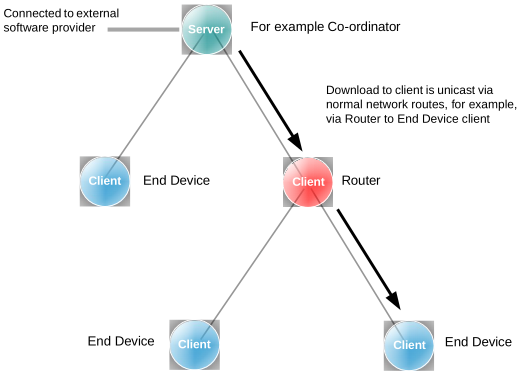
The download of an application image from the server to the network is done on a per client basis and follows normal network routes (including routing via Routers). This is illustrated in the figure below.
OTA Download Example
| |
|
The upgrade application is downloaded into Flash memory internal to the device on the client node. Note that the upper section of Flash memory should normally be reserved for persistent data storage - for example, in an 8-sector Flash device, Sector 7 is used for persistent data storage, leaving Sectors 0-6 available to store application software.
The requirements of the devices which act as the OTA Upgrade cluster server and clients are detailed in the sub-sections below. See Connectivity Framework Reference Manual for details of the Non-Volatile Memory Manager (NVM).
OTA Upgrade Cluster Server
The OTA Upgrade cluster server is a network node that distributes application upgrades to other nodes of the network (as well as performing its own functions). The server must, therefore, be connected to the provider of the upgrade software. The server would also usually be the Coordinator of the ZigBee network.
The server may need to store different upgrade images for different nodes (possibly from different manufacturers) and must have ample Flash memory space for this purpose. Therefore, the server must keep a record of the software required by each client in the network and the software version number that the client is currently on. When a new version of an application image becomes available, the server may notify the relevant client(s) or respond to poll requests for software upgrades from the clients (see Section 49.4.2 below).
Parent topic:Basic Principles
OTA Upgrade Cluster Client
An OTA Upgrade cluster client is a node which receives software upgrades from the server and can be any type of node in a ZigBee network. However, an End Device client which sleeps is not always available to receive notifications of software upgrades from the server and must therefore, periodically poll the server for upgrades. In fact, all types of client can poll the server, if preferred.
During a software download from server to client, the upgrade image is transferred over the air in a series of data blocks. It is the responsibility of the client (and not the server) to keep track of the blocks received and then to validate the final image. The upgrade image is initially saved to the relevant sectors of Flash memory on the client. There must be enough Flash memory space on the client to store the upgrade image and the image of the currently running software.
An OTA upgrade image is downloaded into a Flash memory of the device, utilizing Flash sectors is currently not used for the running image.
Parent topic:Basic Principles
Parent topic:OTA Upgrade cluster