Offline Installation
If a machine lacks Internet access and cannot reach online files, you can create an offline image and manually copy it to use on that machine:
Start the installer on a machine connected to the internet
Select the components that you want to install on the offline machine (example: select LinkServer and Arm GNU Toolchain)
Create the offline image from the Options menu. Select Create offline images -> choose the desired target host OS:
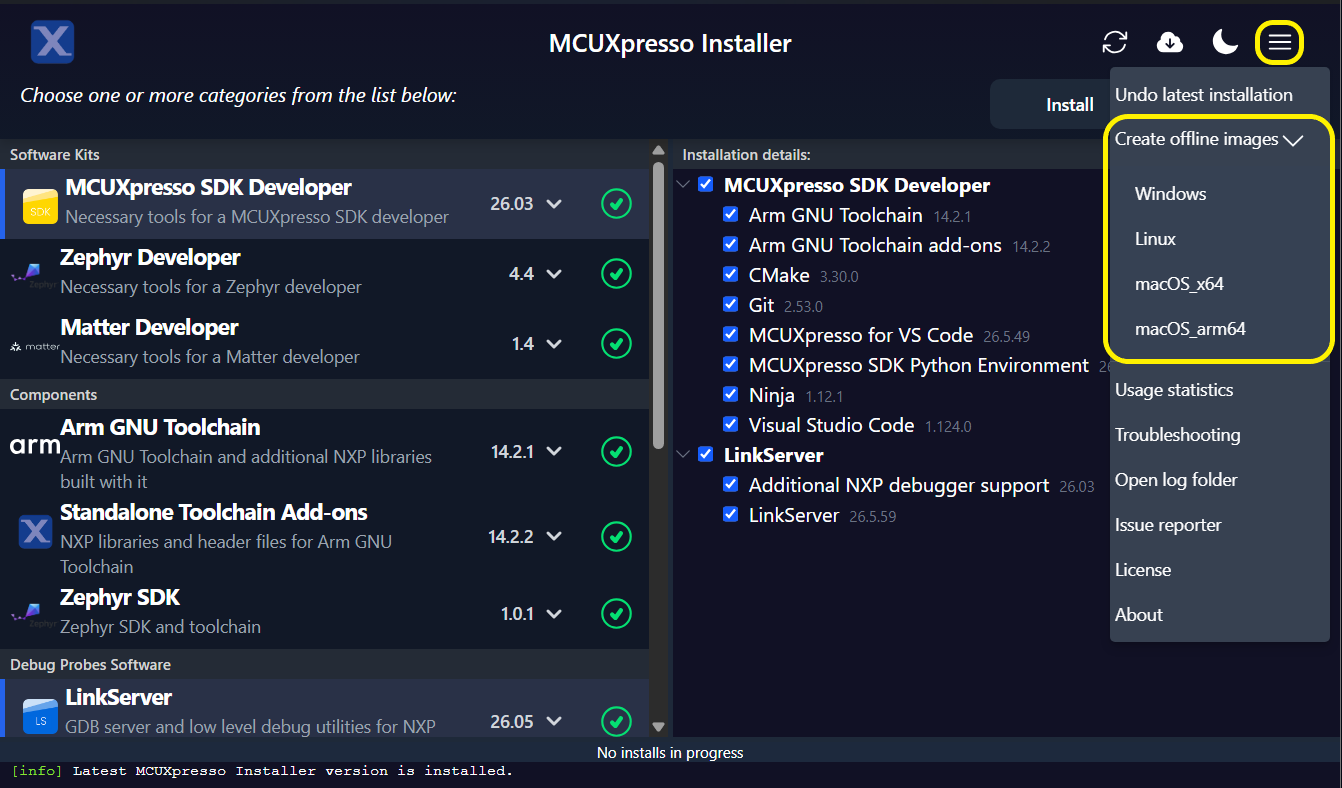
Wait for the image to finish being created. This status is indicated in the MCUXpresso Installer console along with the steps needed to use the image:
Copy all files from an online machine directory: MCUXpressoInstaller layout/.cache/offline/desired target host OS.
Paste all files to the target offline machine directory: MCUXpressoInstaller layout/.cache.
Start MCUXpresso Installer on the target machine and select and install the components as created in the offline image.
Note: Some installation steps (the ones requiring active internet connection at install) are not included in the offline image (example: Python modules). The current offline image functionality does not address these components.