
Use Secure Provisiong Tool to erase flash#
In worst cases a debugger cannot successfully connect to the board. A major reason for this is there are POR boot image inside the on board flash memory which causes the whole system in a trouble state. Secure Provisioning Tool provide a reliable way to erase the flash in this worst case. To achieve this
Set
J60[1..3]to100.Connect the board to your PC from both
J23(Debugging) andJ63(USB OTG 1), then power up the board.Start
Secure Provisioning Tool, selectTool>Flash ProgrammerorCtrl + R.Click
Yesto prompt up questions, wait memory initialization finish.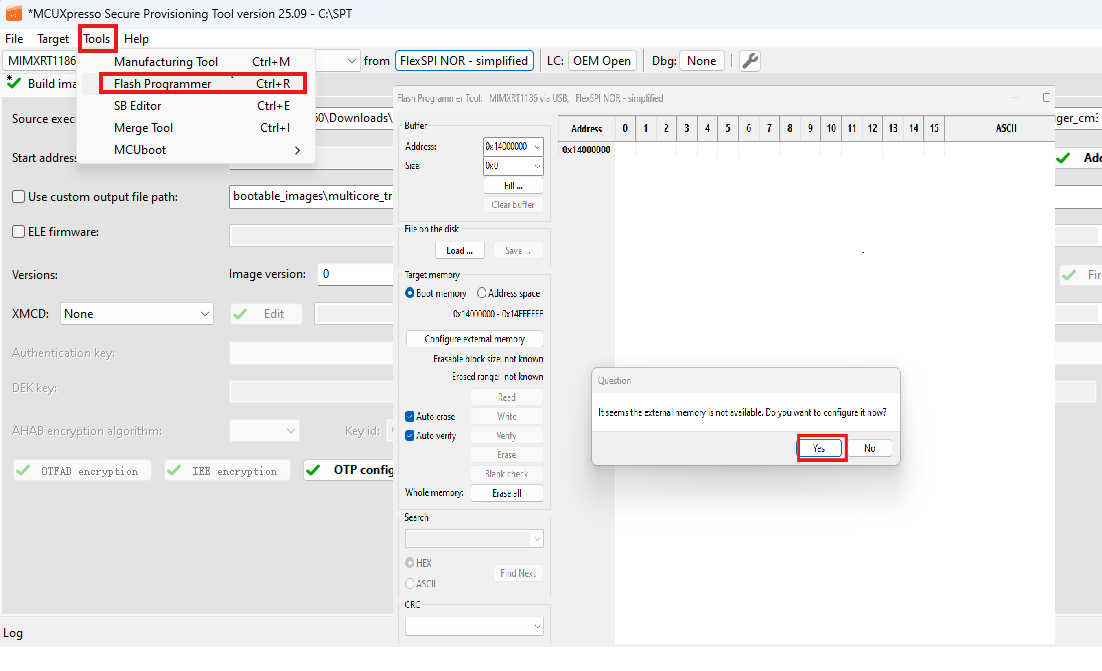
Click
Erase allbutton and wait a minute for the erase process to finish.
After
Success: Erase whole memoryshows up, the board should have restored to a good state to work in various mode.
Parent topic:Bootable image generation