
Run a demo application using MDK#
This document uses peripheral_ht example to describe the steps to open a project, build an example, and run a project on MDK.
For details, see the related section in the Getting Started with MCUXpresso SDK User’s Guide (document: MCUXSDKGSUG) in the directory root/docs/ and the readme file in the corresponding demo’s directory.
Open an MDK project#
For the IAR Embedded Workbench, unpack the contents of the archive to a folder on a local drive.
The example projects are available at:
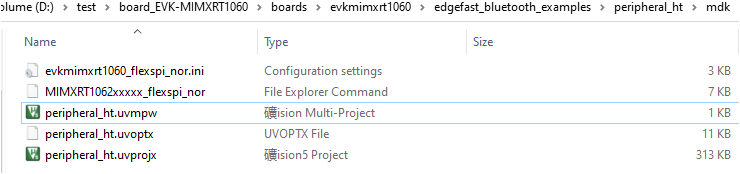
<root>/boards/evkbmimxrt1170/edgefast_open_examples/peripheral_ht/mdk.Open the mdk workspace file. For example, the highlighted *.uvmpw format file.
Parent topic:Run a demo application using MDK
Build an MDK example#
To build an MDK example:
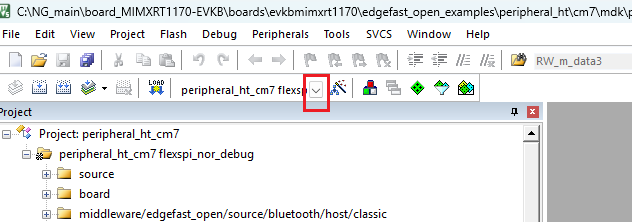
Select flexspi_nor_debug or flexspi_nor_release configurations from the drop-down selector above the project tree in the workspace.
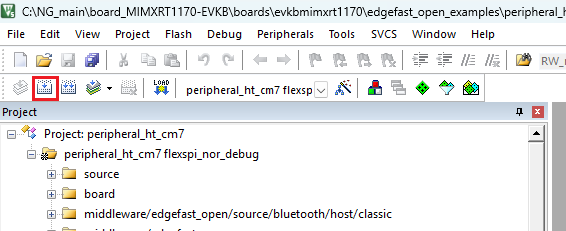
Click the highlighted icon to build the EdgeFast Open Bluetooth project.
Parent topic:Run a demo application using MDK
Run an MDK example#
For MDK project running, all steps are similar to Run an IAR example except the steps of downloading image from compiler.
To download the MDK image to the board, click the Debug button. The executable file downloads to the board.

Parent topic:Run a demo application using MDK
Parent topic:Demo