
Running the Bluetooth Low Energy Localization Scenario#
To run the Bluetooth Low Energy Localization scenario, flash the loc_reader and loc_user_device applications on two KW45B41Z-EVK development boards.
Note: The boards listed in Bluetooth Low Energy Localization Hardware Platforms can also be used to run the steps listed in this section.
Running a Bluetooth Low Energy Localization Scenario Using the Shell Interface#
The following Bluetooth Low Energy localization examples are provisioned by default with a shell command-line interface accessible via a Terminal application such as Tera Term:
Localization Reader
Localization User Device
After connecting with the Terminal application, pressing the RST switch on the board displays the application name.
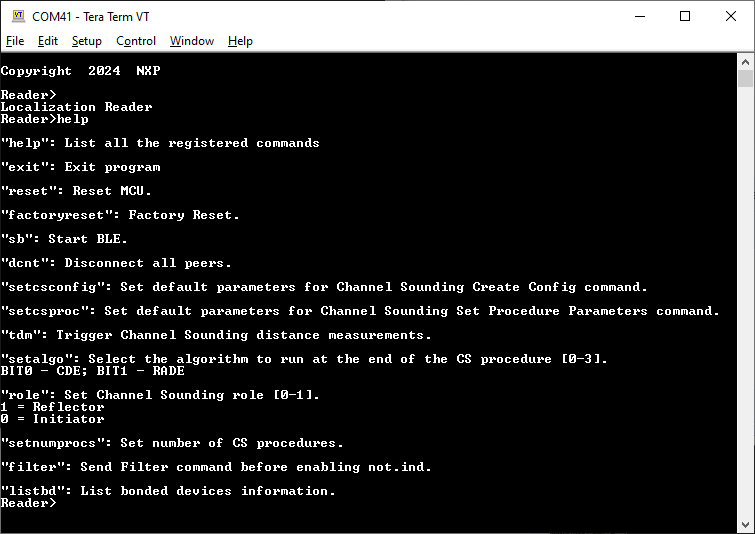
To display the list of available commands and their description, enter the ‘help’ command as shown in Figure 1.

To run the application, perform the following steps:
Enter the
sbcommand on both terminals that are connected to the Localization Reader and Localization User Device applications. The devices connect, perform pairing if not previously bonded, and trigger distance measurement.
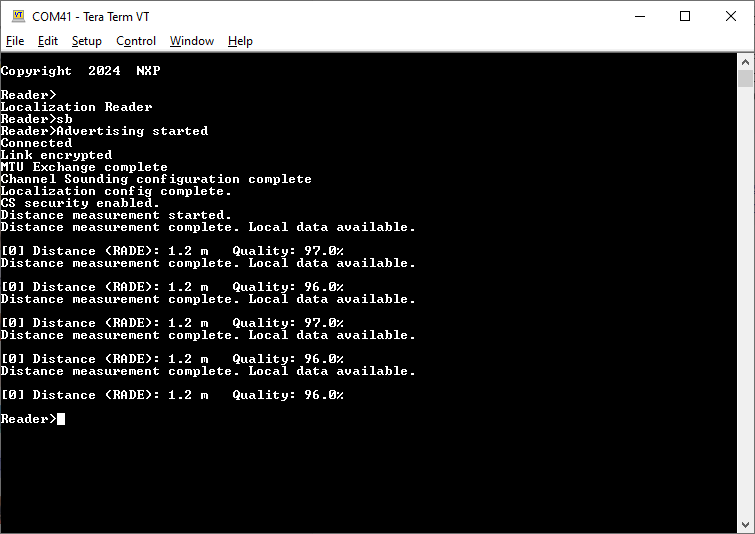
Figure 2 illustrates the start of the Localization Reader application.

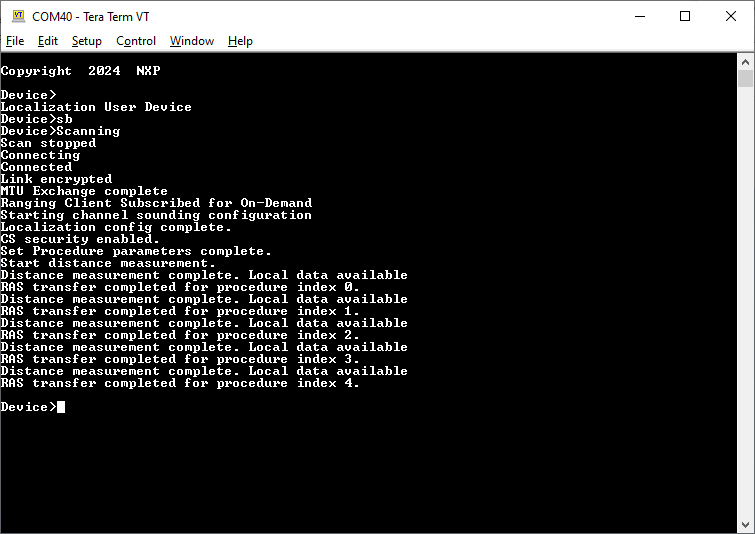
After the devices are connected, the link is encrypted, the Channel Sounding configuration is created, and distance measurement is triggered. This is shown in Figure 3. If two consecutive distance measurements return a value lower or equal to 1 meter, the LED1 on the Localization Reader starts blinking. If the measured distance is higher than 1, LED1 turns off.

To trigger a new distance measurement, use the “
tdm” command:tdm(without parameters): Triggers distance measurement on all connected devicestdm <peerId>: Triggers distance measurement on the specified peer device
Examples:
tdm- Start distance measurement on all connected peerstdm 0- Start distance measurement on peer device with ID 0tdm 1- Start distance measurement on peer device with ID 1
This command can be executed on either the Localization User Device or the Localization Reader. Figure 4 shows an example of triggering the distance measurement from the Localization User Device.
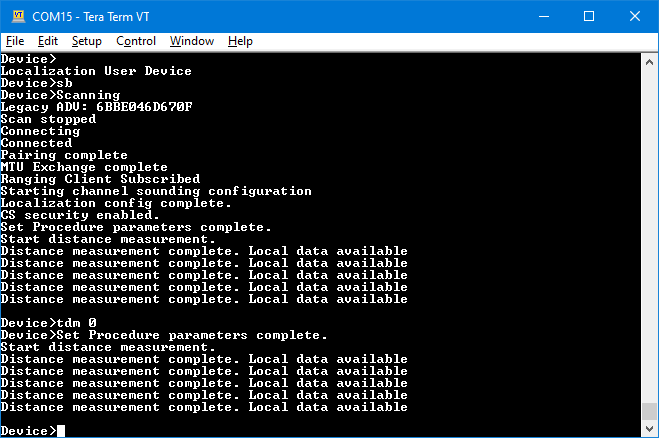
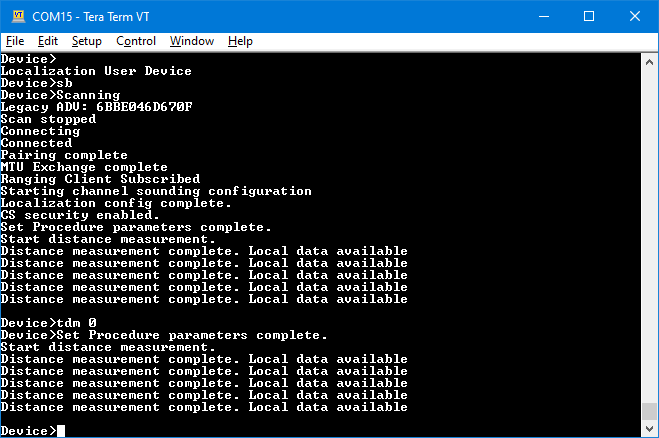
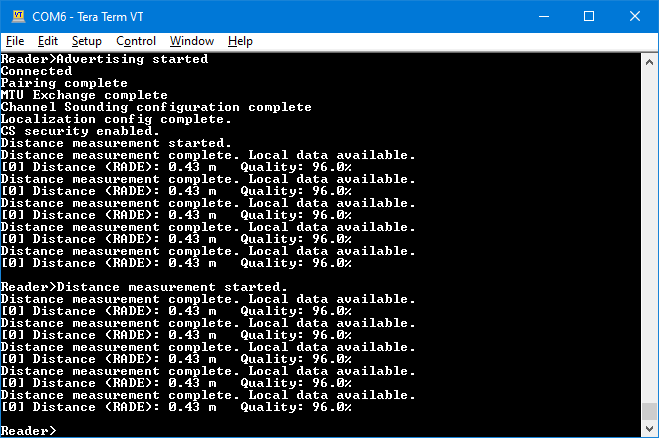
Figure 5 shows the available distance measurement data.

Other available shell commands are:
setcsconfig: This command overwrites the default parameters for the Channel Sounding Create Config command. It updates only the parameters that are explicitly specified; any parameter that is not provided retains its current value. The syntax is:setcsconfig <peerId> <paramName> <value> [<paramName> <value> ...]where
<peerId>is the device ID of the peer, followed by one or more<paramName> <value>pairs. The supported parameter names and their accepted values are:mainmodetype: CS mode to be used as main mode during the CS procedure for this configuration. Possible values:1 (CS mode-1)
2 (CS mode-2)
3 (CS mode-3)
submodetype: CS mode to be used as submode during the CS procedure for this configuration. Possible values:1 (CS mode-1)
2 (CS mode-2)
3 (CS mode-3)
255 (no submode used)
mainmodeminsteps: Lower bound of the range of main mode CS steps to be executed before a submode CS step is executed during the CS procedure. Range:1 to 255
mainmodemaxsteps: Higher bound of the range of main mode CS steps to be executed before a submode CS step is executed during the CS procedure. Range:1 to 255
mainmoderepetition: Number of main mode CS steps repeated from the previous CS subevent at the beginning of the current CS subevent. Range:0 to 3
mode0steps: Number of CS mode-0 steps to be included at the beginning of each CS subevent. Range:\1 to 3
role: CS role. Possible values:0 (initiator)
1 (reflector)
rtttype: RTT variant to be used during the CS procedure. Possible values:0 (RTT AA only)
1 (RTT with 32-bit sounding sequence)
2 (RTT with 96-bit sounding sequence)
3 (RTT with 32-bit random sequence)
4 (RTT with 64-bit random sequence)
5 (RTT with 96-bit random sequence)
6 (RTT with 128-bit random sequence)
channelmap: 80-bit map in big endian order indicating channels to be used for the CS procedure. The default value isfcff7ffcffffffffff1f(all channels used except 0, 1, 23-25 and 77-78). Bit 79 is reserved for future use. At least 15 channels must be enabled.channelmaprepetition: Number of times the channel map will be cyled through for non-mode-0 steps within a CS procedure. Range:1 to 255.
channelselectiontype: Channel selection type. Possible values:0 (Channel Selection Algorithm #3b)
1 (Channel Selection Algorithm #3c)
cssyncphy: PHY to be used for CS_SYNC exchanges during the CS procedure for the specified CS configuration. Possible values:1 (LE 1M PHY)
2 (LE 2M PHY)
3 (LE 2M 2BT PHY) - if supported at Link Layer level
Example:
setcsconfig 0 mode0steps 3 cssyncphy 2updates only the mode-0 steps and the CS_SYNC PHY, leaving all other parameters unchanged.setcsproc: This command overwrites the default parameters for the Channel Sounding Set Procedure Parameters command. It updates only the parameters that are explicitly specified; any parameter that is not provided retains its current value. The syntax is:setcsproc <peerId> <paramName> <value> [<paramName> <value> ...]where
<peerId>is the device ID of the peer, followed by one or more<paramName> <value>pairs. The supported parameter names and their accepted values are:maxprocedureduration: Maximum duration for each CS procedure. Range:1 to 65535 (units of 0.625ms)
minperiodbetweenprocedures: Minimum number of connection events between consecutive CS procedures. Range:1 to 65535
maxperiodbetweenprocedures: Maximum number of connection events between consecutive CS procedures. Range:1 to 65535
maxnumprocedures: Maximum number of CS procedures to be scheduled. Possible values:0 (CS procedures to continue until disabled)
1 to 65535
minsubeventlen: Minimum suggested duration for each CS subevent in microseconds. Range:1250 microseconds to 3.999999 seconds
maxsubeventlen: Maximum suggested duration for each CS subevent in microseconds. Range:1250 microseconds to 3.999999 seconds
antcfgindex: Antenna Configuration Index as described in the Core specification. Range:0 to 7
snrcontrolinit: SNR Control to be applied to the Initiator in the CS procedure (if supported at Link Layer level). Possible values:0 (SNR control adjustment of 18 dB)
1 (SNR control adjustment of 21 dB)
2 (SNR control adjustment of 24 dB)
3 (SNR control adjustment of 27 dB)
4 (SNR control adjustment of 30 dB)
255 (SNR control is not to be applied)
snrcontrolrefl: SNR Control to be applied to the Reflector in the CS procedure (if supported at Link Layer level). Possible values:0 (SNR control adjustment of 18 dB)
1 (SNR control adjustment of 21 dB)
2 (SNR control adjustment of 24 dB)
3 (SNR control adjustment of 27 dB)
4 (SNR control adjustment of 30 dB)
255 (SNR control is not to be applied)
Example:
setcsproc 0 minsubeventlen 2500 antcfgindex 1updates only the minimum subevent length and the antenna configuration index, leaving all other parameters unchanged.verbosity: Sets the verbosity level during the CS procedure.setnumprocs: This command overwrites the default valuegCsProcRepeatMaxNumProcedures_cparameter for the CS Procedure Repeat. It takes the following parameters, in the order below:peerIdmaxnumprocedures: Number of procedures in hex format. Example:setnumprocs 0 0x0005. Value0x0000means infinite repeats.
setmcp: This command overwrites the default valuegChannelSoundingMaxConcurrentProcedures_cparameter for the number of maximum supported simultaneous CS procedures across all connections. It takes the following parameters:maxNumConcurrentProcedures: Number of procedures in decimal format. Example:setmcp 2.
loop: This command toggles the automatic restart of the CS procedure (whether with CS Procedure Repeat enabled or not) upon its end. By default, the CS procedure will not restart automatically.
Parent topic:Running the Bluetooth Low Energy Localization Scenario