
Hardware set up with single antenna configuration#
Prerequisites
Two boards (ranging service client and ranging service server)
PC
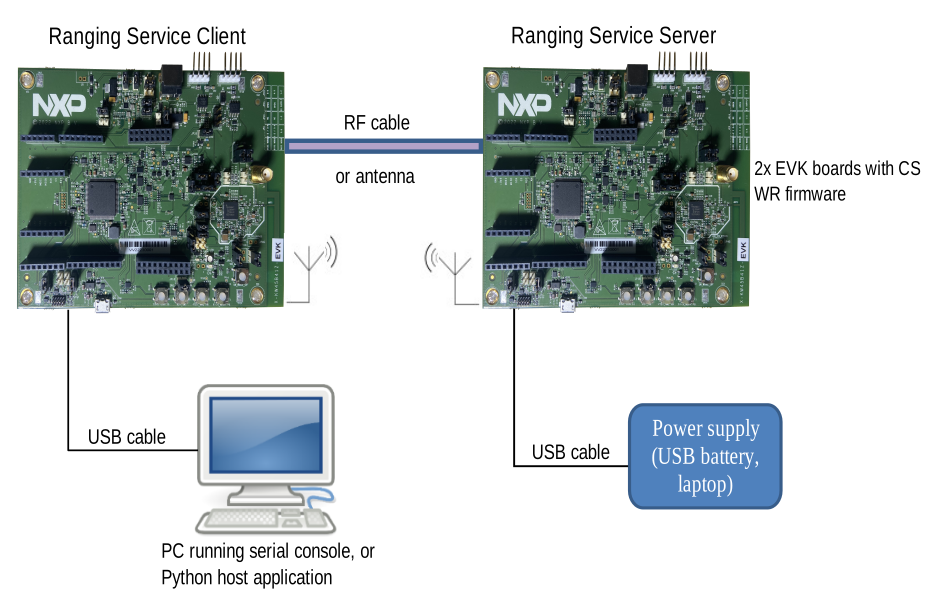
The first board (ranging service client) should be connected to the PC running the host application (see Python host application setup) using a USB cable. Once flashed, the second board (ranging service server), may be connected to a USB battery to facilitate movement.
Start the evaluation of this ranging system with a cabled configuration. Once the system operation is properly understood, the evaluation can be pursued in more challenging environments (with multi-path and interference).
To perform cabled measurements with KW47 boards, a small hardware modification must be done on the PCB. Rotate a capacitor to bypass the printed antenna and connect the RF path to an external SMA connector.
For further details, refer to the documentation corresponding to your board of choice. To perform radiated testing, connect an SMA-mounted antenna on each board instead of a cable.
Figure: Typical wireless ranging setup using KW47-EVK boards
Parent topic:Wireless ranging demo application setup