
RW61x - OTA update by using SB3 file#
In this walkthrough, if possible, the lifecycle of the device is not changed for development purposes, so the device can be restored to its initial state. In real scenarios, transitioning the chips to the corresponding lifecycle is based on specific requirements.
Common information related to SB3 is available in the documentation ‘OTA update by using SB3 file’.
1. Provision the device#
The device must be provisioned to support SB3 processing. To simplify the workflow, the MCUXpresso Secure Provisioning Tool (SEC tool) is used.
To provision the device perform the following steps:
Erase the device
Build
mcuboot_opensource+ota_mcuboot_basicorota_rom_basicproject depending what you want to evaluateGet the device into ISP mode
Typically on development boards hold the ISP button and press the reset button
Open the SEC tool and create new workspace for RW61x target device
Test the ISP connection in SEC tool
Switch to PKI management tab
Click Generate keys (leave default settings)
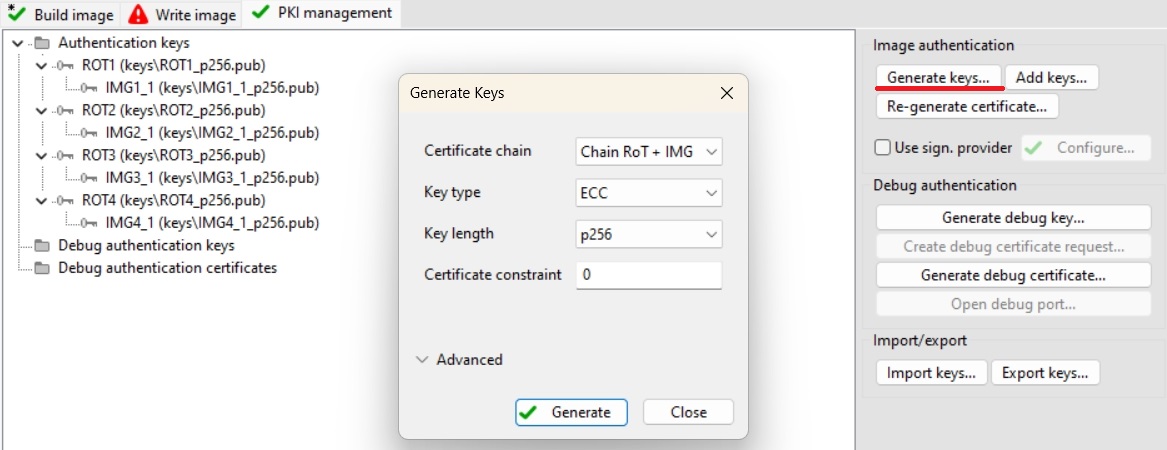
RW61x doesn’t properly support shadow registers to process SB3 files for development purposes, so the correct RKTH and CUST_MK_SK have to be provisioned. To provision these keys and keep the device in the Develop lifecycle, we will initially use Encrypted (IPED) Plain boot type as a workaround. This initial operation provisions the device with RTKH and CUST_MK_SK permanently, but the board will still be usable for development purposes as OTP BOOT_CFG0 (fuseword 15) remains intact.
Note: User is advised to save SEC tool workspace (or atleast the keys somewhere) for future use
Build Image
Boot: Encrypted (IPED) Plain
Select
ota_rom_basicormcuboot_opensourceoutput binary or ELF image as Source executable imageLifecycle: Develop, OTP
Select an authentication key and generate CUST_MK_SK and OEM SB seed
Click Build image

Write image
Click Write image

Now the device is provisioned with RKTH and CUST_MK_SK without transition of the lifecycle.
Enable dual image support
Note: This is needed only for ROM bootloader use case, otherwise skip this step
The correct image offset and size has to be programmed to OTP fuseword 17 (BOOT_CFG2). In this example we use these values:
FLEXSPI_IMAGE_SIZE = 0x0 (The size of the boot image is considered to be equal to the offset of the second image)
FLEXSPI_IMAGE_OFFSET = 0x10
Fuse the OTP using blhost:
blhost -p COM3,115200 -- efuse-program-once 17 00008000
Note: We set a 4MB offset here, but the final value is up to the user as this operation is also permanent. The device will still be usable for development purposes, as ROM evaluates only the valid image header of a signed image and looks for image version presence.
Erase device
This will erase encrypted image from the workaround.
Load MCUboot (only MCUboot use case)
Load unencrypted and unsigned mcuboot_opensource to the device using a programmer as usual
2. Prepare OTA images#
2.1 ROM bootloader only use case#
Build Image tab
Boot: Plain Signed
Select
ota_rom_basicoutput binary or ELF image as Source executable imageDefine Image version 1
Enable Dual image boot with these parameters:
Target dual boot image: Image 0
Image 1 offset: 0x00400000
Image 1 size: Same as offset
Click Build image

Rename generated SB3 file
bootable_images/ota_rom_basic.sbtoota_rom_image0.sbRepeat step 1 with these changes:
Define Image version 2
In Dual image boot:
Target dual boot image: Image 1
Click Build image
Rename generated SB3 file
bootable_images/ota_rom_basic.sbtoota_rom_image1.sb
Note: Do not write the image using Write image tab! This will also fuse the BOOT_CFG0 to enable the Secured boot. The initial SB3 file will be written separatetly in next chapter.
2.2 MCUboot bootloader use case#
Build
ota_mcuboot_basicand sign image byimgtoolas usual by following steps in specificexample_board_readme.mdfor your board. Copy the signed binary to your $sec_tool_workspace/source_imagesLook into ota_examples/_common/sb3_templates directory and copy SB3 configuration templates for your device to your $sec_tool_workspace/configs
rw612_sb3_cfg_primary_slot.yamlfor primary slotrw612_sb3_cfg_secondary_slot.yamlfor secondary slot
In SEC tool open Tools/SB Editor and click Import to import
sb3_config_rw612_secondary_slot.yamlCheck and eventually fix paths to keys and image binary
click Generate


Repeat 3th step for
sb3_config_rw612_primary_slot.yaml
Note: Optionally, we can also create initial SB3 file containing initial (first) ota_mcuboot_basic application for primary or secondary slot to simulate manufacturing process. This image has to be generated with additional --pad --confirm imgtool arguments. The initial signed image can be also loaded directly using ISP (via blhost and receive-sb-file command) or other preferred method as usual.
Note2: Do not write the image using Write image tab! This will also fuse the BOOT_CFG0 to enable the Secured boot. The initial SB3 file will be written separatetly in next chapter.
3. Firmware update#
For demonstration purpose we use ExtraPutty tool as this fork of classic Putty has XMODEM support. Alternatively TeraTerm can be used.
3.1 ROM bootloader only use case#
Load and run initial the initial
ota_rom_basicapplication with one of these ways:load signed image via
blhostcommands:blhost -p COM3,115200 -- fill-memory 0x20001000 0x4 0xC0000004blhost -p COM3,115200 -- configure-memory 0x9 0x20001000blhost -p COM3,115200 -t 20000 receive-sb-file ota_rom_basic_image_0_v1
or
load unsigned application via debug session - in this case the
imagecommand returns invalid information as there is no valid image header to parse
Check image state and active flag location with
imagecommandSee active flag location to specify inactive image slot
Send the OTA image
Run
xmodem_sb3commandSend
ota_rom_image1.sbtargetting inactive slot via Files Transfer/Xmodem (1k)
Reboot the device with
rebootcommandCheck image update with
imagecommand
Here is an example of serial output:
*************************************
* Basic ROM application example     *
*************************************

$ image
Flash REMAP_OVERLAY disabled
IMAGE 0:
    <IMG_VERSION 0x1 LENGTH 34884 EXEC_ADDR 0x8001000>
    *ACTIVE*
IMAGE 1: Invalid image header
$ xmodem_sb3
IAP API version=1.0.0
Started xmodem processing SB3
Initiated XMODEM-CRC transfer. Receiving... (Press 'x' to cancel)
CCCCCCC
Received 41984 bytes
SB3 has been processed
$
$ reboot
System reset!

*************************************
* Basic ROM application example     *
*************************************

$ image
Flash REMAP_OVERLAY active
IMAGE 0:
    <IMG_VERSION 0x1 LENGTH 34884 EXEC_ADDR 0x8001000>
IMAGE 1:
    <IMG_VERSION 0x2 LENGTH 34884 EXEC_ADDR 0x8001000>
    *ACTIVE*
$
3.2 MCUboot bootloader use case#
Load
mcuboot_opensourceand run initial the initialota_mcuboot_basicapplication with one of these ways:load signed image via
blhostcommands:blhost -p COM3,115200 -- fill-memory 0x20001000 0x4 0xC0000004blhost -p COM3,115200 -- configure-memory 0x9 0x20001000blhost -p COM3,115200 -t 20000 receive-sb-file signed_padded_ota_mcuboot_basic_primary_slot.sb
or
load unsigned application via debug session - in this case the
imagecommand returns invalid information as there is no valid image header to parse
Check image state and active flag location with
imagecommandSee active flag location to specify inactive image slot
Erase inactive slot with
image erasecommandNote: not needed if the SB file contains the erase command
Send the OTA image
Run
xmodem_sb3commandSend
ota_mcuboot_secondary_slot.sbtargetting inactive slot via Files Transfer/Xmodem (1k)
Mark installed image ready for test
Run
image testcommand
Reboot the device with
rebootcommandCheck image update with
imagecommandMark the updated slot with confirm flag using
image acceptand check the state again withimagecommand again
hello sbl.
Bootloader Version 2.2.0
Primary   slot: version=1.0.0+1000
Image 0 Secondary slot: Image not found
Image 0 loaded from the primary slot
Bootloader chainload address offset: 0x40000
Reset_Handler address offset: 0x40400
Jumping to the image


Booting the primary slot - flash remapping is disabled

*************************************
* Basic MCUBoot application example *
*************************************

Built Oct  3 2025 20:33:10
Toolchain IAR ANSI C/C++ Compiler V9.70.1.475/W64 for ARM

$ image
Image 0; name APP; state None:

  Slot 0 APP_PRIMARY; offset 0x40000; size 0x200000 (2097152):
    <IMAGE: size 42421; version 1.0.0+1000>
    SHA256 of image payload: E069B6127A708EE88B39...
    log_addr 0x28040000
    *ACTIVE*

  Slot 1 APP_SECONDARY; offset 0x240000; size 0x200000 (2097152):
    <No Image Found>

$ image erase
Erasing inactive slot...done
$ xmodem_sb3
Started xmodem processing SB3
Make sure this device is provisioned to accept secure binary and its load address is 0x240000
Initiated XMODEM-CRC transfer. Receiving... (Press 'x' to cancel)
CCCCC
Received 51200 bytes
SB3 has been processed
$
$ image test
write magic number offset = 0x43ff00
$ reboot
System reset!
hello sbl.
Bootloader Version 2.2.0
Primary   slot: version=1.0.0+1000
Secondary slot: version=1.2.0+1000
writing copy_done; fa_id=1 off=0x1fffe0 (0x43ffe0)
Image 0 loaded from the secondary slot
Bootloader chainload address offset: 0x240000
Reset_Handler address offset: 0x240400
Jumping to the image


Booting the secondary slot - flash remapping is enabled

*************************************
* Basic MCUBoot application example *
*************************************

Built Oct  3 2025 20:33:10
Toolchain IAR ANSI C/C++ Compiler V9.70.1.475/W64 for ARM

$ image
Flash REMAP_OVERLAY active.

Image 0; name APP; state Testing:

  Slot 0 APP_PRIMARY; offset 0x40000; size 0x200000 (2097152):
    <IMAGE: size 42421; version 1.0.0+1000>
    SHA256 of image payload: E069B6127A708EE88B39...
    log_addr 0x28040000 remaps to 0x28240000

  Slot 1 APP_SECONDARY; offset 0x240000; size 0x200000 (2097152):
    <IMAGE: size 42421; version 1.2.0+1000>
    SHA256 of image payload: E069B6127A708EE88B39...
    log_addr 0x28240000 remaps to 0x28240000
    *ACTIVE*

$ image accept
$ image
Flash REMAP_OVERLAY active.

Image 0; name APP; state Permanent:

  Slot 0 APP_PRIMARY; offset 0x40000; size 0x200000 (2097152):
    <IMAGE: size 42421; version 1.0.0+1000>
    SHA256 of image payload: E069B6127A708EE88B39...
    log_addr 0x28040000 remaps to 0x28240000

  Slot 1 APP_SECONDARY; offset 0x240000; size 0x200000 (2097152):
    <IMAGE: size 42421; version 1.2.0+1000>
    SHA256 of image payload: E069B6127A708EE88B39...
    log_addr 0x28240000 remaps to 0x28240000
    *ACTIVE*

$